beform Engine. Kundens rum, bevarat.
En rendering är bara användbar om kunden känner igen sitt eget rum. Allt under huven finns till för det: geometrin består, materialen håller sig inom sina gränser och varje resultat kontrolleras innan någon ser det.
Sju delar, en väg från ett foto till en förfrågan.
beform Engine är inte en enda modell. Det är sju delar som körs i ordning, från att läsa kundens foto till förfrågan som når ditt team, och en slinga som skärper ditt eget lager medan du säljer.
- Förstå
Avläsning
Rummet läses av.
Innan något formas läser beform fotot: rummets geometri och kamerans position, var varje yta börjar och slutar, dagsljusets riktning och de material som redan finns i rummet.
- Geometri
- Kamera
- Ytor
- Dagsljus
- Befintliga material
Kunskap
Ditt företag, strukturerat.
Dina sortiment, utföranden, stilriktningar, standarder och regler ligger i ett eget lager, med dina priser där du har konfigurerat dem, så att en bild bara kan visa det ditt företag faktiskt säljer.
- Sortiment
- Utföranden
- Stilriktningar
- Regler
- Standarder
- Priser där de är konfigurerade
Riktning
Önskemålet blir en instruktion.
Området kunden valde, stilen kunden pekade på, referenserna kunden tog med och meningen kunden skrev blir en enda precis instruktion: vad som måste stanna, vad som får ändras och hur långt det får gå.
- Område
- Vald stil
- Referenser
- Kundens anteckning
- Forma
Formning
Bilden tar form.
Instruktionen skickas till de starkaste modeller som finns för det tillfället, som Fast, Pro eller Ultra, och bilden formas med geometrin i kundens eget foto låst på plats.
- Fast
- Pro
- Ultra
- Geometrilås
- Val av leverantör
Kontroll
Kontrollerad innan någon ser den.
Varje resultat mäts innan det visas: en komplett fil, fotots eget bildutsnitt, väggar och öppningar på sin plats, en förändring som verkligen är gjord och inga tomma ytor. Det märks som en AI-bild i bilden och i filen.
- Fil
- Bildutsnitt
- Struktur
- Förändring
- Ren
- Märkning
- Fortsätt
Överlämning
Den blir en förfrågan.
Den valda bilden lämnar motorn som något ditt team kan agera på: en projektförfrågan med fotot och kontaktuppgifterna bifogade, en rad i en offert, en post i ditt CRM.
- Projektförfrågan
- Offertrad
- Bildfil
- Post i CRM
Inlärning
Ditt lager blir skarpare.
Vad dina rådgivare behåller, ändrar eller förkastar, och vad kunderna väljer till slut, förs tillbaka in i ditt eget lager, så att nästa bild börjar närmare den standard ditt företag skulle godkänna.
- Rådgivarnas återkoppling
- Kundernas val
- Din egen husstandard
Slingan
Inlärningen föder kunskapen. Varje projekt företaget säljer tränar dess eget lager, och motorn börjar nästa bild där.
Byggt av människor som lärt sig hur det här arbetet säljs.
En allmän modell vet hur ett kök ser ut. Den vet inte var en skarv i bänkskivan hör hemma, vilka luckor ett företag har på lager eller vad som händer mellan en förfrågan och en påskriven offert. Den kunskapen är produkten.
Branscherna
beform är byggt för en enda sorts arbete: att ändra ett rum som någon redan lever i. Varje bransch säljer på sitt sätt, visar på sitt sätt och har sitt eget ordförråd, så varje bransch har sina egna regler inne i motorn i stället för en allmän inställning.
- Köksstudior
- Badrumsspecialister
- Byggentreprenörer
- Fasad och måleri
- Trädgårdsanläggare och poolbyggare
- Fönster och solskydd
- Golv och invändiga ytskikt
- Arkitekter och fastighetsutvecklare
Hur material beter sig
En bild är övertygande eller fel i just de detaljer en montör skulle lägga märke till. De detaljerna är skrivna som regler och testas per område, eftersom en allmän modell inte har någon anledning att känna till dem.
- Var en yta börjar och var den slutar
- Fogar, skarvar, socklar och silikonlinjer
- Kanter, profiler och fönstersmygar
- Glansnivå, ådring och hur ett ytskikt tar upp dagsljus
- Fast belysning mot det ljus som redan finns i rummet
- Om resultatet faktiskt går att bygga
Hur de här företagen säljer
Arbetet säljs av människor, i en ordning som inte har ändrats: en förfrågan, ett besök i utställningen, ett platsbesök, en uppmätt offert, en leveranstid på veckor. beform är format runt den ordningen, och därför slutar en bild som en förfrågan och en offertrad i stället för en nedladdning.
- Förfrågan, och vem som svarar på den först
- Mötet i utställningen och platsbesöket
- Sortiment, leverantörer och leveranstider
- Vad som får utlovas i en offert, och vad som inte får det
- Vem som godkänner en bild innan en kund ser den
Rummets linjer stannar där de var.
beform ritar in väggarna, fönstret, taklinjen och kameran innan något renderas. De linjerna ligger fast. Renderingen får bara ändra det som en renovering skulle ändra.
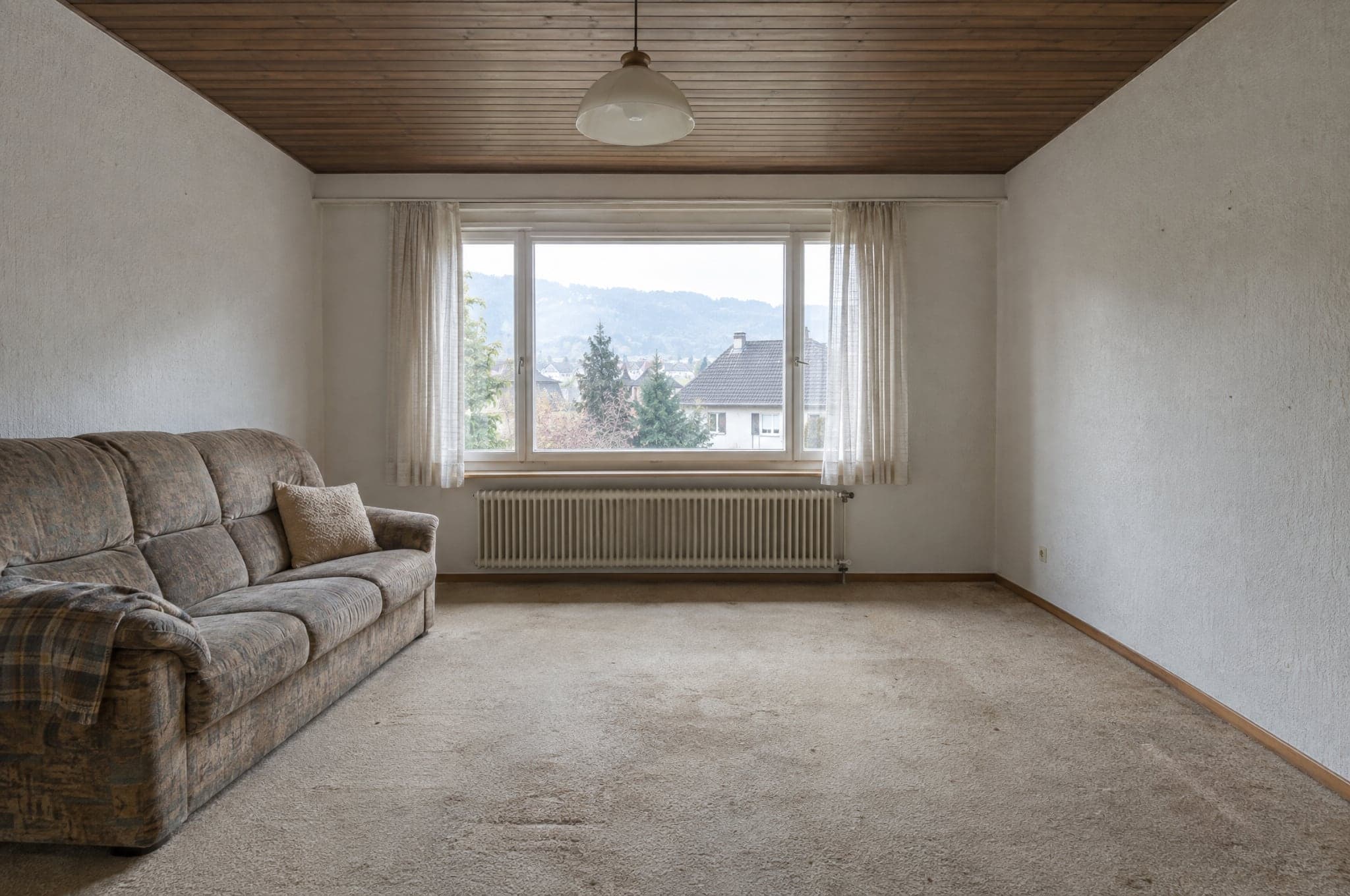 Exempel
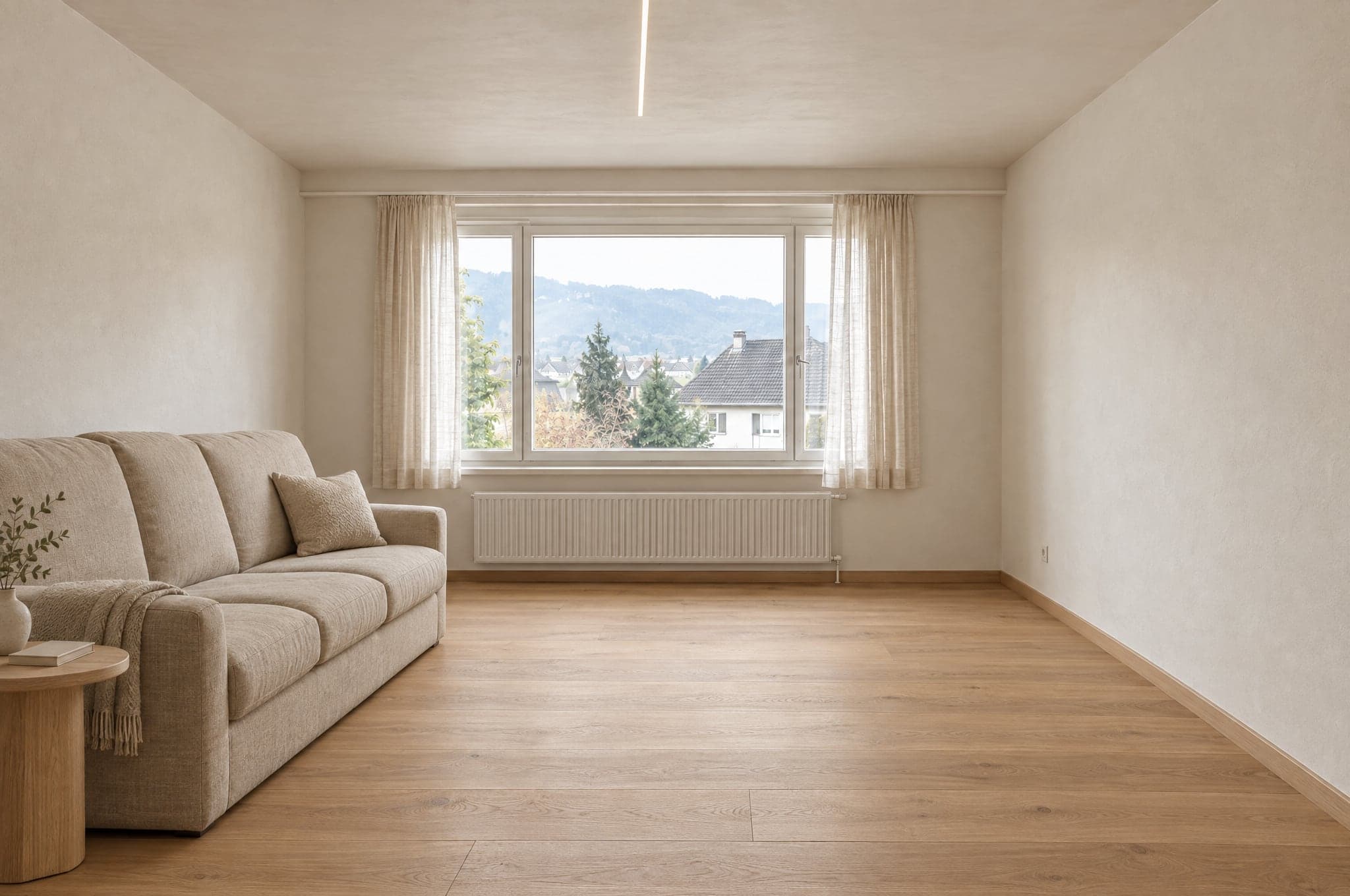 Exempel
Stannar som på fotot
- Väggar och tak
- Fönster och dörrar
- Rummets proportioner
- Kamerans position
- Dagsljusets riktning
Ändras med riktningen
- Ytor och ytskikt
- Snickerier och möbler
- Inredning och armaturer
- Färger
- Belysning
Varje område har sin egen uppsättning material.
Ett kök får aldrig duschkakel och en fasad får aldrig inomhusfärg. Med System är gränsen din egen katalog, så en rendering visar bara produkter som du säljer.
Kök
- Luckor
- Bänkskivor
- Stänkskydd
- Golv
- Belysning
Utanför gränsen
Duschkakel
Badrum
- Väggkakel
- Tvättställsskåp
- Armaturer
- Dusch
- Golv
Utanför gränsen
Köksluckor
Fasad
- Puts
- Fasadbeklädnad
- Fönsterkarmar
- Färg
- Entré
Utanför gränsen
Invändig färg
Trädgård och pool
- Stenläggning
- Planteringar
- Pool
- Terrass
- Belysning
Utanför gränsen
Parkett
Modellerna genererar. beform gör resten.
beform tränar ingen grundmodell. beform bygger och tränar det lager som gör de starkaste allmänna modellerna tillförlitliga för kök, badrum, fasader och trädgårdar, och flyttar hela tiden det lagret till de modeller som är bäst.
beform-lagret
Allt som gör de modellerna tillförlitliga för kök, badrum, fasader och trädgårdar byggs och tränas av beform. Där ligger arbetet, och det är det ett företag köper.
Regler per bransch och per område
Vad som får ändras i ett kök, ett badrum, en fasad eller en trädgård, och vad som aldrig får flyttas. Skrivet per bransch, testat per område.
Geometrilåset
Väggar, fönster, dörrar, tak och kamera ritas in från fotot och hålls fast, så att kunden fortfarande känner igen sitt eget rum.
Materialbiblioteket
Hur ett ytskikt beter sig i ett rum, och hur varje beteende kopplas till de produkter ett företag faktiskt säljer.
Företagets egen träning
Referenser, produktdata, färdiga projekt och rådgivarnas återkoppling blir ett lager som bara tillhör det företaget.
Fördelning mellan leverantörer
Varje steg går till den modell som just nu är bäst på det. När en starkare modell dyker upp flyttas fördelningen och reglerna står kvar.
Utvärderingsuppsättningar
Fasta uppsättningar av verkliga rum per område. En ny modell eller en ändrad regel körs mot dem och jämförs innan den når ett konto.
Kvalitetsspärren
Den automatiska kontroll som varje resultat går igenom innan det visas, och märkningen det bär i bilden och i filen.
De allmänna modellerna
Att generera en bild och läsa en mening görs av de starkaste modeller som finns i dag, från flera leverantörer. beform tränar ingen egen grundmodell och påstår inte det.
En bild är början, inte leveransen.
Motorn bedöms på vad ditt företag kan göra härnäst med resultatet, och därför producerar den mer än en bild.
Det den producerar
- En fotorealistisk bild av kundens eget rum, i en riktning ur ditt sortiment.
- Flera versioner att jämföra, var och en sparad och namngiven.
- En bildfil märkt som AI-genererad, i bilden och i metadata.
- En projektförfrågan med fotot, området, den valda riktningen och kontaktuppgifterna.
- En bild som din rådgivare kan ta direkt in i offerten.
- Ett vägledande prisintervall, där ett företag har satt upp tillägget Priser och kostnadsuppskattningar.
Vem det är för
Kunden på din webbplats
Ser sitt eget kök, sitt badrum, sin fasad eller sin trädgård färdig innan någon har varit på besök, och sparar bilden för att visa den för dem som bestämmer tillsammans med kunden.
Rådgivaren i kundmötet
Öppnar samma bild, ändrar material medan kunden tittar på och går därifrån med ett beslut i stället för en lista med adjektiv.
Marknadsteamet
Driver kampanjer som svarar med besökarens eget rum, och får in förfrågningar som redan är kvalificerade.
Ägaren
Ser var förfrågningarna kommer ifrån, vad renderingen kostar och vilka bilder som blev påskrivna jobb.
Samma foto i en chattapp ger dig en fin bild.
Den ger dig inte ditt rum, ditt sortiment, samma svar två gånger eller något som ditt team kan skicka vidare. Det är skillnaden mellan en prompt och ett tränat lager.
Det håller rummet
En prompt i en chattapp får rita om rummet fritt. Lagret ritar in geometrin först och håller fast den, så att resultatet fortfarande är kundens rum.
Det visar bara det du säljer
En allmän modell hittar på en trovärdig produkt. Lagret begränsas av din katalog, så att det kunden valde går att offerera.
Det blir likadant varje gång
Samma foto och samma riktning ger ett jämförbart resultat för varje rådgivare, i stället för att bero på vem som skriver den bättre prompten.
Det stannar inte vid bilden
Bilden kommer in som en förfrågan, en offertrad och en märkt fil, i ditt varumärke och i ditt CRM, med användningen bokförd.
Kontrollerad innan någon ser den.
Varje resultat mäts innan det visas, en bild som inte håller formas en gång till eller visas inte alls, och varje bild som klarar kontrollen märks i bilden och i filen. Vad en bild inte kan berätta står också skrivet här.
Mätt automatiskt
Innan ett resultat visas mäts fem saker: filen är komplett, i full upplösning och i det bildformat som efterfrågades; bildutsnittet är fotots, inte beskuret eller inzoomat; väggar, fönster, dörrar, taklinjer och horisonten är där de var; förändringen är verkligen gjord, det är inte fotot som lämnas tillbaka; och ingen yta är tom, grå eller svart. Samma bild får alltid samma svar. Kontrollen bedömer inte smak eller om ett material är rätt.
När ett resultat inte håller
Det formas en gång till, med en strängare instruktion som pekar ut vad som inte höll. Om det ändå inte håller visas det inte. Kunden ser att renderingen inte blev klar och kan försöka igen.
Märkt när den klarar kontrollen
Ett resultat som klarar kontrollen märks som en AI-bild, i bilden och i filens metadata, så att det säger vad det är var det än hamnar.
Vad en bild inte är
Den är en illustration av en riktning, ingen ritning och ingen offert. Den är inte skalenlig, mått och prisintervall är vägledande, och företaget bekräftar material, genomförbarhet och pris i sin egen offert.
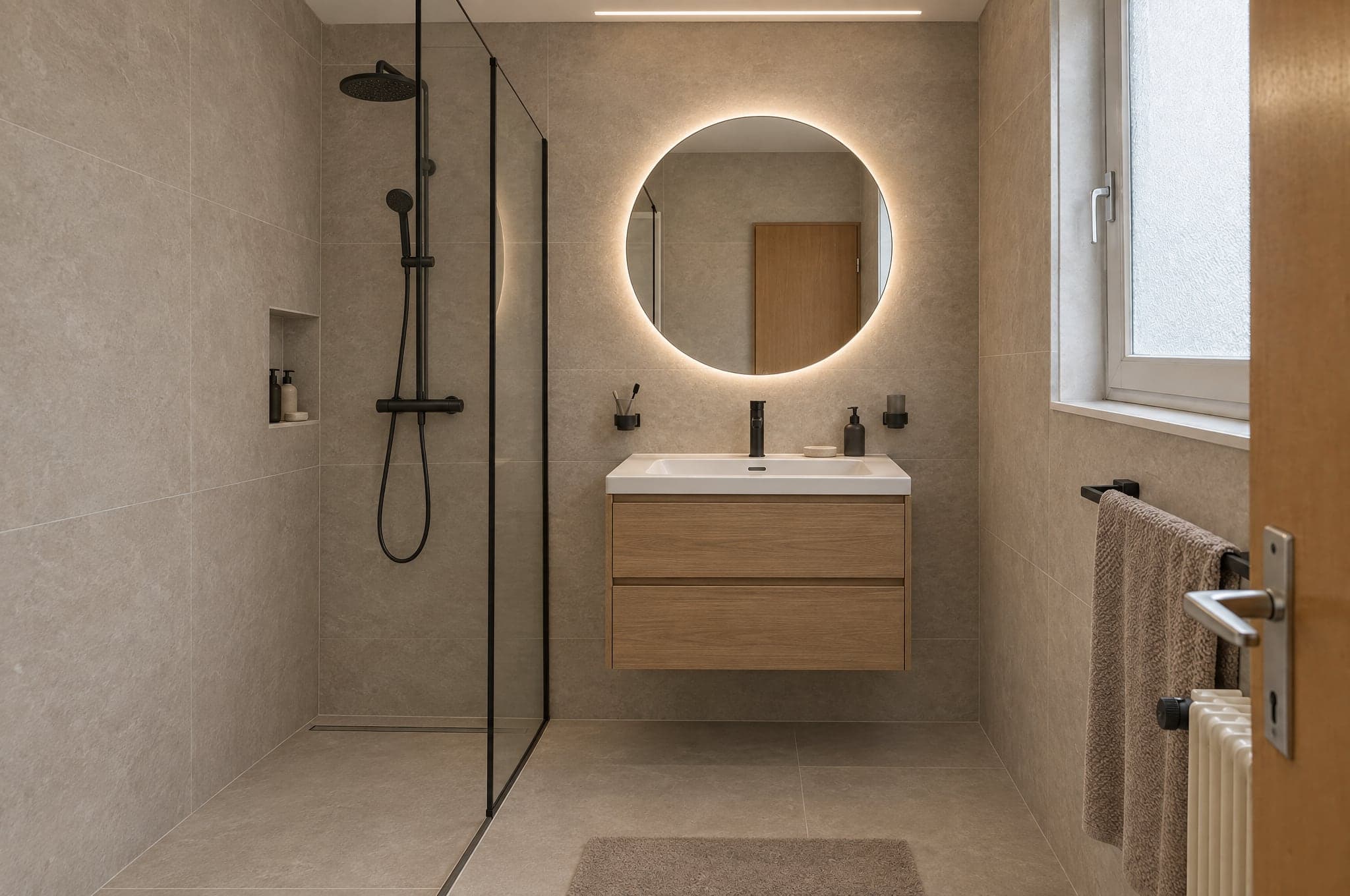 Exempel
Automatisk kontroll
Klarad- Fil
- Bildutsnitt
- Struktur
- Förändring
- Ren
Tre motorer, valda efter styrka.
Välj motor per produkt och per tillfälle. Skissa med Fast, kör webbplatsen på Pro och presentera med Ultra. Varje resultat passerar samma kvalitetslager innan en kund ser det.
För presentationer
Ultra
Högsta möjliga trohet mot kundens eget rum. Geometri, ljus och material håller i helskärm och i tryck.
DetaljtrohetHastighet- Typisk tid
- 40 till 90 s
- Passar bäst för
- Offerter, rådgivarens presentationer, premiumprojekt
För vardagen
Pro
Skarp och pålitlig. Standardmotorn på webbplatsen och i den dagliga rådgivningen.
DetaljtrohetHastighet- Typisk tid
- 15 till 30 s
- Passar bäst för
- Showroom på webbplatsen, vardagligt arbete i Studio
För volym
Fast
Första riktningar på några sekunder, för kampanjer där volymen betyder mer än den sista detaljen. Uppgradera valfritt resultat till Pro eller Ultra i ett enda steg.
DetaljtrohetHastighet- Typisk tid
- 8 till 15 s
- Passar bäst för
- Landningssidor för kampanjer, första riktningar
På din webbplats, eller på en egen adress.
Showroom körs där dina kunder redan hittar dig. Studio körs i webbläsaren på surfplattan i utställningen, i mobilen på plats och på skärmen på kontoret.
- <script>
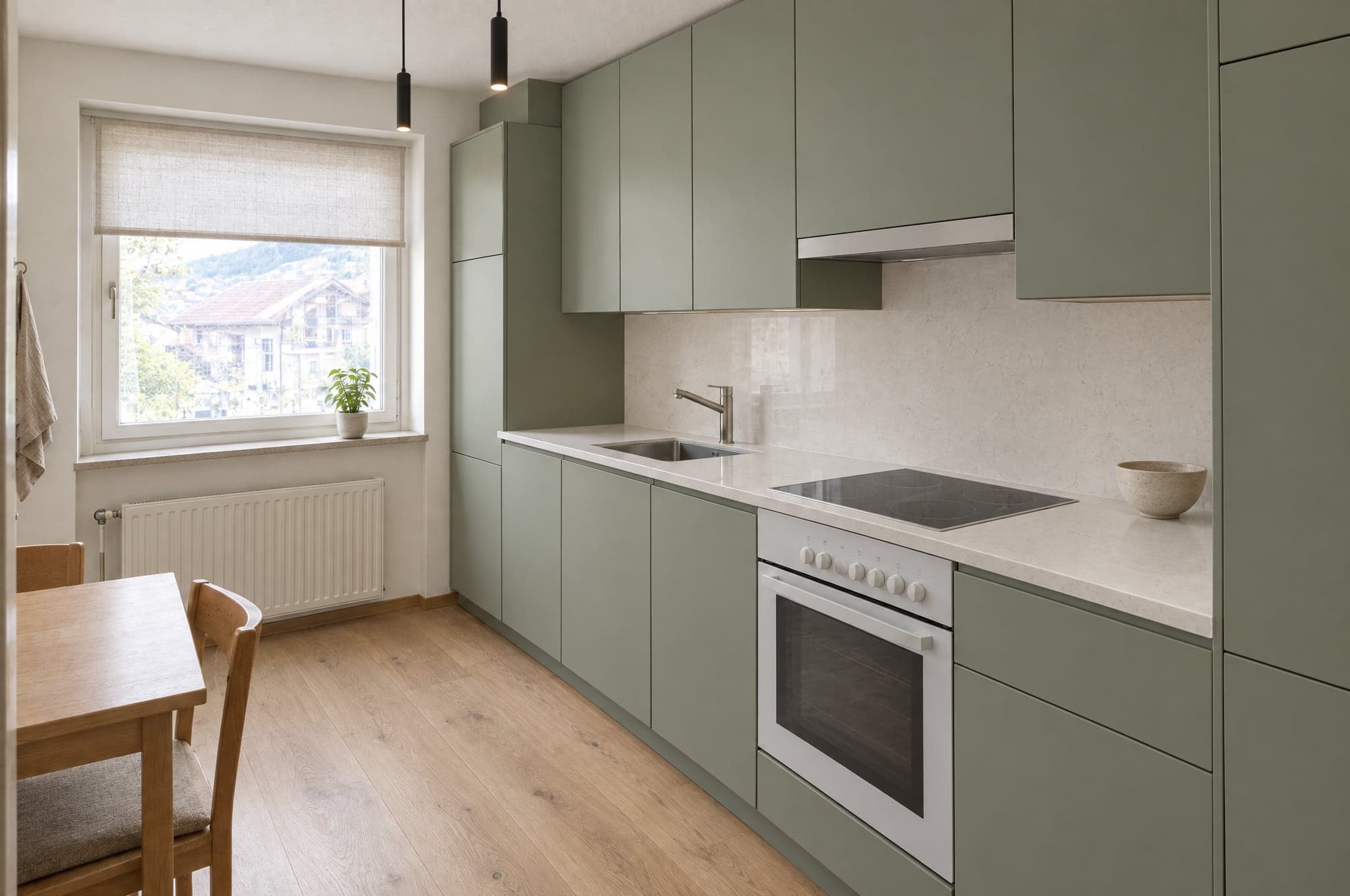 Spara min bild
Inbäddat på din webbplats
En script-tagg placerar Showroom på valfri sida på din webbplats. WordPress, Webflow, Shopify, Squarespace eller en egenutvecklad webbplats. Det ärver dina färger och ditt typsnitt.
- visual.dindoman.seDitt badrumVarmt naturligtSpara min bild
På en egen subdomän
Showroom hostat på en adress som visual.dindoman.se, för kampanjer, QR-koder i utställningen och webbplatser som du helst inte vill röra.
Förfrågningarna hamnar där ditt team redan arbetar.
27 kopplingar för CRM, automatisering, webbplatser, marknadsföring och kommunikation. HubSpot, Pipedrive och Salesforce kopplar du i din portal, och en signerad webhook når alla andra system, direkt eller via Zapier och Make.
CRM och försäljning
Förfrågningar blir kontakter, leads och affärer.
- HubSpot
Skapar eller uppdaterar kontakten och lägger till en affär eller en anteckning, med länkar till bilden.
- Salesforce
Ett lead per förfrågan via Web-to-Lead, uppgifter och länkar i de fält du mappar.
- Pipedrive
En person och en affär i det steg du väljer, eller ett lead, med en anteckning som länkar till bilden.
- Zoho CRM
Via Zapier, Make eller den signerade webhooken, eller uppsatt av beform.
- Microsoft Dynamics 365
Via den signerade webhooken, Zapier eller Make, eller uppsatt av beform.
- monday.com
Via Zapier, Make eller den signerade webhooken, eller uppsatt av beform.
- Bexio
Via Zapier, Make eller den signerade webhooken, eller uppsatt av beform.
- Odoo
Via den signerade webhooken, Zapier eller Make, eller uppsatt av beform.
Automatisering
Skicka varje förfrågan dit din process behöver den.
- Zapier
Kopplat via den signerade webhooken, med en steg-för-steg-guide i din portal.
- Make
En custom webhook startar ditt scenario, med en steg-för-steg-guide i din portal.
- n8n
En webhook-nod startar ditt arbetsflöde vid varje signerad förfrågan.
- Airtable
En post per förfrågan, via Zapier eller Make.
- Google Sheets
En rad per förfrågan via Zapier eller Make, för team som säljer från ett kalkylark.
- Webhooks
En signerad HTTPS-POST per förfrågan, som skickas om vid fel, med alla fält och länkar till bilden.
Webbplatser
Showroom körs på den webbplats du redan har.
- WordPress
En script-tagg på valfri sida, eller en hostad sida på din domän.
- Webflow
Placera Showroom i valfri sektion med ett embed-element.
- Shopify
En Showroom-sida i ditt tema, placerad med inbäddningsskriptet.
- Squarespace
Lägg till Showroom med ett kodblock på valfri sida.
- Wix
Bädda in Showroom med ett element för egen kod.
- Framer
Lägg in Showroom på en sida med en embed-komponent.
Marknadsföring och analys
Mät flödet och mata dina kampanjer med data.
- Google AnalyticsPlanerad
Uppladdningar, riktningar och förfrågningar som händelser i GA4.
- Google Tag ManagerPlanerad
Varje steg i flödet skickas till datalagret.
- Google AdsPlanerad
Kvalificerade förfrågningar skickas tillbaka som konverteringar för budgivningen.
- MetaPlanerad
Förfrågningar rapporteras som konverteringar för dina Meta-kampanjer.
- Mailchimp
Kontakter når den målgrupp du väljer, via Zapier eller Make.
- Brevo
Kontakter och deras valda riktning når Brevo via Zapier eller Make.
Kommunikation
Informera teamet, svara kunden.
- Slack
Ett meddelande i din säljkanal för varje ny förfrågan, via Zapier eller Make.
- Microsoft Teams
Nya förfrågningar publiceras i kanalen som ditt team följer, via Zapier eller Make.
- WhatsApp
Ett meddelande till ditt team för varje ny förfrågan, via Zapier eller Make.
- Gmail
Varje förfrågan via e-post till ditt team, vad du än kopplar i övrigt.
- Calendly
Kunderna bokar rådgivningen direkt efter att de har sparat sin bild.
Märkt som AI, synligt och i filen.
beform är byggt för transparensreglerna i EU:s AI-förordning. Varje bild säger vad den är, både till personen som tittar på den och till programvaran som öppnar den.
Så märker och hanterar beform bilder i dag. Ingen certifiering.
En synlig märkning
Varje demobild har en synlig beform-märkning, så att ingen tar den för ett fotografi.
Märkt i filen
Bilder som levereras av beform har IPTC-metadata som anger att de är AI-genererade, den standard som används av utgivare och plattformar.
En illustration av kundens eget rum
Geometrin i kundens foto behålls, och varje bild presenteras som en illustration av en riktning, inte som ett färdigt projekt.
Inga beslut om människor
Ingen biometrisk behandling och inga automatiserade beslut om människor. Varje bild kontrolleras automatiskt innan någon ser den.
Byggt i Schweiz, lagrat i Zürich.
Det din IT-avdelning och din jurist frågar först, besvarat på ett ställe.
- Lagrat i Zürich, körs i Frankfurt
- Databasen och fillagringen finns i Zürich i Schweiz, och applikationen körs i Frankfurt i Tyskland. För att forma en bild skickas fotot till Googles och OpenAI:s AI-modeller, som behandlar det i sin egen infrastruktur, bland annat i USA, enligt villkor för personuppgiftsbehandling.
- Krypterat under överföring och i vila
- TLS på varje anslutning till beform, och kryptering i vila hos de hostingleverantörer som lagrar uppgifterna.
- Varje företag hålls åtskilt
- Alla kunder delar en databas, och varje post tillhör en av dem. Säkerhet på radnivå (row level security) gör att en inloggad användare bara kan läsa sitt eget företags poster, och ett test som loggar in som två företag kontrollerar åtskillnaden efter ändringar i databasen.
- Åtkomst per roll, tvåfaktorsinloggning
- Personliga konton med rollerna ägare, administratör, sälj, rådgivare och läsare, kontrollerade på servern, och tvåfaktorsinloggning tillgänglig för alla användare. beform-teamet ser dina uppgifter bara via en tidsbegränsad supportåtkomst som du beviljar, eller medan det förbereder en Second Look-körning som du har bett om.
- Privat lagring, kortlivade länkar
- Foton och bilder är aldrig publikt läsbara. Varje fil öppnas bara via en signerad länk som upphör att gälla, och känsliga åtgärder som exporter registreras i en granskningslogg.
- Lagringstid enligt avtalet
- Foton från besökare som inte skickar någon förfrågan raderas efter 90 dagar, om inget annat har avtalats. Förfrågningar finns kvar tills du raderar dem. När avtalet upphör exporterar vi dina uppgifter om du ber om det inom 30 dagar, och raderar dem sedan inom ytterligare 30 dagar. Kopior av raderade uppgifter försvinner ur säkerhetskopiorna inom högst 90 dagar.
- Ingen träning på dina uppgifter
- beform använder inte ditt innehåll eller dina kunders uppgifter för att träna AI-modeller, och enligt API-villkoren för beforms konton gör AI-leverantörerna det inte heller.
- En schweizisk avtalspart
- beform är en produkt från crue GmbH, Schweiz. Kundavtalet lyder under schweizisk rätt, och dess bilaga om personuppgiftsbehandling omfattar den schweiziska dataskyddslagen (FADP), GDPR och, där den är tillämplig, UK GDPR.
Begär en genomgång på dina egna projekt.
Se beform på de rum, fasader och trädgårdar som dina kunder faktiskt skickar till dig. Inga bildspel, inget exempelkök.
- 01Du skickar din webbplats och en rad om vad du säljer.
- 02Edvin tar fram bilder från tre av dina egna projekt.
- 03Trettio minuter tillsammans om resultatet, förfrågningsflödet och upplägget.
 Edvin KarlssonPartner, beform
Berätta var vi ska börja
Edvin svarar inom en arbetsdag med en tid och vad du ska skicka.
Se beform på ditt eget kundfoto.
Ladda upp ett foto i demon och se det ta form. Eller boka trettio minuter, så kör vi det på tre av dina riktiga projekt.