El beform Engine. La estancia de su cliente, intacta.
Un render solo sirve si el cliente reconoce su propio espacio. Todo lo que hay por dentro existe para eso: la geometría se mantiene, los materiales no salen de sus límites y cada resultado se comprueba antes de que nadie lo vea.
Siete partes, un solo camino de una foto a una solicitud.
El beform Engine no es un modelo. Son siete partes que se ejecutan en orden, desde la lectura de la fotografía del cliente hasta la solicitud que llega a su equipo, con un bucle que afina su propia capa a medida que usted vende.
- Comprender
Percepción
El espacio se lee.
Antes de formar nada, beform lee la fotografía: la geometría del espacio y la posición de la cámara, dónde empieza y dónde acaba cada superficie, la dirección de la luz natural y los materiales que ya hay en la estancia.
- Geometría
- Cámara
- Superficies
- Luz natural
- Materiales existentes
Conocimiento
Su empresa, estructurada.
Sus gamas, sus acabados, sus líneas estéticas, sus estándares y sus reglas están en una capa propia, con sus precios allí donde los haya configurado, para que una imagen solo pueda mostrar lo que su empresa vende de verdad.
- Gamas
- Acabados
- Líneas estéticas
- Reglas
- Estándares
- Precios donde estén configurados
Propuesta
El deseo se convierte en instrucción.
El espacio que eligió el cliente, el estilo que escogió, las referencias que trajo y la frase que escribió se convierten en una sola instrucción precisa: qué tiene que quedarse, qué puede cambiar y hasta dónde.
- Espacio
- Estilo elegido
- Referencias
- La nota del cliente
- Formar
Generación
La imagen toma forma.
La instrucción se enruta a los modelos más potentes disponibles en ese momento, como Fast, Pro o Ultra, y la imagen se forma con la geometría de la propia fotografía del cliente sujeta en su sitio.
- Fast
- Pro
- Ultra
- Bloqueo de la geometría
- Enrutamiento entre proveedores
Control
Comprobado antes de que nadie lo vea.
Cada resultado se mide antes de mostrarse: un archivo completo, el encuadre de la fotografía, paredes y huecos en su sitio, un cambio hecho de verdad y ninguna zona en blanco. Se identifica como imagen de IA en la propia imagen y en el archivo.
- Archivo
- Encuadre
- Estructura
- Cambio
- Limpieza
- Etiqueta
- Continuar
Traspaso
Se convierte en una solicitud.
La imagen elegida sale del motor como algo con lo que su equipo puede trabajar: una solicitud de proyecto con la foto y el contacto adjuntos, una partida de un presupuesto, un registro en su CRM.
- Solicitud de proyecto
- Partida del presupuesto
- Archivo de imagen
- Registro en el CRM
Aprendizaje
Su capa se afina.
Lo que sus asesores conservan, cambian o descartan, y lo que los clientes eligen al final, vuelve a su propia capa, así que la siguiente imagen parte más cerca del nivel que su empresa daría por bueno.
- Comentarios de los asesores
- Elecciones de los clientes
- Su estándar de casa
El bucle
El aprendizaje alimenta el conocimiento. Cada proyecto que vende la empresa entrena su propia capa, y el motor arranca la siguiente imagen desde ahí.
Hecho por gente que aprendió cómo se vende este trabajo.
Un modelo generalista sabe cómo es una cocina. No sabe dónde va la junta de una encimera, qué frentes tiene en stock una empresa ni qué ocurre entre una consulta y un presupuesto firmado. Ese conocimiento es el producto.
Los oficios
beform está hecho para un solo tipo de trabajo: cambiar un espacio con el que alguien ya convive. Cada oficio vende de otra manera, muestra de otra manera y tiene su propio vocabulario, así que cada oficio tiene sus propias reglas dentro del motor en lugar de un único ajuste general.
- Estudios de cocina
- Especialistas en baños
- Contratistas generales
- Fachadas y pintura
- Paisajistas y constructores de piscinas
- Ventanas y protección solar
- Pavimentos y acabados interiores
- Arquitectos y promotoras
Cómo se comportan los materiales
Una imagen resulta convincente o falla en los detalles que notaría un instalador. Esos detalles están escritos como reglas y se prueban por espacio, porque un modelo generalista no tiene por qué conocerlos.
- Dónde empieza y dónde acaba una superficie
- Juntas, uniones, rodapiés y líneas de silicona
- Cantos, perfiles y mochetas de ventana
- Nivel de brillo, veta y cómo recibe un acabado la luz natural
- La iluminación instalada frente a la luz que ya hay en la estancia
- Si el resultado se podría ejecutar de verdad
Cómo venden estas empresas
El trabajo lo venden personas, en una secuencia que no ha cambiado: una consulta, una cita en la exposición, una visita técnica, un presupuesto medido, un plazo de semanas. beform está pensado alrededor de esa secuencia, y por eso una imagen acaba como una solicitud y como una partida de presupuesto, no como una descarga.
- La consulta, y quién la atiende primero
- La cita en la exposición y la visita técnica
- Gamas, proveedores y plazos de entrega
- Lo que se puede prometer en un presupuesto y lo que no
- Quién da el visto bueno a una imagen antes de que la vea un cliente
Las líneas de la estancia se quedan donde estaban.
beform traza las paredes, la ventana, la línea del techo y la cámara antes de generar nada. Esas líneas quedan fijas. El render solo puede cambiar lo que cambiaría una reforma.
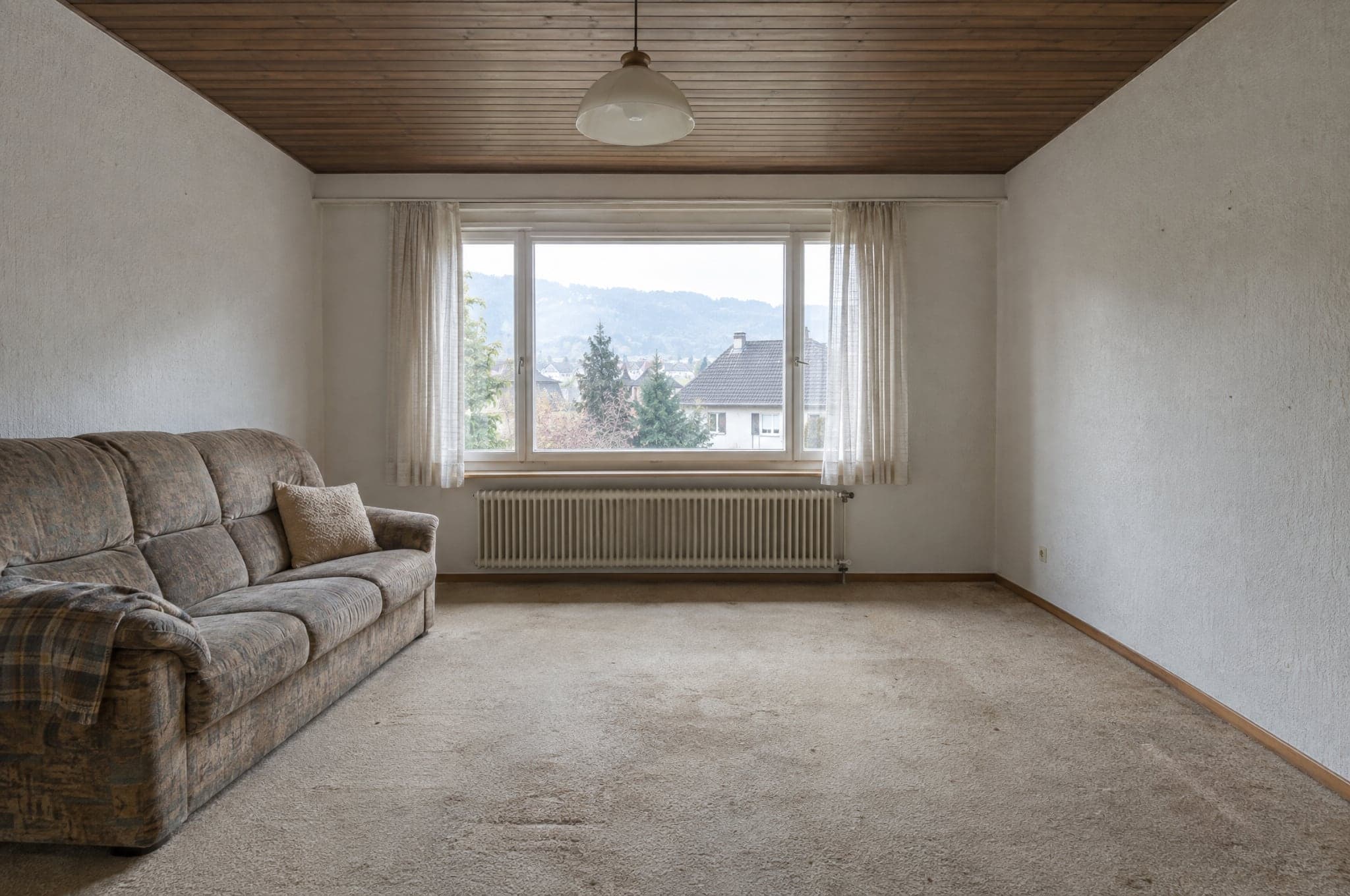 Ejemplo
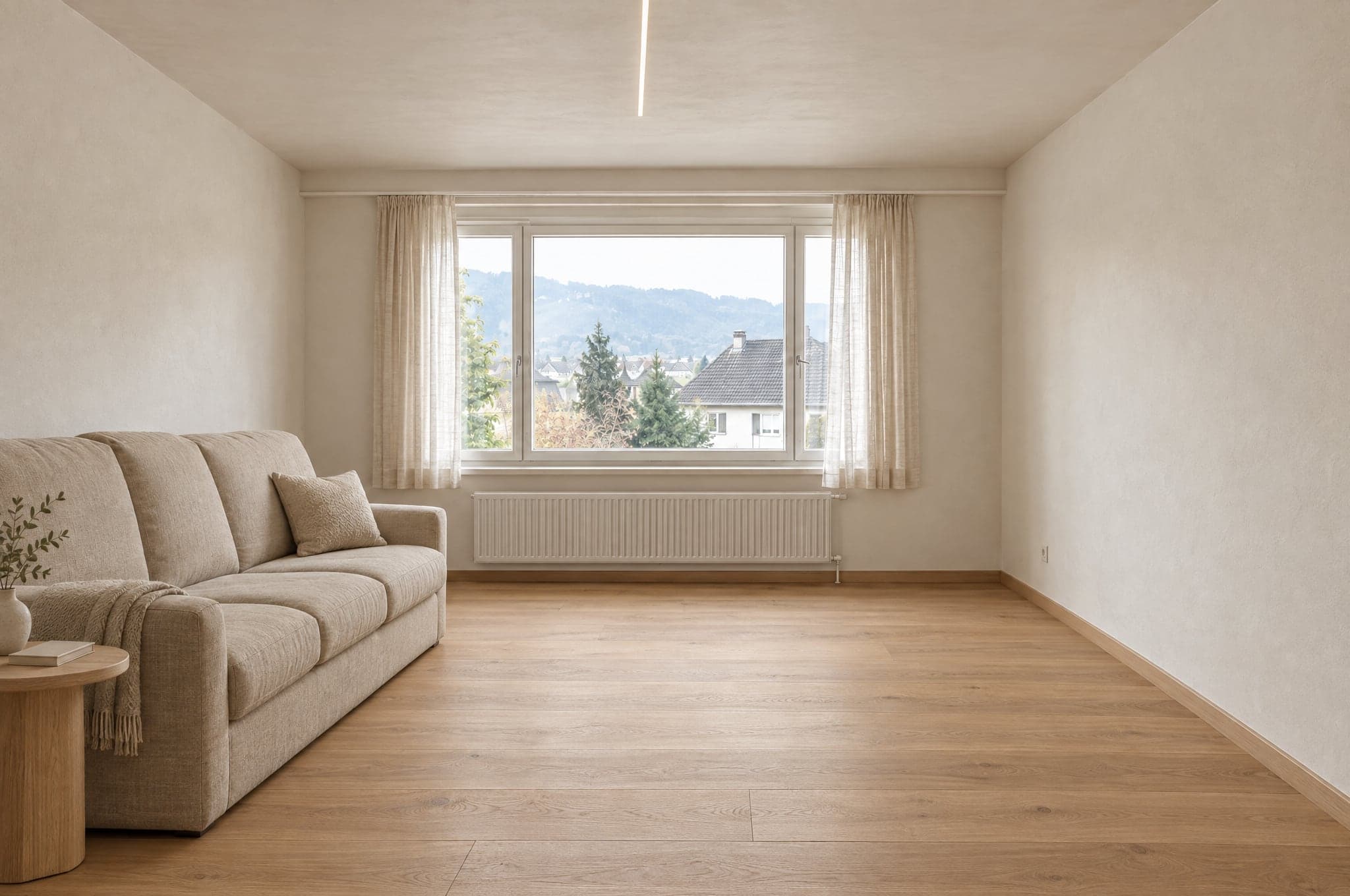 Ejemplo
Se mantiene como en la foto
- Paredes y techo
- Ventanas y puertas
- Proporciones de la estancia
- Posición de la cámara
- Dirección de la luz natural
Cambia según la propuesta
- Superficies y acabados
- Carpintería y mobiliario
- Sanitarios, grifería y accesorios
- Colores
- Iluminación
Cada espacio tiene su propio conjunto de materiales.
Una cocina nunca recibe azulejos de ducha y una fachada nunca recibe pintura de interior. Con el System, el límite es su propio catálogo, así que un render solo muestra productos que usted vende.
Cocina
- Frentes
- Encimeras
- Frontal
- Suelo
- Iluminación
Fuera del límite
Azulejos de ducha
Baño
- Azulejos de pared
- Mueble de lavabo
- Grifería
- Ducha
- Suelo
Fuera del límite
Frentes de cocina
Fachada
- Revoco
- Revestimiento
- Marcos de ventana
- Color
- Entrada
Fuera del límite
Pintura interior
Jardín y piscina
- Pavimento
- Vegetación
- Piscina
- Terraza
- Iluminación
Fuera del límite
Parquet
Los modelos generan. beform hace el resto.
beform no entrena ningún modelo fundacional. Construye y entrena la capa que hace fiables los mejores modelos generalistas para cocinas, baños, fachadas y jardines, y va trasladando esa capa a los modelos que sean mejores en cada momento.
La capa de beform
Todo lo que hace fiables esos modelos para cocinas, baños, fachadas y jardines lo construye y lo entrena beform. Ahí está el trabajo, y eso es lo que una empresa compra.
Reglas por oficio y por espacio
Qué puede cambiar en una cocina, un baño, una fachada o un jardín, y qué no puede moverse nunca. Escrito por oficio y probado por espacio.
El bloqueo de la geometría
Paredes, ventanas, puertas, techo y cámara se trazan a partir de la fotografía y se sujetan, para que el cliente siga reconociendo su propio espacio.
La biblioteca de materiales
Cómo se comporta un acabado en una estancia, y cómo se corresponde cada comportamiento con los productos que una empresa vende de verdad.
El entrenamiento propio de la empresa
Referencias, datos de producto, proyectos terminados y comentarios de los asesores se convierten en una capa que pertenece solo a esa empresa.
Enrutamiento entre proveedores
Cada paso va al modelo que mejor lo hace en ese momento. Cuando aparece un modelo más potente, el enrutamiento cambia y las reglas se quedan.
Conjuntos de evaluación
Conjuntos fijos de estancias reales por espacio. Un modelo nuevo o una regla modificada se ejecutan contra ellos y se comparan antes de llegar a una cuenta.
El control de calidad
La comprobación automática que pasa cada resultado antes de mostrarse, y la etiqueta que lleva en la propia imagen y en el archivo.
Los modelos generalistas
Generar una imagen y leer una frase lo hacen los mejores modelos actuales de varios proveedores. beform no entrena ningún modelo fundacional propio, y tampoco lo pretende.
Una imagen es el principio, no la entrega.
El motor se juzga por lo que su empresa puede hacer después con el resultado, y por eso produce más que una imagen.
Lo que produce
- Una imagen fotorrealista del propio espacio del cliente, en una propuesta de su gama.
- Varias versiones para comparar, cada una conservada y con su nombre.
- Un archivo de imagen identificado como generado con IA, en la imagen y en los metadatos.
- Una solicitud de proyecto con la foto, el espacio, la propuesta elegida y el contacto.
- Una imagen que su asesor puede llevar directamente al presupuesto.
- Un rango de precios orientativo, allí donde una empresa haya implantado el módulo adicional Precios y estimaciones.
Para quién es
El cliente en su web
Ve su propia cocina, su baño, su fachada o su jardín terminados antes de que nadie visite nada, y conserva la imagen para mostrársela a quien decide con él.
El asesor en la reunión
Abre la misma imagen, cambia materiales mientras el cliente mira y sale con una decisión en lugar de una lista de adjetivos.
El equipo de marketing
Lanza campañas que responden con el propio espacio del visitante y recibe solicitudes que ya vienen cualificadas.
El dueño de la empresa
Ve de dónde vienen las solicitudes, cuánto cuestan los renders y qué imágenes acabaron en obra firmada.
La misma foto en una app de chat le da una imagen bonita.
No le dará su estancia, su gama, la misma respuesta dos veces ni nada que su equipo pueda enviar. Esa es la diferencia entre un prompt y una capa entrenada.
Sujeta la estancia
Un prompt en una app de chat puede volver a dibujar el espacio a su antojo. La capa traza primero la geometría y la sujeta, así que el resultado sigue siendo la estancia del cliente.
Solo muestra lo que usted vende
Un modelo generalista se inventa un producto verosímil. La capa está acotada por su catálogo, así que lo que eligió el cliente se puede presupuestar.
Es igual cada vez
La misma foto y la misma propuesta dan un resultado comparable para cada asesor, en lugar de depender de quién escribe el mejor prompt.
No se detiene en la imagen
La imagen llega como una solicitud, como una partida de presupuesto y como un archivo identificado, con su marca y en su CRM, y con el uso contabilizado.
Comprobado antes de que nadie lo vea.
Cada resultado se mide antes de mostrarse, una imagen que no se sostiene se genera una vez más o no llega a mostrarse, y cada imagen que supera la comprobación se identifica en la propia imagen y en el archivo. Lo que una imagen no puede decirle también está escrito aquí.
Medido automáticamente
Antes de mostrar un resultado se miden cinco cosas: que el archivo esté completo, a plena resolución y con las proporciones pedidas; que el encuadre sea el de la fotografía, sin recortes ni zoom; que paredes, ventanas, puertas, líneas de tejado y horizonte estén donde estaban; que el cambio se haya hecho de verdad y no sea la fotografía devuelta tal cual; y que ninguna zona esté en blanco, gris o negra. La misma imagen recibe siempre la misma respuesta. La comprobación no juzga el gusto ni si un material es el adecuado.
Cuando un resultado no se sostiene
Se genera una vez más, con una instrucción más estricta que nombra lo que ha fallado. Si sigue sin sostenerse, no se muestra. El cliente ve que el render no se ha completado y puede volver a intentarlo.
Identificado cuando la supera
Un resultado que supera la comprobación se identifica como imagen de IA, en la propia imagen y en los metadatos del archivo, para que diga lo que es vaya donde vaya.
Lo que una imagen no es
Es la ilustración de una propuesta, no un plano ni un presupuesto. No está a escala, las mediciones y los rangos de precios son orientativos, y la empresa confirma materiales, viabilidad y precio en su propio presupuesto.
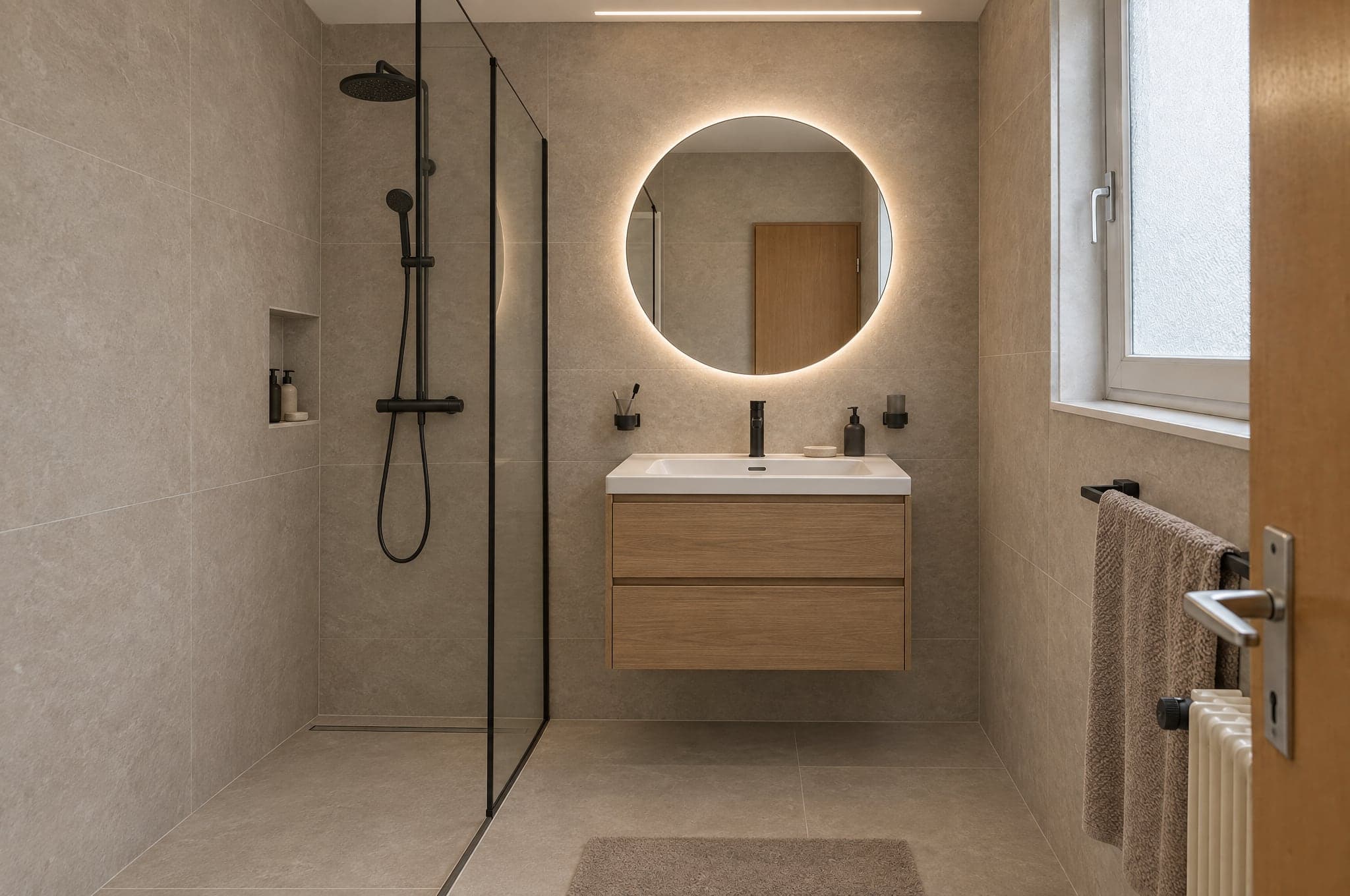 Ejemplo
Comprobación automática
Superada- Archivo
- Encuadre
- Estructura
- Cambio
- Limpieza
Tres motores, elegidos por sus puntos fuertes.
Elija el motor por producto y por momento. Bocetos con Fast, la web con Pro, presentaciones con Ultra. Cada resultado pasa por la misma capa de calidad antes de que lo vea un cliente.
Para presentaciones
Ultra
La máxima fidelidad al espacio real del cliente. Geometría, luz y materiales se sostienen a pantalla completa y en papel.
FidelidadVelocidad- Tiempo habitual
- de 40 a 90 s
- Ideal para
- Presupuestos, presentaciones de asesores, proyectos premium
Para el día a día
Pro
Nítido y fiable. El motor por defecto en la web y en el asesoramiento diario.
FidelidadVelocidad- Tiempo habitual
- de 15 a 30 s
- Ideal para
- Showroom en la web, trabajo diario en el Studio
Para volumen
Fast
Primeras propuestas en segundos, para campañas en las que el volumen importa más que el último detalle. Cualquier resultado puede pasarse a Pro o Ultra con un clic.
FidelidadVelocidad- Tiempo habitual
- de 8 a 15 s
- Ideal para
- Landing pages de campañas, primeras propuestas
En su web o en una dirección propia.
El Showroom funciona allí donde sus clientes ya le encuentran. El Studio funciona en el navegador: en la tableta de la exposición, en el móvil en la obra y en la pantalla de la oficina.
- <script>
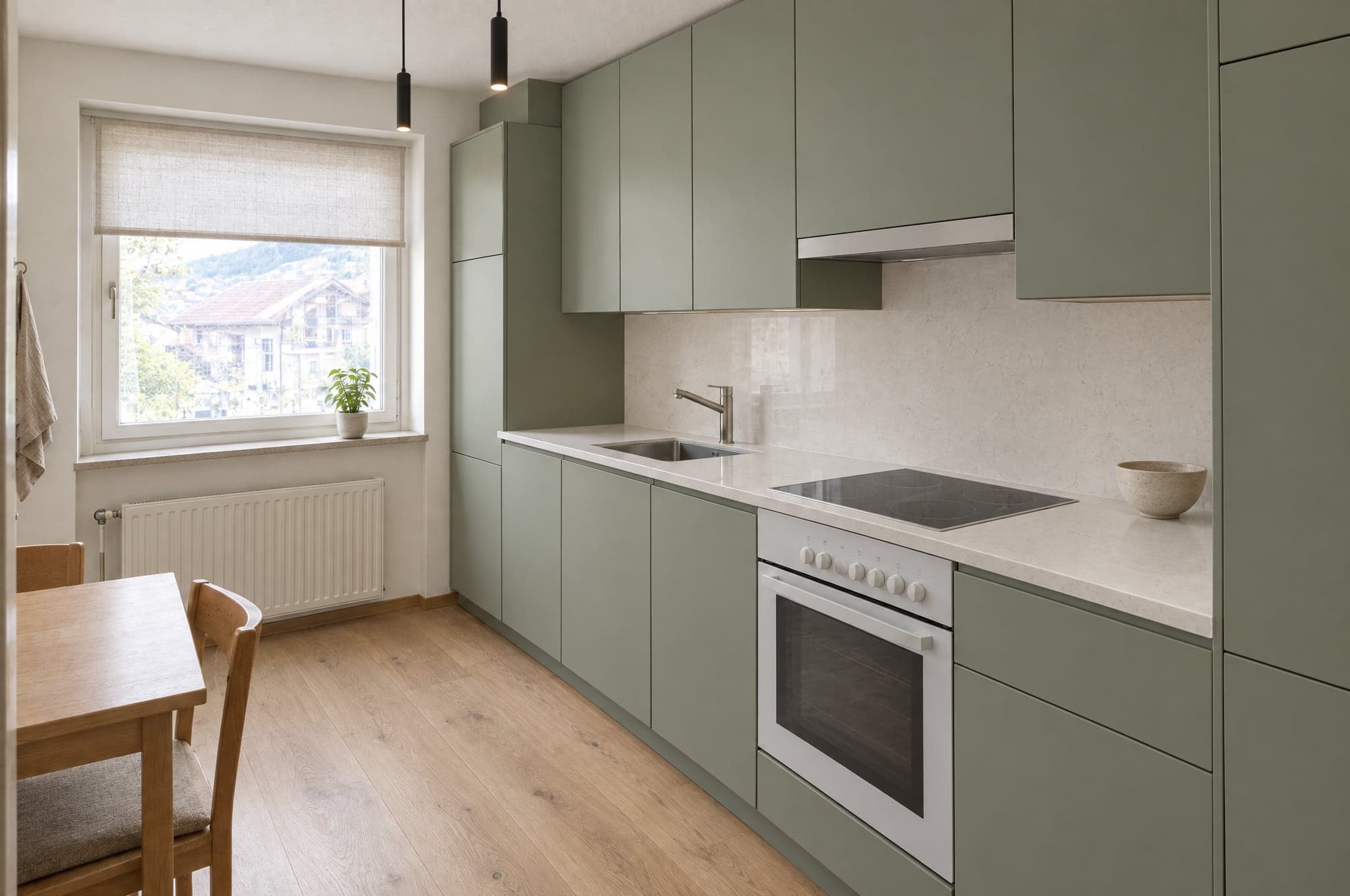 Guardar mi imagen
Integrado en su web
Una etiqueta de script coloca el Showroom en cualquier página de su web. WordPress, Webflow, Shopify, Squarespace o un desarrollo a medida. Adopta sus colores y su tipografía.
- visual.sudominio.comSu bañoNatural cálidoGuardar mi imagen
En un subdominio suyo
Un Showroom alojado en una dirección como visual.sudominio.com, para campañas, códigos QR en la exposición y webs que prefiere no tocar.
Las solicitudes llegan allí donde ya trabaja su equipo.
27 conexiones para CRM, automatización, sitios web, marketing y comunicación. HubSpot, Pipedrive y Salesforce se conectan en su portal, y un webhook firmado llega a cualquier otro sistema, directamente o a través de Zapier y Make.
CRM y ventas
Las solicitudes se convierten en contactos, leads y oportunidades.
- HubSpot
Crea o actualiza el contacto y añade una oportunidad o una nota, con enlaces a la imagen.
- Salesforce
Un lead por solicitud mediante Web-to-Lead, con los datos y enlaces en los campos que usted asigne.
- Pipedrive
Una persona y una oportunidad en la fase que elija, o un lead, con una nota que enlaza la imagen.
- Zoho CRM
A través de Zapier, Make o el webhook firmado, o configurado por beform.
- Microsoft Dynamics 365
A través del webhook firmado, Zapier o Make, o configurado por beform.
- monday.com
A través de Zapier, Make o el webhook firmado, o configurado por beform.
- Bexio
A través de Zapier, Make o el webhook firmado, o configurado por beform.
- Odoo
A través del webhook firmado, Zapier o Make, o configurado por beform.
Automatización
Dirija cada solicitud adonde su proceso la necesite.
- Zapier
Conectado a través del webhook firmado, con una guía paso a paso en su portal.
- Make
Un webhook personalizado inicia su escenario, con una guía paso a paso en su portal.
- n8n
Un nodo webhook inicia su flujo de trabajo con cada solicitud firmada.
- Airtable
Un registro por solicitud, a través de Zapier o Make.
- Google Sheets
Una fila por solicitud a través de Zapier o Make, para los equipos que venden desde una hoja de cálculo.
- Webhooks
Un POST HTTPS firmado por solicitud, reintentado si falla, con todos los campos y enlaces a la imagen.
Webs
El Showroom funciona en la web que ya tiene.
- WordPress
Una etiqueta de script en cualquier página, o una página alojada en su dominio.
- Webflow
Coloque el Showroom en cualquier sección con un elemento embed.
- Shopify
Una página de Showroom en su tema, insertada con el script de integración.
- Squarespace
Añada el Showroom con un bloque de código en cualquier página.
- Wix
Integre el Showroom con un elemento de código personalizado.
- Framer
Inserte el Showroom en una página con un componente embed.
Marketing y analítica
Mida el flujo y alimente sus campañas.
- Google AnalyticsPrevisto
Subidas, propuestas y solicitudes como eventos en GA4.
- Google Tag ManagerPrevisto
Cada paso del flujo enviado a la capa de datos.
- Google AdsPrevisto
Las solicitudes cualificadas vuelven como conversiones para las pujas.
- MetaPrevisto
Las solicitudes se registran como conversiones para sus campañas de Meta.
- Mailchimp
Los contactos llegan a la audiencia que elija, a través de Zapier o Make.
- Brevo
Los contactos y su propuesta elegida llegan a Brevo a través de Zapier o Make.
Comunicación
Avise al equipo, responda al cliente.
- Slack
Un mensaje en su canal de ventas por cada nueva solicitud, a través de Zapier o Make.
- Microsoft Teams
Las nuevas solicitudes se publican en el canal que sigue su equipo, a través de Zapier o Make.
- WhatsApp
Un mensaje a su equipo por cada nueva solicitud, a través de Zapier o Make.
- Gmail
Cada solicitud por correo electrónico a su equipo, conecte lo que conecte.
- Calendly
Los clientes reservan el asesoramiento justo después de conservar su imagen.
Identificado como IA, a la vista y en el archivo.
beform está diseñado para las normas de transparencia de la Ley de IA de la UE. Cada imagen dice lo que es, a la persona que la mira y al software que la abre.
Cómo identifica y gestiona beform las imágenes hoy. No es una certificación.
Una marca visible
Cada imagen de la demo lleva una marca visible de beform, para que nadie la confunda con una fotografía.
Identificado en el archivo
Las imágenes que entrega beform incluyen metadatos IPTC que las identifican como generadas con IA, el estándar que utilizan editores y plataformas.
Una ilustración de su propio espacio
Se conserva la geometría de la foto del cliente, y cada imagen se presenta como la ilustración de una propuesta, no como un proyecto terminado.
Ninguna decisión sobre personas
Ningún tratamiento biométrico y ninguna decisión automatizada sobre personas. Cada imagen se comprueba automáticamente antes de que nadie la vea.
Desarrollado en Suiza, almacenado en Zúrich.
Lo que preguntan primero su equipo de TI y su abogado, respondido en un solo lugar.
- Almacenado en Zúrich, ejecutado en Fráncfort
- La base de datos y el almacenamiento de archivos están en Zúrich, Suiza, y la aplicación se ejecuta en Fráncfort, Alemania. Para formar una imagen, la foto se envía a los modelos de IA de Google y OpenAI, que la tratan en su propia infraestructura, también en Estados Unidos, con condiciones de tratamiento de datos.
- Cifrado en tránsito y en reposo
- TLS en cada conexión con beform y cifrado en reposo por parte de los proveedores de alojamiento que guardan los datos.
- Cada empresa aislada de las demás
- Todas las empresas clientes comparten una base de datos, y cada registro pertenece a una de ellas. La seguridad a nivel de fila permite que un usuario con sesión iniciada lea solo los registros de su propia empresa, y una prueba que inicia sesión como dos empresas comprueba la separación después de los cambios en la base de datos.
- Acceso por rol, inicio de sesión con doble factor
- Cuentas personales con los roles propietario, administrador, ventas, asesor y lector, comprobados en el servidor, y el inicio de sesión con doble factor disponible para cada usuario. El equipo de beform solo ve sus datos a través de un acceso de soporte limitado en el tiempo que usted concede, o mientras prepara una campaña de Second Look que usted solicitó.
- Almacenamiento privado, enlaces de vida corta
- Las fotos y las imágenes nunca son legibles públicamente. Cada archivo solo se abre con un enlace firmado que caduca, y las acciones sensibles, como las exportaciones, se anotan en un registro de auditoría.
- Conservación fijada en el contrato
- Las fotos de los visitantes que no envían una solicitud se eliminan a los 90 días, salvo acuerdo distinto. Las solicitudes se conservan hasta que usted las elimine. Cuando termina el contrato, exportamos sus datos si lo pide en un plazo de 30 días y después los eliminamos en otros 30 días. Las copias de los datos eliminados salen de las copias de seguridad en un plazo máximo de 90 días.
- Ningún entrenamiento con sus datos
- beform no usa su contenido ni los datos de sus clientes para entrenar modelos de IA, y según las condiciones de API de las cuentas de beform, los proveedores de IA tampoco lo hacen.
- Un socio contractual suizo
- beform es un producto de crue GmbH, Suiza. El contrato de cliente se rige por el derecho suizo, y su anexo de tratamiento de datos cubre la LPD suiza, el RGPD y, cuando se aplica, el UK GDPR.
Solicite una demostración con sus propios proyectos.
Vea beform con las estancias, fachadas y jardines que sus clientes le envían de verdad. Sin diapositivas, sin cocina de muestra.
- 01Usted nos envía su web y una línea sobre lo que vende.
- 02Edvin prepara imágenes a partir de tres de sus propios proyectos.
- 03Treinta minutos juntos para ver el resultado, el flujo de solicitudes y la modalidad.
 Edvin KarlssonSocio, beform
Díganos por dónde empezar
Edvin responde en un plazo de un día laborable con una hora y lo que debe enviarle.
Vea beform con la foto de uno de sus clientes.
Suba una foto a la demo y vea cómo toma forma. O reserve treinta minutos y lo aplicaremos a tres de sus proyectos reales.