محرّك beform. غرفة عميلكم، كما هي.
لا فائدة من التصوّر إلا إذا تعرّف العميل على مساحته. وكل ما يعمل خلف الكواليس موجود لهذا الغرض: الهندسة تبقى، والخامات تبقى ضمن حدودها، وكل نتيجة تُفحص قبل أن يراها أحد.
سبعة أجزاء ومسار واحد من صورة إلى طلب.
محرّك beform ليس نموذجًا واحدًا. إنه سبعة أجزاء تعمل بالترتيب، من قراءة صورة العميل إلى الطلب الذي يصل إلى فريقكم، مع حلقة تصقل طبقتكم الخاصة مع كل عملية بيع.
- الفهم
الإدراك
تُقرأ المساحة.
قبل أن يتشكّل أي شيء، يقرأ beform الصورة: هندسة المساحة وموضع الكاميرا، وأين يبدأ كل سطح وأين ينتهي، واتجاه ضوء النهار، والخامات الموجودة في الغرفة أصلًا.
- الهندسة
- الكاميرا
- الأسطح
- ضوء النهار
- الخامات الموجودة
المعرفة
شركتكم، مهيكلة.
تشكيلاتكم وتشطيباتكم وتوجّهاتكم الأسلوبية ومعاييركم وقواعدكم تقع في طبقة خاصة بها، مع أسعاركم حيث أعددتموها، فلا يستطيع التصوّر أن يعرض إلا ما تبيعه شركتكم فعلًا.
- التشكيلات
- التشطيبات
- التوجّهات الأسلوبية
- القواعد
- المعايير
- الأسعار حيث تكون مُعدّة
التوجّه
الرغبة تتحوّل إلى تعليمات.
المساحة التي اختارها العميل، والأسلوب الذي انتقاه، والمراجع التي أحضرها، والجملة التي كتبها، تتحوّل إلى تعليمات واحدة دقيقة: ما يجب أن يبقى، وما يجوز أن يتغيّر، وإلى أي مدى.
- المساحة
- الأسلوب المختار
- المراجع
- ملاحظة العميل
- التشكيل
التكوين
يتشكّل التصوّر.
تُوجَّه التعليمات إلى أقوى النماذج المتاحة في تلك اللحظة، بوصفها Fast أو Pro أو Ultra، ويتشكّل التصوّر مع الحفاظ على هندسة صورة العميل نفسها في مكانها.
- Fast
- Pro
- Ultra
- تثبيت هندسة المكان
- التوجيه بين المزوّدين
الضبط
يُفحص قبل أن يراه أحد.
تُقاس كل نتيجة قبل عرضها: ملف كامل، وإطار الصورة الأصلية نفسه، وجدران وفتحات في أماكنها، وتغيير أُجري فعلًا، ولا مناطق فارغة. وتُوسم بأنها تصوّر بالذكاء الاصطناعي داخل الصورة وداخل الملف.
- الملف
- الإطار
- البنية
- التغيير
- النقاء
- الوسم
- المتابعة
التسليم
يتحوّل إلى طلب.
يغادر التصوّر المختار المحرّك في صورة شيء يستطيع فريقكم التصرف بناءً عليه: طلب مشروع مرفق بالصورة وبيانات التواصل، أو بند في عرض سعر، أو سجل في نظام CRM لديكم.
- طلب مشروع
- بند في عرض السعر
- ملف صورة
- سجل في CRM
التعلّم
تزداد طبقتكم دقة.
ما يبقيه مستشاروكم أو يغيّرونه أو يستبعدونه، وما يختاره العملاء في النهاية، يعود إلى طبقتكم الخاصة، فيبدأ التصوّر التالي أقرب إلى المعيار الذي تعتمده شركتكم.
- ملاحظات المستشارين
- اختيارات العملاء
- معيار شركتكم
الحلقة
التعلّم يغذّي المعرفة. كل مشروع تبيعه الشركة يدرّب طبقتها الخاصة، ومن هناك يبدأ المحرّك التصوّر التالي.
بناه من تعلّموا كيف تُباع هذه الأعمال.
النموذج العام يعرف كيف يبدو المطبخ. لكنه لا يعرف أين يقع وصل سطح العمل، ولا أي واجهات تحتفظ بها الشركة في مخزونها، ولا ما يحدث بين الاستفسار وعرض السعر الموقَّع. هذه المعرفة هي المنتج.
المهن
بُني beform لنوع واحد من العمل: تغيير مساحة يعيش فيها أحد بالفعل. وكل مهنة تبيع بطريقة مختلفة، وتعرض بطريقة مختلفة، ولها مفرداتها، ولذلك لكل مهنة قواعدها داخل المحرّك بدل إعداد عام واحد.
- استوديوهات المطابخ
- متخصصو الحمّامات
- المقاولون العامون
- الواجهات والدهانات
- منسقو الحدائق وبناة المسابح
- النوافذ والحماية من الشمس
- الأرضيات والتشطيبات الداخلية
- المعماريون والمطورون العقاريون
كيف تتصرّف الخامات
التصوّر يكون مقنعًا أو خاطئًا في التفاصيل التي يلاحظها الفنّي. وهذه التفاصيل مكتوبة كقواعد ومختبَرة لكل مساحة، لأن النموذج العام لا سبب لديه ليعرفها.
- أين يبدأ السطح وأين ينتهي
- الوصلات والفواصل والوزرات وخطوط السيليكون
- الحواف والبروفيلات وكشفات النوافذ
- درجة اللمعان والعروق وكيف يتلقى التشطيب ضوء النهار
- الإضاءة المركّبة مقابل الضوء الموجود في الغرفة أصلًا
- هل يمكن تنفيذ النتيجة فعلًا
كيف تبيع هذه الشركات
يبيع الناس هذا العمل، بتسلسل لم يتغيّر: استفسار، فموعد في صالة العرض، فزيارة للموقع، فعرض سعر مبني على قياسات، فمهلة تنفيذ بالأسابيع. وbeform مصمَّم حول هذا التسلسل، ولهذا ينتهي التصوّر طلبًا وبندًا في عرض سعر، لا ملفًا يُنزَّل.
- الاستفسار، ومن يرد عليه أولًا
- موعد صالة العرض وزيارة الموقع
- التشكيلات والموردون ومهل التسليم
- ما يجوز الوعد به في عرض السعر، وما لا يجوز
- من يعتمد التصوّر قبل أن يراه العميل
خطوط الغرفة تبقى في مكانها.
يحدّد beform مسار الجدران والنافذة وخط السقف وزاوية الكاميرا قبل إنشاء أي تصوّر. هذه الخطوط ثابتة. ولا يُسمح للتصوّر أن يغيّر إلا ما سيغيّره التجديد.
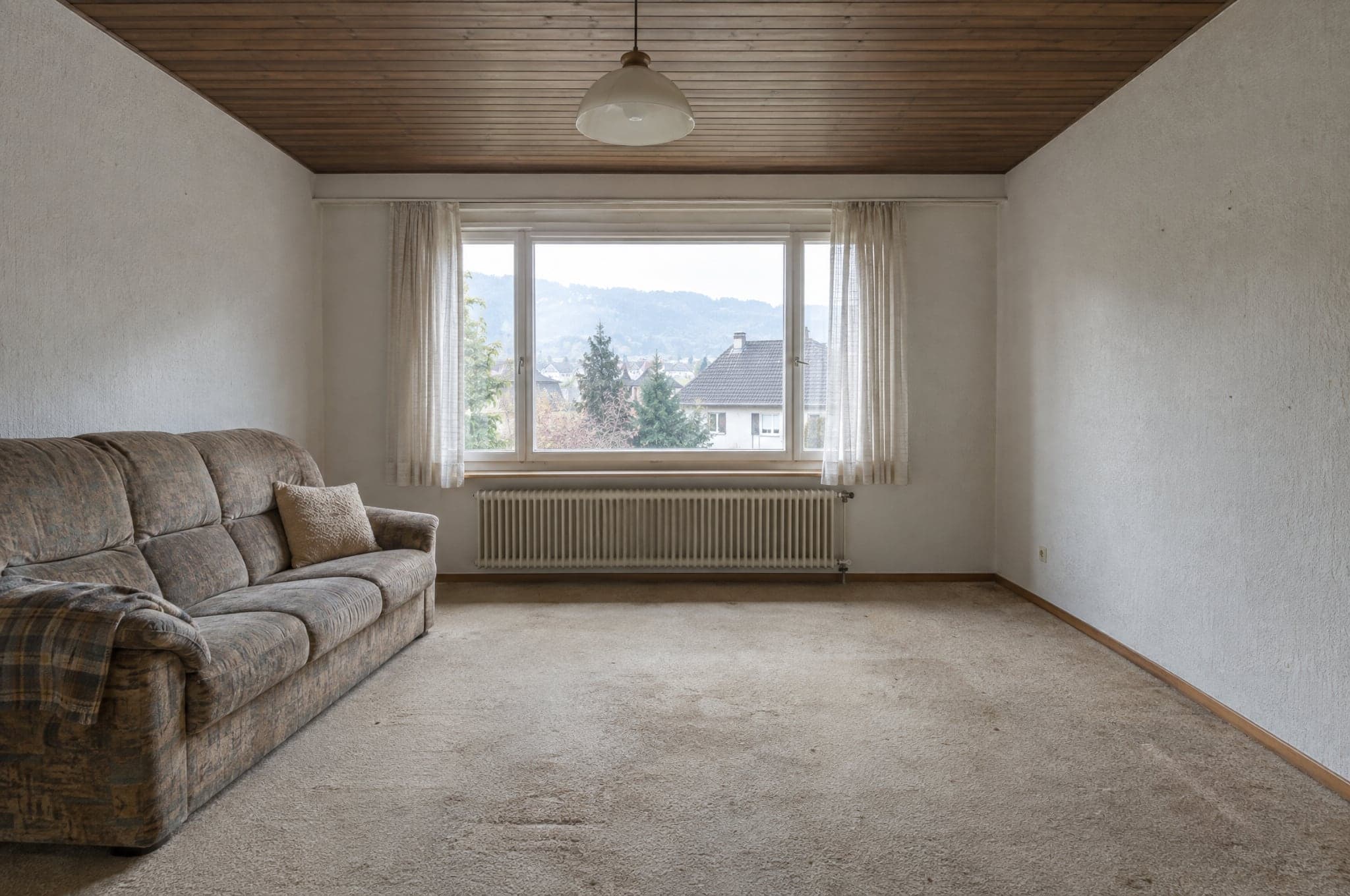 مثال
مثال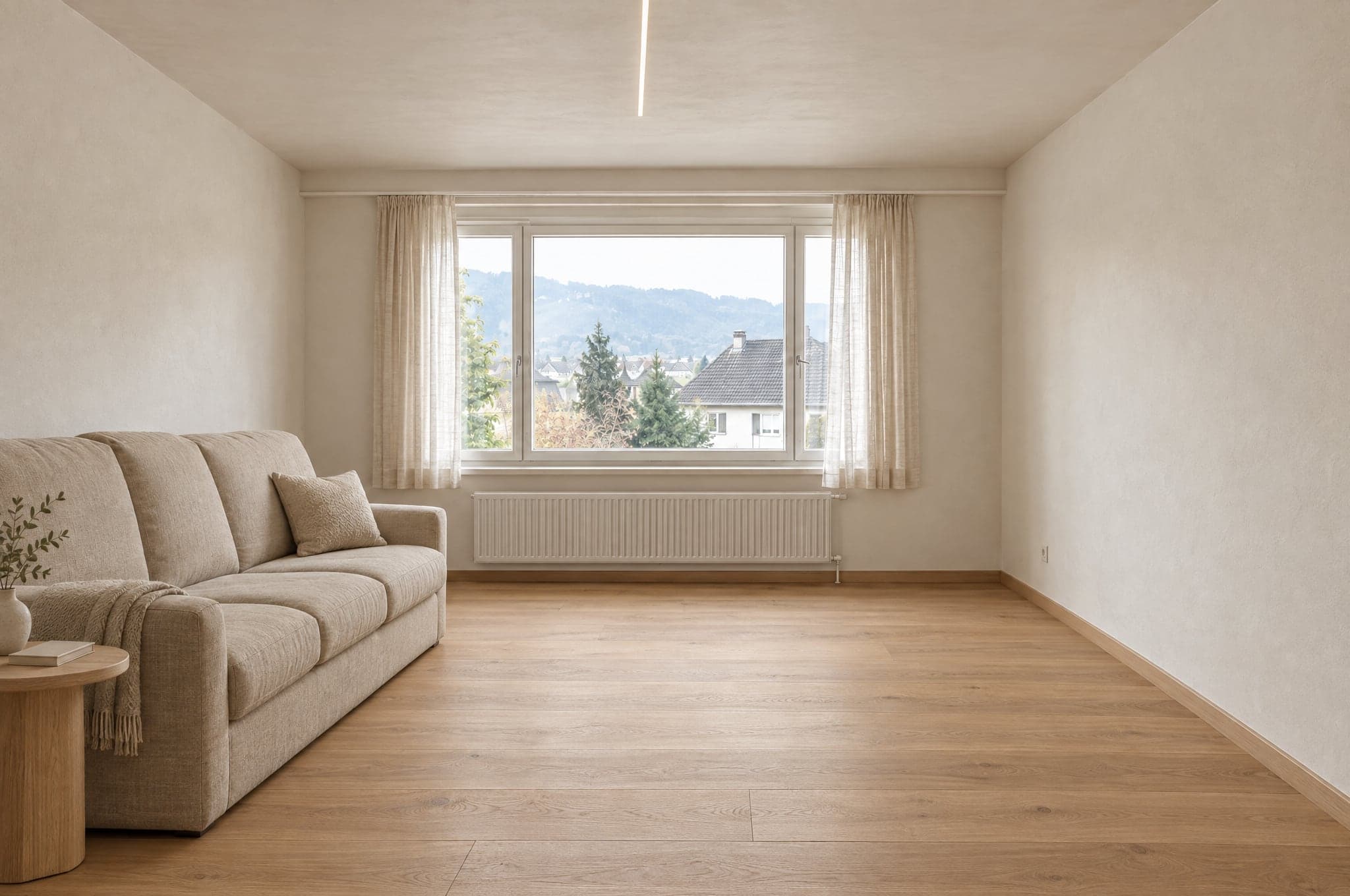 مثال
مثاليبقى كما في الصورة
- الجدران والسقف
- النوافذ والأبواب
- نسب الغرفة
- موضع الكاميرا
- اتجاه ضوء النهار
يتغيّر وفق التوجّه
- الأسطح والتشطيبات
- الخزائن والأثاث
- التجهيزات والتركيبات
- الألوان
- الإضاءة
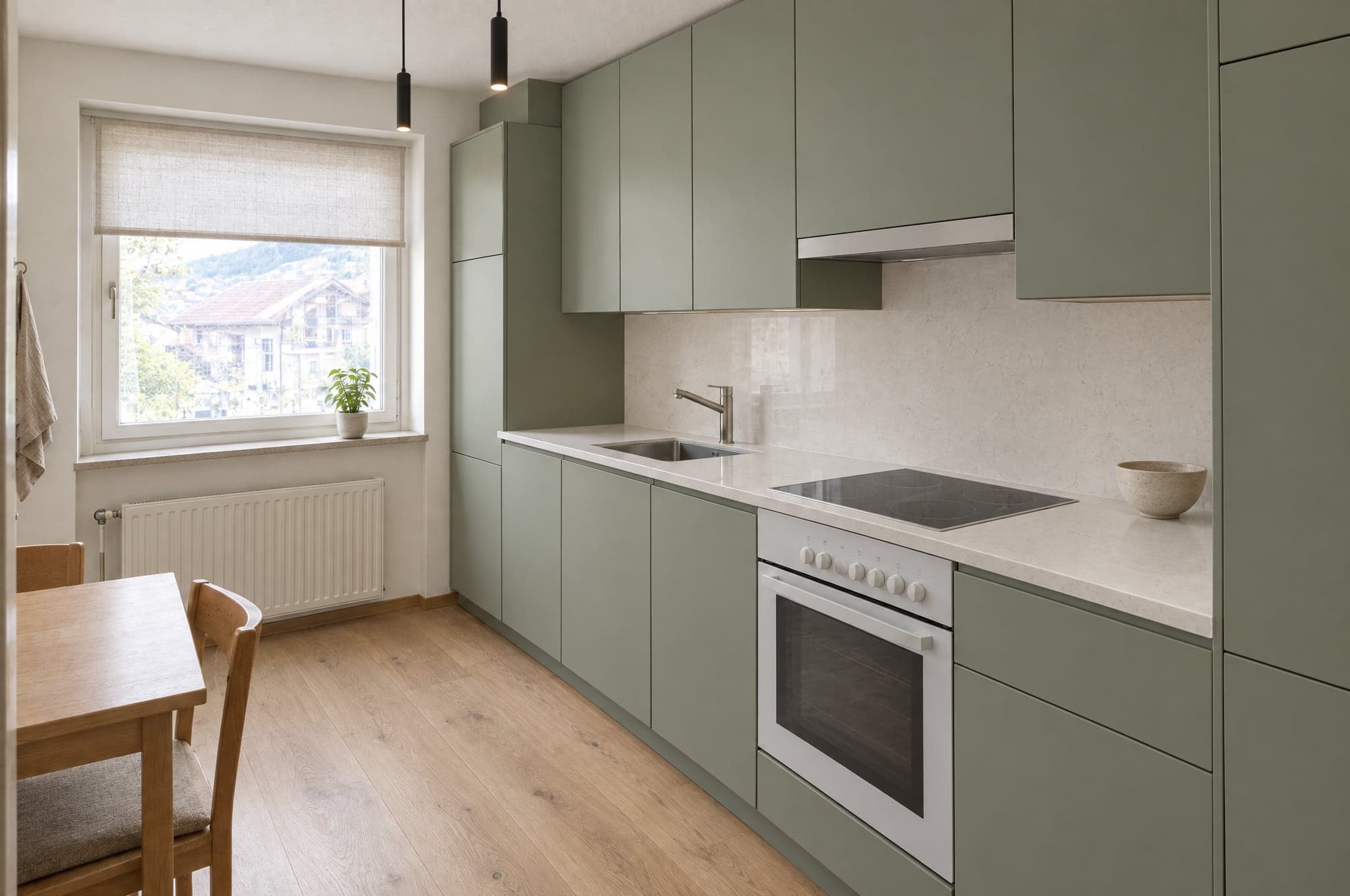
لكل مساحة مجموعة خامات خاصة بها.
لا يحصل المطبخ أبدًا على بلاط الدش، ولا تحصل الواجهة على طلاء داخلي. ومع System تكون الحدود هي كتالوجكم نفسه، فلا يعرض التصوّر إلا منتجات تبيعونها.
المطبخ
- الواجهات
- أسطح العمل
- الجدار الخلفي
- الأرضية
- الإضاءة
خارج الحدود
بلاط الدش
الحمّام
- بلاط الجدران
- وحدة المغسلة
- الخلاطات
- الدش
- الأرضية
خارج الحدود
واجهات المطبخ
الواجهة
- اللياسة
- التكسية
- إطارات النوافذ
- الألوان
- المدخل
خارج الحدود
الدهانات الداخلية
الحديقة والمسبح
- الأرضيات الخارجية
- النباتات
- المسبح
- التراس
- الإضاءة
خارج الحدود
الباركيه
النماذج تُنشئ الصور. beform يفعل الباقي.
beform لا يدرّب نموذجًا أساسيًا. بل يبني ويدرّب الطبقة التي تجعل أقوى النماذج العامة موثوقة في المطابخ والحمّامات والواجهات والحدائق، وينقل هذه الطبقة باستمرار إلى النماذج الأفضل في كل مرحلة.
طبقة beform
كل ما يجعل تلك النماذج موثوقة في المطابخ والحمّامات والواجهات والحدائق يبنيه beform ويدرّبه. وهنا يكمن العمل، وهذا ما تشتريه الشركة.
قواعد لكل مهنة ولكل مساحة
ما يجوز تغييره في مطبخ أو حمّام أو واجهة أو حديقة، وما لا يجوز تحريكه أبدًا. مكتوب لكل مهنة، ومختبَر لكل مساحة.
تثبيت هندسة المكان
الجدران والنوافذ والأبواب والسقف والكاميرا تُستخلص من الصورة وتُثبَّت، فيظل العميل يتعرّف على مساحته.
مكتبة الخامات
كيف يتصرّف التشطيب داخل الغرفة، وكيف يرتبط كل سلوك بالمنتجات التي تبيعها الشركة فعلًا.
تدريب الشركة الخاص
المراجع وبيانات المنتجات والمشاريع المنجزة وملاحظات المستشارين تصبح طبقة تخصّ تلك الشركة وحدها.
التوجيه بين المزوّدين
تذهب كل خطوة إلى النموذج الأفضل فيها حاليًا. وحين يظهر نموذج أقوى، يتحرّك التوجيه وتبقى القواعد.
مجموعات التقييم
مجموعات ثابتة من غرف حقيقية لكل مساحة. يُختبر عليها كل نموذج جديد أو قاعدة معدّلة وتُقارن النتائج قبل أن تصل إلى أي حساب.
بوابة الجودة
الفحص الآلي الذي تمر به كل نتيجة قبل عرضها، والوسم الذي تحمله داخل الصورة وداخل الملف.
النماذج العامة
إنشاء الصورة وقراءة الجملة يقوم بهما أقوى النماذج الحالية من عدة مزوّدين. وbeform لا يدرّب نموذجًا أساسيًا خاصًا به، ولا يدّعي ذلك.
الصورة هي البداية، لا المُخرَج النهائي.
يُقاس المحرّك بما يمكن لشركتكم أن تفعله بالنتيجة في الخطوة التالية، ولهذا فإنه ينتج أكثر من صورة.
ما ينتجه
- تصوّر واقعي كالصورة الفوتوغرافية لمساحة العميل نفسها، بتوجّه من تشكيلتكم.
- عدة نسخ للمقارنة، كل واحدة محفوظة ومسمّاة.
- ملف صورة موسوم بأنه مُنشأ بالذكاء الاصطناعي، في الصورة وفي بياناتها الوصفية.
- طلب مشروع يضم الصورة والمساحة والتوجّه المختار وبيانات التواصل.
- تصوّر يستطيع مستشاركم نقله مباشرة إلى عرض السعر.
- نطاق سعري استرشادي، حيث تكون الوحدة الإضافية «الأسعار والتقديرات» مُجهَّزة لدى الشركة.
لمن هو
العميل على موقعكم الإلكتروني
يرى مطبخه أو حمّامه أو واجهته أو حديقته مكتملة قبل أن يزوره أحد، ويحتفظ بالصورة ليعرضها على من يقرّر معه.
المستشار في الاجتماع
يفتح التصوّر نفسه، ويغيّر الخامات والعميل يشاهد، ويخرج بقرار بدل قائمة من الصفات.
فريق التسويق
يدير حملات تردّ بمساحة الزائر نفسها، ويستقبل طلبات مؤهَّلة أصلًا.
صاحب الشركة
يرى من أين تأتي الطلبات، وكم تكلّف التصوّرات، وأي تصوّر تحوّل إلى عمل موقَّع.
الصورة نفسها في تطبيق محادثة تمنحكم صورة جميلة.
لكنها لن تمنحكم غرفتكم، ولا تشكيلتكم، ولا النتيجة نفسها مرتين، ولا شيئًا يمكن لفريقكم إرساله. هذا هو الفرق بين وصف نصي وطبقة مدرَّبة.
تحافظ على الغرفة
الوصف النصي في تطبيق محادثة حرّ في إعادة رسم المساحة. أما الطبقة فتستخلص الهندسة أولًا وتثبّتها، فتبقى النتيجة غرفة العميل نفسها.
لا تعرض إلا ما تبيعونه
النموذج العام يخترع منتجًا يبدو معقولًا. أما الطبقة فمحدودة بكتالوجكم، فيكون ما اختاره العميل قابلًا لعرض سعر.
النتيجة نفسها في كل مرة
الصورة نفسها والتوجّه نفسه يعطيان نتيجة قابلة للمقارنة لدى كل مستشار، بدل أن تتوقف على من يكتب الوصف الأفضل.
لا تتوقف عند الصورة
يصل التصوّر طلبًا، وبندًا في عرض سعر، وملفًا موسومًا، بهويتكم وفي نظام CRM لديكم، مع احتساب الاستخدام.
يُفحص قبل أن يراه أحد.
تُقاس كل نتيجة قبل عرضها، وأي تصوّر لا يصمد يُشكَّل مرة أخرى أو لا يُعرض أصلًا، وكل تصوّر يجتاز الفحص يُوسم داخل الصورة وداخل الملف. وما لا يستطيع التصوّر إخباركم به مكتوب هنا أيضًا.
تُقاس آليًا
قبل عرض أي نتيجة تُقاس خمسة أمور: أن يكون الملف كاملًا وبالدقة الكاملة وبنسبة الأبعاد المطلوبة؛ وأن يكون الإطار هو إطار الصورة الأصلية، دون قص أو تكبير؛ وأن تبقى الجدران والنوافذ والأبواب وخطوط السقف والأفق حيث كانت؛ وأن يكون التغيير قد أُجري فعلًا، لا أن تُعاد الصورة الأصلية نفسها؛ وألا تكون أي منطقة فارغة أو رمادية أو سوداء. والصورة نفسها تحصل دائمًا على الجواب نفسه. ولا يحكم الفحص على الذوق، ولا على ما إذا كانت الخامة صحيحة.
حين لا تصمد النتيجة
تُشكَّل مرة أخرى، بتعليمات أكثر صرامة تسمّي ما لم يصمد. وإن لم تصمد بعد ذلك، لا تُعرض. ويرى العميل أن التصوّر لم يكتمل، ويمكنه المحاولة من جديد.
موسوم عند اجتيازه
النتيجة التي تجتاز الفحص تُوسم بأنها تصوّر بالذكاء الاصطناعي داخل الصورة وفي البيانات الوصفية للملف، فتدلّ على حقيقتها أينما ذهبت.
ما ليس التصوّر
هو رسم توضيحي لتوجّه، لا مخطط ولا عرض سعر. وهو ليس بمقياس رسم، والقياسات ونطاقات الأسعار استرشادية، وتؤكّد الشركة الخامات وإمكانية التنفيذ والسعر في عرضها الخاص.
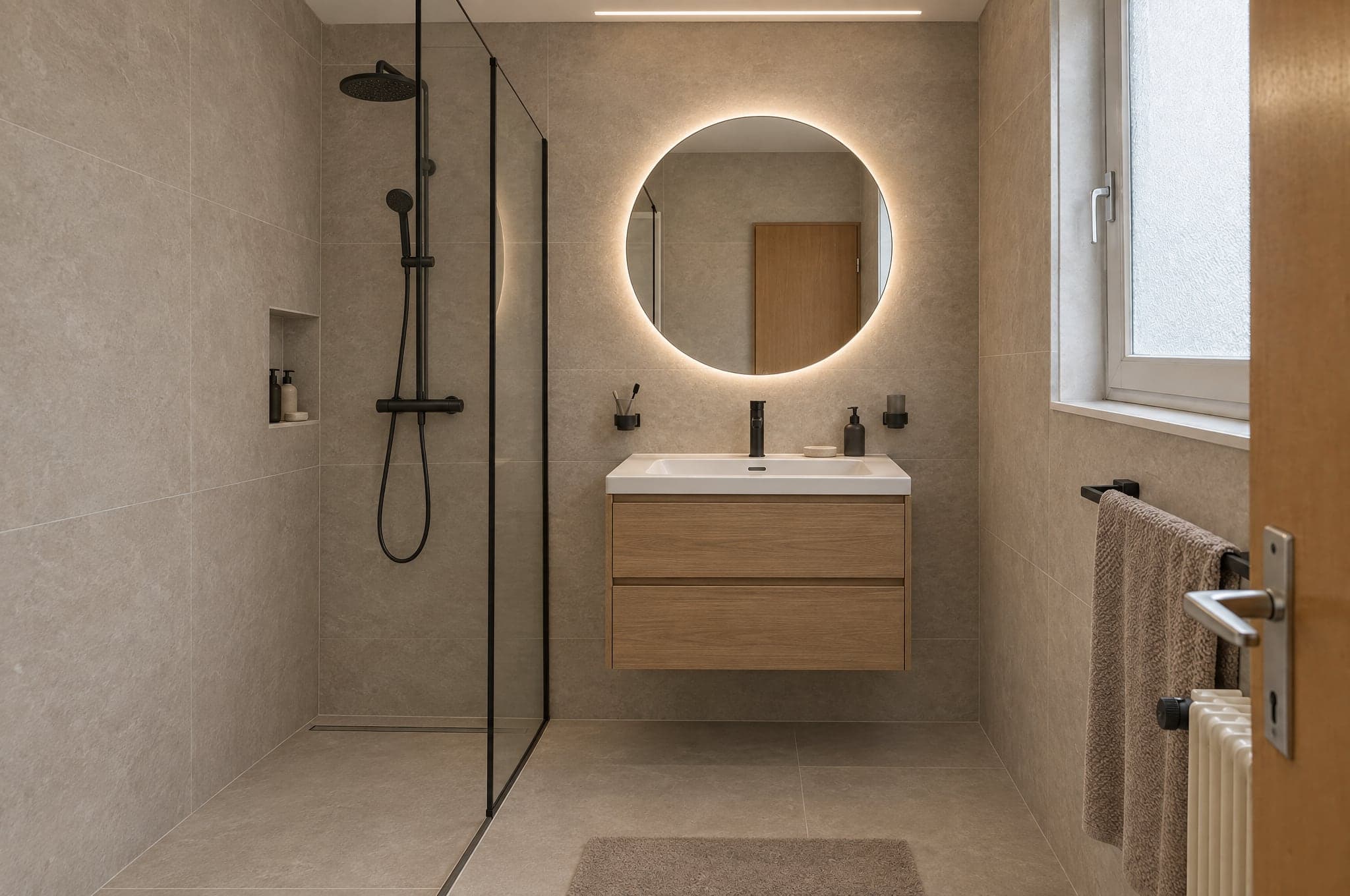 مثال
مثالفحص آلي
اجتاز- الملف
- الإطار
- البنية
- التغيير
- النقاء
ثلاثة محرّكات، يُختار كل منها لنقطة قوته.
اختاروا المحرّك لكل منتج ولكل لحظة. ابدأوا الأفكار الأولى على Fast، وشغّلوا الموقع الإلكتروني على Pro، واعرضوا على Ultra. وكل نتيجة تجتاز طبقة الجودة نفسها قبل أن يراها العميل.
للعروض التقديمية
Ultra
أعلى درجات الدقة في مطابقة مساحة العميل نفسها. تحافظ الهندسة والضوء والخامات على جودتها بملء الشاشة وفي الطباعة.
الدقةالسرعة- الوقت المعتاد
- من 40 إلى 90 ثانية
- الاستخدام الأنسب
- عروض الأسعار، وعروض المستشارين التقديمية، والمشاريع الراقية
للاستخدام اليومي
Pro
حادّ التفاصيل وموثوق. المحرك الافتراضي على الموقع وفي الجلسات الاستشارية اليومية.
الدقةالسرعة- الوقت المعتاد
- من 15 إلى 30 ثانية
- الاستخدام الأنسب
- Showroom على الموقع، والعمل اليومي في Studio
للأحجام الكبيرة
Fast
توجّهات أولى في ثوانٍ، للحملات التي يهم فيها الحجم أكثر من أدق التفاصيل. ويمكن ترقية أي نتيجة إلى Pro أو Ultra بخطوة واحدة.
الدقةالسرعة- الوقت المعتاد
- من 8 إلى 15 ثوانٍ
- الاستخدام الأنسب
- صفحات هبوط الحملات، والتوجّهات الأولى
على موقعكم الإلكتروني، أو على عنوان خاص بكم.
يعمل Showroom حيث يجدكم عملاؤكم أصلًا. ويعمل Studio في المتصفح على الجهاز اللوحي في صالة العرض، وعلى الهاتف في موقع العمل، وعلى شاشة المكتب.
- <script>
 الاحتفاظ بتصوّري
مدمج في موقعكم
وسم script واحد يضع Showroom في أي صفحة من موقعكم. WordPress أو Webflow أو Shopify أو Squarespace أو موقع مطوّر خصيصًا. ويأخذ ألوانكم وخطكم تلقائيًا.
- visual.yourdomain.aeحمّامكمدافئ وطبيعيالاحتفاظ بتصوّري
على نطاق فرعي خاص بكم
Showroom مستضاف على عنوان مثل visual.yourdomain.com، للحملات، ولرموز QR في صالة العرض، وللمواقع التي تفضّلون عدم المساس بها.
تصل الطلبات إلى حيث يعمل فريقكم أصلًا.
27 تكاملًا جاهزًا لأنظمة CRM والأتمتة والمواقع الإلكترونية والتسويق والتواصل. وتُربط HubSpot و Pipedrive و Salesforce من بوابتكم، ويصل webhook موقَّع إلى أي نظام آخر، مباشرة أو عبر Zapier و Make.
CRM والمبيعات
تتحول الطلبات إلى جهات اتصال وعملاء محتملين وصفقات.
- HubSpot
ينشئ جهة الاتصال أو يحدّثها ويضيف صفقة أو ملاحظة، مع روابط إلى التصوّر.
- Salesforce
عميل محتمل لكل طلب عبر Web-to-Lead، مع البيانات والروابط في الحقول التي تحددونها.
- Pipedrive
شخص وصفقة في المرحلة التي تختارونها، أو عميل محتمل، مع ملاحظة فيها رابط التصوّر.
- Zoho CRM
عبر Zapier أو Make أو الـ webhook الموقَّع، أو بإعداد من beform.
- Microsoft Dynamics 365
عبر الـ webhook الموقَّع أو Zapier أو Make، أو بإعداد من beform.
- monday.com
عبر Zapier أو Make أو الـ webhook الموقَّع، أو بإعداد من beform.
- Bexio
عبر Zapier أو Make أو الـ webhook الموقَّع، أو بإعداد من beform.
- Odoo
عبر الـ webhook الموقَّع أو Zapier أو Make، أو بإعداد من beform.
الأتمتة
وجّهوا كل طلب إلى حيث تحتاجه عملياتكم.
- Zapier
يُربط عبر الـ webhook الموقَّع، مع دليل خطوة بخطوة في بوابتكم.
- Make
يبدأ webhook مخصص السيناريو لديكم، مع دليل خطوة بخطوة في بوابتكم.
- n8n
تبدأ عقدة webhook مسار عملكم مع كل طلب موقَّع.
- Airtable
سجل لكل طلب، عبر Zapier أو Make.
- Google Sheets
صف لكل طلب عبر Zapier أو Make، للفرق التي تبيع من جدول بيانات.
- Webhooks
طلب HTTPS POST موقَّع لكل طلب، يُعاد إرساله عند الفشل، مع جميع الحقول وروابط إلى التصوّر.
المواقع الإلكترونية
يعمل Showroom على موقعكم الحالي.
- WordPress
وسم script واحد في أي صفحة، أو صفحة مستضافة على نطاقكم.
- Webflow
ضعوا Showroom في أي قسم باستخدام عنصر Embed.
- Shopify
صفحة Showroom ضمن قالب متجركم، تُضاف بسكربت التضمين.
- Squarespace
أضيفوا Showroom عبر كتلة Code في أي صفحة.
- Wix
ادمجوا Showroom باستخدام عنصر Custom Code.
- Framer
ضعوا Showroom في أي صفحة باستخدام مكوّن Embed.
التسويق والتحليلات
قيسوا المسار وغذّوا حملاتكم بالبيانات.
- Google Analyticsمخطط له
رفع الصور والتوجّهات والطلبات كأحداث في GA4.
- Google Tag Managerمخطط له
كل خطوة في المسار تُرسل إلى طبقة البيانات.
- Google Adsمخطط له
الطلبات المؤهَّلة تُرسل كتحويلات لتحسين المزايدة.
- Metaمخطط له
الطلبات تُسجَّل كتحويلات لحملاتكم على Meta.
- Mailchimp
تصل جهات الاتصال إلى الجمهور الذي تختارونه، عبر Zapier أو Make.
- Brevo
تصل جهات الاتصال والتوجّه الذي اختارته إلى Brevo عبر Zapier أو Make.
التواصل
أبلغوا الفريق، وردّوا على العميل.
- Slack
رسالة في قناة المبيعات لكل طلب جديد، عبر Zapier أو Make.
- Microsoft Teams
نشر الطلبات الجديدة في القناة التي يتابعها فريقكم، عبر Zapier أو Make.
- WhatsApp
رسالة إلى فريقكم لكل طلب جديد، عبر Zapier أو Make.
- Gmail
كل طلب بالبريد الإلكتروني إلى فريقكم، مهما ربطتم غير ذلك.
- Calendly
يحجز العملاء الجلسة الاستشارية مباشرة بعد الاحتفاظ بتصوّرهم.
وسم الذكاء الاصطناعي، ظاهر وداخل الملف.
صُمّم beform مع مراعاة قواعد الشفافية في قانون الذكاء الاصطناعي الأوروبي (EU AI Act). كل تصوّر يوضّح طبيعته، للشخص الذي ينظر إليه وللبرنامج الذي يفتحه.
يوضح كيف يَسِم beform التصوّرات ويتعامل معها اليوم. ولا يُعد شهادة اعتماد.
وسم ظاهر
يحمل كل تصوّر في العرض التجريبي وسمًا ظاهرًا من beform، فلا يظنه أحد صورة فوتوغرافية.
علامة داخل الملف
تحمل الصور التي يسلّمها beform بيانات IPTC الوصفية التي تحددها صورًا مُنشأة بالذكاء الاصطناعي، وهو المعيار الذي يعتمده الناشرون والمنصات.
رسم توضيحي لمساحتهم نفسها
تُحفظ هندسة المكان كما في صورة العميل، ويُقدَّم كل تصوّر بوصفه رسمًا توضيحيًا لتوجّه ما، لا مشروعًا منفّذًا.
لا قرارات بشأن الأشخاص
لا معالجة بيومترية ولا قرارات آلية بشأن الأشخاص. ويُفحص كل تصوّر آليًا قبل أن يراه أحد.
طُوّر في سويسرا، ويُخزَّن في زيوريخ.
أول ما يسأل عنه قسم تقنية المعلومات لديكم ومحاميكم، مُجابًا عنه في مكان واحد.
- التخزين في زيوريخ، والتشغيل في فرانكفورت
- قاعدة البيانات وتخزين الملفات في زيوريخ بسويسرا، ويعمل التطبيق في فرانكفورت بألمانيا. ولتشكيل التصوّر، تُرسَل الصورة إلى نماذج الذكاء الاصطناعي لدى Google و OpenAI، التي تعالجها على بنيتهما التحتية الخاصة، بما في ذلك في الولايات المتحدة، بموجب شروط معالجة البيانات.
- مشفَّر أثناء النقل وفي التخزين
- TLS على كل اتصال مع beform، ويتولى مزوّدو الاستضافة الذين يحفظون البيانات تشفيرها في التخزين.
- كل شركة معزولة عن غيرها
- يتشارك جميع العملاء قاعدة بيانات واحدة، وكل سجل فيها يعود إلى واحد منهم. ويتيح أمان مستوى الصف للمستخدم المسجَّل دخوله قراءة سجلات شركته فقط، ويتحقق اختبار يسجّل الدخول باسم شركتين من هذا الفصل بعد إجراء تغييرات على قاعدة البيانات.
- الوصول حسب الدور، والمصادقة الثنائية عند الدخول
- حسابات شخصية بأدوار المالك والمسؤول والمبيعات والمستشار والمشاهد، يُتحقَّق منها على الخادم، والمصادقة الثنائية عند تسجيل الدخول متاحة لكل مستخدم. ولا يرى فريق beform بياناتكم إلا عبر وصول دعم محدود المدة تمنحونه أنتم، أو أثناء إعداد دورة Second Look طلبتموها.
- تخزين خاص وروابط قصيرة الأجل
- الصور والتصوّرات غير قابلة للقراءة العلنية أبدًا. ولا يُفتح أي ملف إلا عبر رابط موقَّع تنتهي صلاحيته، وتُسجَّل الإجراءات الحساسة، مثل التصدير، في سجل التدقيق.
- مدة الاحتفاظ كما يحدّدها العقد
- تُحذف صور الزوار الذين لا يرسلون طلبًا بعد 90 يومًا، ما لم يُتفق على خلاف ذلك. وتبقى الطلبات إلى أن تحذفوها. وعند انتهاء العقد، نصدّر بياناتكم إذا طلبتم ذلك خلال 30 يومًا، ثم نحذفها خلال 30 يومًا أخرى. وتُزال نسخ البيانات المحذوفة من النسخ الاحتياطية خلال 90 يومًا على الأكثر.
- لا تدريب على بياناتكم
- لا يستخدم beform محتواكم أو بيانات عملائكم لتدريب نماذج الذكاء الاصطناعي، ولا يفعل ذلك مزوّدو الذكاء الاصطناعي أيضًا بموجب شروط API الخاصة بحسابات beform.
- شريك تعاقدي سويسري
- beform منتج لشركة crue GmbH في سويسرا. وتخضع اتفاقية العميل للقانون السويسري، ويغطي ملحقها الخاص بمعالجة البيانات القانون الفيدرالي السويسري لحماية البيانات (FADP)، واللائحة العامة لحماية البيانات (GDPR)، واللائحة العامة لحماية البيانات في المملكة المتحدة (UK GDPR) حيثما تنطبق.
طلب جولة تعريفية على مشاريعكم أنتم.
شاهدوا beform على الغرف والواجهات والحدائق التي يرسلها إليكم عملاؤكم فعلًا. دون شرائح عرض، ودون مطبخ نموذجي.
- 01ترسلون إلينا عنوان موقعكم الإلكتروني وسطرًا عمّا تبيعونه.
- 02يُعدّ Edvin تصوّرات من ثلاثة من مشاريعكم.
- 03ثلاثون دقيقة معًا حول النتيجة ومسار الطلبات والإعداد.
 Edvin Karlssonشريك في beform
أخبرونا من أين نبدأ
يردّ Edvin خلال يوم عمل واحد بموعد مقترح وبما ينبغي إرساله.
شاهدوا beform على صورة من أحد عملائكم.
ارفعوا صورة واحدة في العرض التجريبي وشاهدوها تتشكّل. أو احجزوا ثلاثين دقيقة، وسنجرّبه معكم على ثلاثة من مشاريعكم الحقيقية.