De beform Engine. De ruimte van uw klant, behouden.
Een render is alleen nuttig als de klant de eigen ruimte herkent. Alles onder de motorkap bestaat daarvoor: de geometrie blijft, de materialen blijven binnen hun grenzen en elk resultaat wordt gecontroleerd voordat iemand het ziet.
Zeven delen, één weg van foto naar aanvraag.
De beform Engine is niet één model. Het zijn zeven delen die op elkaar volgen, van het lezen van de foto van de klant tot de aanvraag die bij uw team aankomt, en een kringloop die uw eigen laag scherper maakt terwijl u verkoopt.
- Begrijpen
Waarneming
De ruimte wordt gelezen.
Voordat er iets wordt gevormd, leest beform de foto: de geometrie van de ruimte en de positie van de camera, waar elk oppervlak begint en eindigt, de richting van het daglicht en de materialen die al in de ruimte zitten.
- Geometrie
- Camera
- Oppervlakken
- Daglicht
- Bestaande materialen
Kennis
Uw bedrijf, gestructureerd.
Uw assortimenten, afwerkingen, stijlrichtingen, normen en regels zitten in een eigen laag, met uw prijzen waar u die hebt ingesteld, zodat een beeld alleen kan tonen wat uw bedrijf echt verkoopt.
- Assortimenten
- Afwerkingen
- Stijlrichtingen
- Regels
- Normen
- Prijzen waar ingesteld
Richting
De wens wordt een instructie.
De ruimte die de klant koos, de stijl die hij uitzocht, de referenties die hij meebracht en de zin die hij schreef, worden één precieze instructie: wat moet blijven, wat mag veranderen en hoe ver dat mag gaan.
- Ruimte
- Gekozen stijl
- Referenties
- De notitie van de klant
- Vormen
Vorming
Het beeld wordt gevormd.
De instructie gaat naar de sterkste modellen die op dat moment beschikbaar zijn, als Fast, Pro of Ultra, en het beeld wordt gevormd terwijl de geometrie uit de eigen foto van de klant vastligt.
- Fast
- Pro
- Ultra
- Geometrievergrendeling
- Keuze van aanbieder
Controle
Gecontroleerd voordat iemand het ziet.
Elk resultaat wordt gemeten voordat het wordt getoond: een volledig bestand, de uitsnede van de foto, muren en openingen op hun plaats, een verandering die echt is doorgevoerd en geen lege vlakken. Het wordt als AI-beeld gelabeld in het beeld en in het bestand.
- Bestand
- Uitsnede
- Structuur
- Verandering
- Schoon
- Label
- Vervolgen
Overdracht
Het wordt een aanvraag.
Het gekozen beeld verlaat de engine als iets waarmee uw team verder kan: een projectaanvraag met de foto en het contact erbij, een regel in een offerte, een record in uw CRM.
- Projectaanvraag
- Offerteregel
- Beeldbestand
- CRM-record
Leren
Uw laag wordt scherper.
Wat uw adviseurs bewaren, wijzigen of weggooien, en wat klanten uiteindelijk kiezen, gaat terug in uw eigen laag. Zo begint het volgende beeld dichter bij de norm die uw bedrijf zou vrijgeven.
- Feedback van adviseurs
- Keuzes van klanten
- Uw eigen norm
De kringloop
Leren voedt kennis. Elk project dat het bedrijf verkoopt, traint de eigen laag verder, en de engine begint het volgende beeld daar.
Gebouwd door mensen die hebben geleerd hoe dit werk wordt verkocht.
Een algemeen model weet hoe een keuken eruitziet. Het weet niet waar een naad in een werkblad hoort, welke fronten een bedrijf op voorraad heeft, of wat er gebeurt tussen een aanvraag en een ondertekende offerte. Die kennis is het product.
De branches
beform is gebouwd voor één soort werk: een ruimte veranderen waarin iemand al leeft. Elke branche verkoopt anders, toont anders en heeft eigen vaktermen. Daarom heeft elke branche eigen regels in de engine in plaats van één algemene instelling.
- Keukenstudio’s
- Badkamerspecialisten
- Aannemers
- Gevels en schilderwerk
- Hoveniers en zwembadbouwers
- Kozijnen en zonwering
- Vloeren en interieurafwerking
- Architecten en projectontwikkelaars
Hoe materialen zich gedragen
Een beeld overtuigt of valt door de mand in de details die een monteur ziet. Die details zijn als regels vastgelegd en worden per ruimte getest, want een algemeen model heeft geen reden om ze te kennen.
- Waar een oppervlak begint en waar het eindigt
- Naden, stootranden, plinten en kitlijnen
- Randen, profielen en raamdagkanten
- Glansgraad, structuur en hoe een afwerking daglicht opneemt
- Ingebouwde verlichting tegen het licht dat er al is
- Of het resultaat werkelijk gebouwd zou kunnen worden
Hoe deze bedrijven verkopen
Dit werk wordt door mensen verkocht, in een volgorde die niet is veranderd: een aanvraag, een afspraak in de showroom, een bezoek op locatie, een ingemeten offerte, een levertijd van weken. beform is om die volgorde heen gebouwd. Daarom eindigt een beeld als aanvraag en als offerteregel en niet als download.
- De aanvraag, en wie die als eerste beantwoordt
- Het showroombezoek en het bezoek op locatie
- Assortimenten, leveranciers en levertijden
- Wat er in een offerte beloofd mag worden en wat niet
- Wie een beeld vrijgeeft voordat een klant het ziet
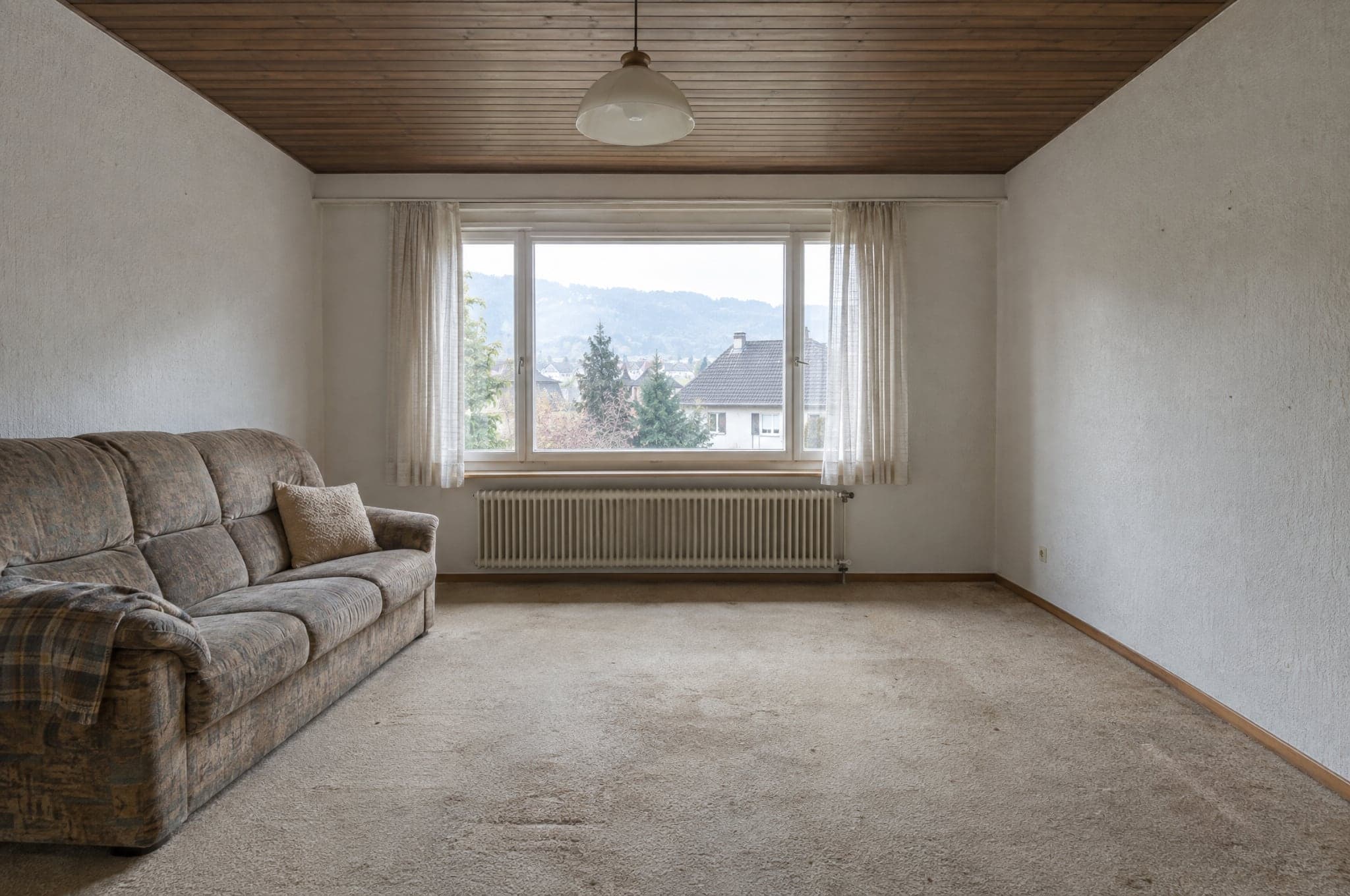
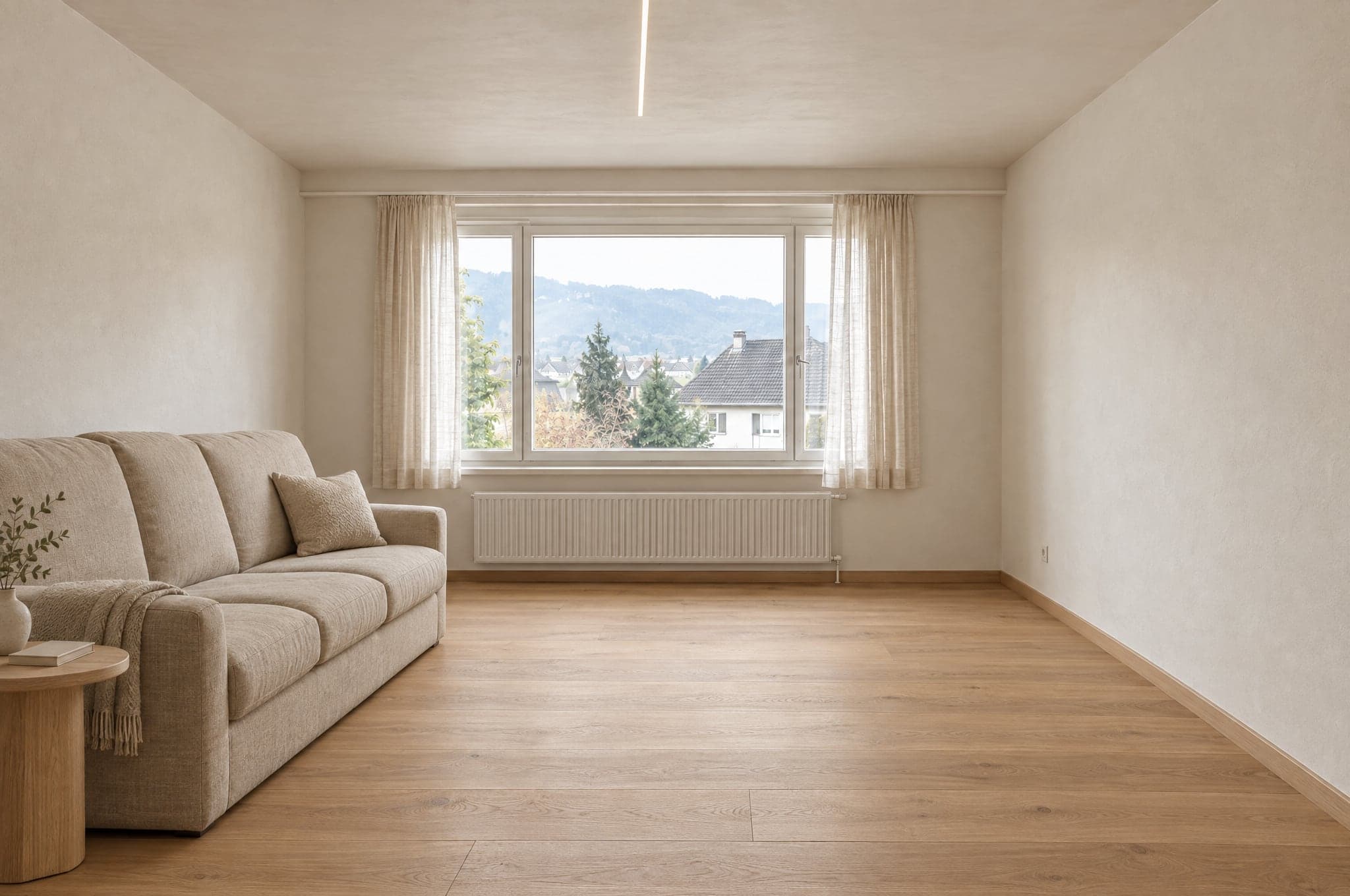
De lijnen van de ruimte blijven waar ze waren.
beform traceert de muren, het raam, de plafondlijn en de camera voordat er iets wordt gerenderd. Die lijnen liggen vast. De render mag alleen veranderen wat een renovatie zou veranderen.
 Voorbeeld
 Voorbeeld
Blijft zoals gefotografeerd
- Muren en plafond
- Ramen en deuren
- Verhoudingen van de ruimte
- Camerapositie
- Richting van het daglicht
Verandert met de richting
- Oppervlakken en afwerkingen
- Kasten en meubels
- Armaturen en inbouwelementen
- Kleuren
- Verlichting
Elke ruimte heeft een eigen set materialen.
Een keuken krijgt nooit douchetegels en een gevel nooit binnenverf. Bij het System is de grens uw eigen catalogus, zodat een render alleen producten toont die u verkoopt.
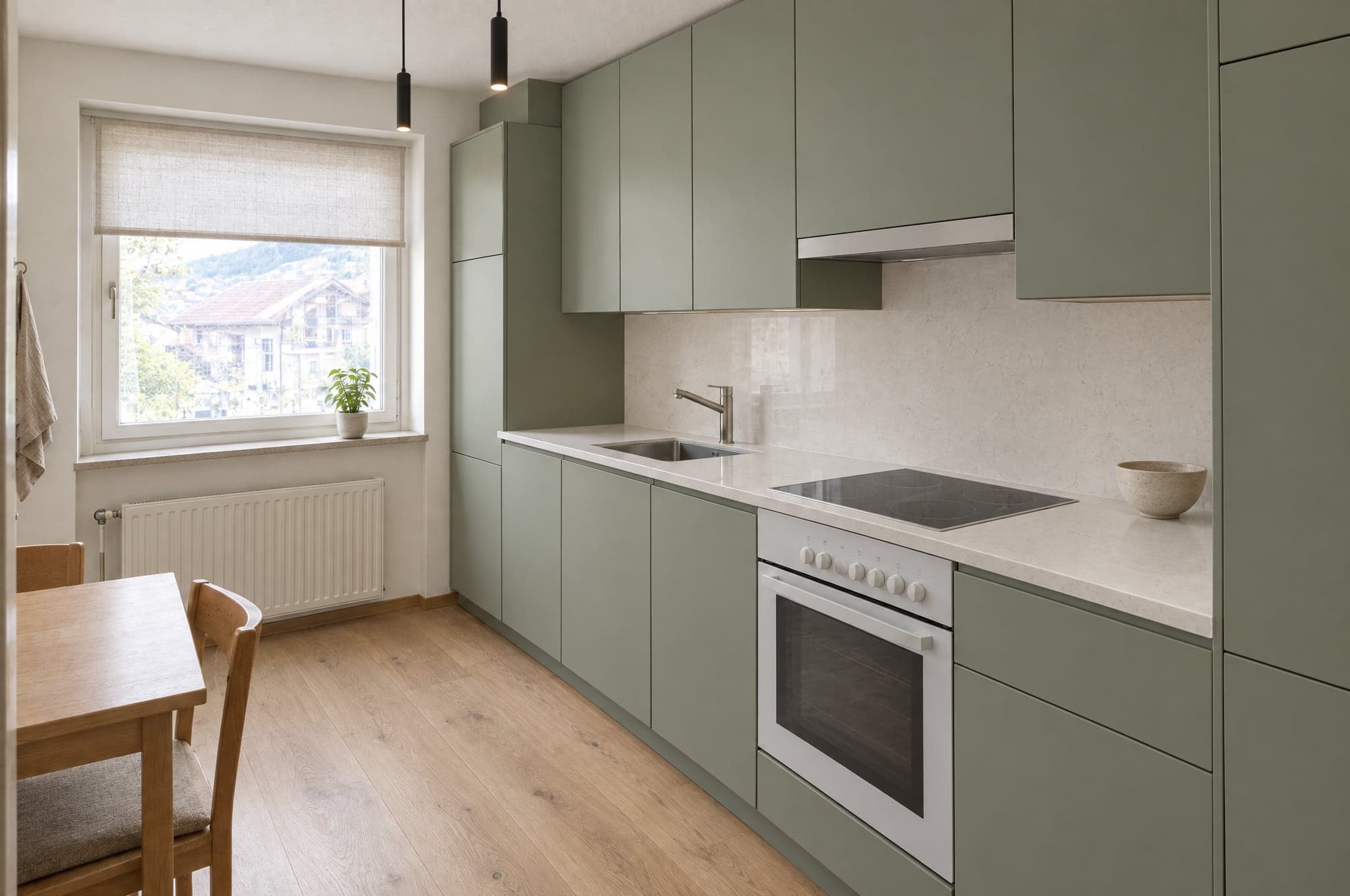
Keuken
- Fronten
- Werkbladen
- Achterwand
- Vloer
- Verlichting
Buiten de grens
Douchetegels
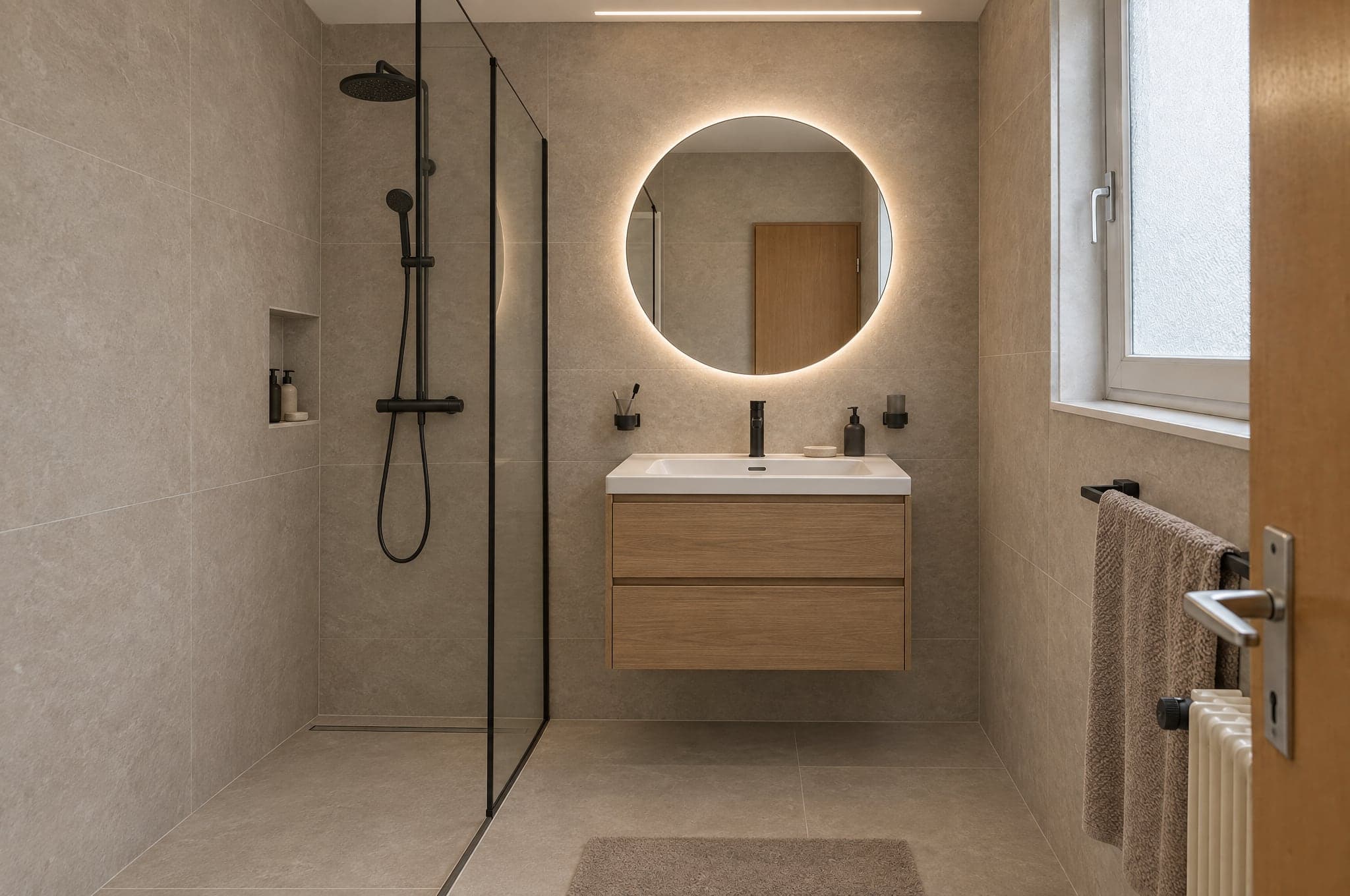
Badkamer
- Wandtegels
- Badmeubel
- Kranen
- Douche
- Vloer
Buiten de grens
Keukenfronten
Gevel
- Stucwerk
- Gevelbekleding
- Kozijnen
- Kleur
- Entree
Buiten de grens
Binnenverf
Tuin en zwembad
- Bestrating
- Beplanting
- Zwembad
- Terras
- Verlichting
Buiten de grens
Parket
De modellen doen het genereren. beform doet de rest.
beform traint geen basismodel. beform bouwt en traint de laag die de sterkste algemene modellen betrouwbaar maakt voor keukens, badkamers, gevels en tuinen, en verplaatst die laag steeds naar de modellen die op dat moment het beste zijn.
De laag van beform
Alles wat die modellen betrouwbaar maakt voor keukens, badkamers, gevels en tuinen, is door beform gebouwd en getraind. Daar zit het werk, en dat is wat een bedrijf koopt.
Regels per branche en per ruimte
Wat er in een keuken, een badkamer, aan een gevel of in een tuin mag veranderen, en wat nooit mag verschuiven. Per branche vastgelegd, per ruimte getest.
De geometrievergrendeling
Muren, ramen, deuren, plafond en camera worden uit de foto getraceerd en vastgehouden, zodat de klant de eigen ruimte nog herkent.
De materialenbibliotheek
Hoe een afwerking zich in een ruimte gedraagt, en hoe elk gedrag wordt gekoppeld aan de producten die een bedrijf echt verkoopt.
De eigen training van het bedrijf
Referenties, productdata, afgeronde projecten en feedback van adviseurs worden een laag die alleen aan dat bedrijf toebehoort.
Verdeling over de aanbieders
Elke stap gaat naar het model dat er op dat moment het beste in is. Komt er een sterker model, dan verschuift de verdeling en blijven de regels.
Toetssets
Vaste sets echte ruimtes per gebied. Een nieuw model of een gewijzigde regel loopt daartegen en wordt vergeleken voordat het een account bereikt.
De kwaliteitscontrole
De automatische controle die elk resultaat doorloopt voordat het wordt getoond, en het label dat het draagt in het beeld en in het bestand.
De algemene modellen
Het genereren van een beeld en het lezen van een zin doen de sterkste huidige modellen van verschillende aanbieders. beform traint geen eigen basismodel en beweert dat ook niet.
Een beeld is het begin, niet het eindproduct.
De engine wordt beoordeeld op wat uw bedrijf daarna met het resultaat kan doen, en daarom levert hij meer dan een beeld.
Wat het oplevert
- Een fotorealistisch beeld van de eigen ruimte van de klant, in een richting uit uw assortiment.
- Meerdere versies om te vergelijken, elk bewaard en benoemd.
- Een beeldbestand gelabeld als AI-gegenereerd, in het beeld en in de metadata.
- Een projectaanvraag met de foto, de ruimte, de gekozen richting en het contact.
- Een beeld dat uw adviseur direct in de offerte kan overnemen.
- Een indicatieve prijsmarge, waar een bedrijf de uitbreiding Prijzen en ramingen heeft ingericht.
Voor wie
De klant op uw website
Ziet de eigen keuken, badkamer, gevel of tuin afgerond voordat er iemand langskomt, en houdt het beeld om het te laten zien aan wie meebeslist.
De adviseur in het gesprek
Opent hetzelfde beeld, verandert materialen terwijl de klant meekijkt, en vertrekt met een besluit in plaats van een lijst bijvoeglijke naamwoorden.
Het marketingteam
Voert campagnes die antwoorden met de eigen ruimte van de bezoeker, en ontvangt aanvragen die al gekwalificeerd zijn.
De eigenaar
Ziet waar aanvragen vandaan komen, wat het renderen kost en welke beelden tot ondertekend werk hebben geleid.
Dezelfde foto in een chatapp geeft u een mooi plaatje.
Het geeft u niet uw ruimte, niet uw assortiment, niet twee keer hetzelfde antwoord en niets dat uw team kan versturen. Dat is het verschil tussen een prompt en een getrainde laag.
Het houdt de ruimte vast
Een prompt in een chatapp mag de ruimte opnieuw tekenen. De laag traceert eerst de geometrie en houdt die vast, zodat het resultaat nog steeds de ruimte van de klant is.
Het toont alleen wat u verkoopt
Een algemeen model verzint een plausibel product. De laag wordt begrensd door uw catalogus, zodat wat de klant koos ook geoffreerd kan worden.
Het is elke keer hetzelfde
Dezelfde foto en dezelfde richting geven voor elke adviseur een vergelijkbaar resultaat, in plaats van af te hangen van wie de betere prompt schrijft.
Het stopt niet bij het beeld
Het beeld komt binnen als aanvraag, als offerteregel en als gelabeld bestand, in uw huisstijl en in uw CRM, met het gebruik verantwoord.
Gecontroleerd voordat iemand het ziet.
Elk resultaat wordt gemeten voordat het wordt getoond, een beeld dat niet standhoudt wordt nog één keer gevormd of helemaal niet getoond, en elk beeld dat de controle doorstaat, wordt gelabeld in het beeld en in het bestand. Wat een beeld u niet kan vertellen, staat hier ook.
Automatisch gemeten
Voordat een resultaat wordt getoond, worden vijf dingen gemeten: het bestand is volledig, op volle resolutie en in de gevraagde verhouding; de uitsnede is die van de foto, niet bijgesneden of ingezoomd; muren, ramen, deuren, daklijnen en de horizon staan waar ze stonden; de verandering is echt doorgevoerd, het is niet de foto die wordt teruggegeven; en geen vlak is leeg, grijs of zwart. Hetzelfde beeld krijgt altijd hetzelfde antwoord. De controle beoordeelt geen smaak en ook niet of een materiaal klopt.
Als een resultaat niet standhoudt
Het wordt nog één keer gevormd, met een strengere instructie die benoemt wat niet klopte. Houdt het dan nog niet stand, dan wordt het niet getoond. De klant ziet dat de render niet is voltooid en kan het opnieuw proberen.
Gelabeld als het slaagt
Een resultaat dat de controle doorstaat, wordt gelabeld als AI-beeld, in het beeld en in de metadata van het bestand, zodat het overal zegt wat het is.
Wat een beeld niet is
Het is de illustratie van een richting, geen bouwtekening en geen offerte. Het is niet op schaal, maten en prijsmarges zijn indicatief, en het bedrijf bevestigt materialen, haalbaarheid en prijs in zijn eigen offerte.
 Voorbeeld
Automatische controle
Geslaagd- Bestand
- Uitsnede
- Structuur
- Verandering
- Schoon
Drie engines, gekozen op hun sterkte.
Kies de engine per onderdeel en per moment. Schetsen op Fast, de website op Pro, presenteren op Ultra. Elk resultaat doorloopt dezelfde kwaliteitslaag voordat een klant het ziet.
Voor presentaties
Ultra
De hoogste getrouwheid aan de eigen ruimte van de klant. Geometrie, licht en materialen blijven overeind op volledig scherm en in print.
GetrouwheidSnelheid- Gebruikelijke tijd
- 40 tot 90 s
- Geschikt voor
- Offertes, presentaties van adviseurs, premium projecten
Voor elke dag
Pro
Scherp en betrouwbaar. De standaardengine op de website en in het dagelijkse adviesgesprek.
GetrouwheidSnelheid- Gebruikelijke tijd
- 15 tot 30 s
- Geschikt voor
- Showroom op de website, dagelijks werk in de Studio
Voor volume
Fast
Eerste ontwerprichtingen in seconden, voor campagnes waar volume zwaarder weegt dan het laatste detail. Elk resultaat zet u met één klik om naar Pro of Ultra.
GetrouwheidSnelheid- Gebruikelijke tijd
- 8 tot 15 s
- Geschikt voor
- Landingspagina’s voor campagnes, eerste ontwerprichtingen
Op uw website, of op een eigen adres.
De Showroom draait waar uw klanten u al vinden. De Studio draait in de browser, op de tablet in de showroom, op de telefoon op locatie en op het scherm op kantoor.
- <script>
 Mijn beeld bewaren
Ingebed op uw website
Eén scripttag plaatst de Showroom op elke pagina van uw site. WordPress, Webflow, Shopify, Squarespace of maatwerk. Hij neemt uw kleuren en lettertype over.
- visual.uwdomein.nlUw badkamerWarm naturelMijn beeld bewaren
Op een subdomein van u
Een gehoste Showroom op een adres zoals visual.uwdomein.nl, voor campagnes, QR-codes in de showroom en sites waaraan u liever niet komt.
Aanvragen komen terecht waar uw team al werkt.
27 koppelingen voor CRM’s, automatisering, websites, marketing en communicatie. HubSpot, Pipedrive en Salesforce koppelt u in uw portaal, en een ondertekende webhook bereikt elk ander systeem, direct of via Zapier en Make.
CRM en verkoop
Aanvragen worden contacten, leads en deals.
- HubSpot
Maakt het contact aan of werkt het bij en voegt een deal of een notitie toe, met links naar het beeld.
- Salesforce
Een lead per aanvraag via Web-to-Lead, gegevens en links in de velden die u koppelt.
- Pipedrive
Een persoon en een deal in de fase die u kiest, of een lead, met een notitie die naar het beeld linkt.
- Zoho CRM
Via Zapier, Make of de ondertekende webhook, of ingericht door beform.
- Microsoft Dynamics 365
Via de ondertekende webhook, Zapier of Make, of ingericht door beform.
- monday.com
Via Zapier, Make of de ondertekende webhook, of ingericht door beform.
- Bexio
Via Zapier, Make of de ondertekende webhook, of ingericht door beform.
- Odoo
Via de ondertekende webhook, Zapier of Make, of ingericht door beform.
Automatisering
Stuur elke aanvraag door naar waar uw proces die nodig heeft.
- Zapier
Gekoppeld via de ondertekende webhook, met een stapsgewijze handleiding in uw portaal.
- Make
Een custom webhook start uw scenario, met een stapsgewijze handleiding in uw portaal.
- n8n
Een webhook-node start uw workflow bij elke ondertekende aanvraag.
- Airtable
Een record per aanvraag, via Zapier of Make.
- Google Sheets
Een rij per aanvraag via Zapier of Make, voor teams die vanuit een spreadsheet verkopen.
- Webhooks
Een ondertekende HTTPS-POST per aanvraag, opnieuw verstuurd bij een fout, met alle velden en links naar het beeld.
Websites
De Showroom draait op de site die u al hebt.
- WordPress
Eén scripttag op elke pagina, of een gehoste pagina op uw domein.
- Webflow
Plaats de Showroom in elke sectie met een embed-element.
- Shopify
Een Showroom-pagina in uw thema, geplaatst met het embed-script.
- Squarespace
Voeg de Showroom toe met een codeblok op elke pagina.
- Wix
Plaats de Showroom met een element voor eigen code.
- Framer
Zet de Showroom op een pagina met een embed-component.
Marketing en analyse
Meet de flow en voed uw campagnes.
- Google AnalyticsGepland
Uploads, ontwerprichtingen en aanvragen als events in GA4.
- Google Tag ManagerGepland
Elke stap van de flow doorgegeven aan de datalaag.
- Google AdsGepland
Gekwalificeerde aanvragen teruggestuurd als conversies voor biedingen.
- MetaGepland
Aanvragen gerapporteerd als conversies voor uw Meta-campagnes.
- Mailchimp
Contacten komen in de doelgroep die u kiest, via Zapier of Make.
- Brevo
Contacten en hun gekozen ontwerprichting komen via Zapier of Make in Brevo.
Communicatie
Informeer het team, antwoord de klant.
- Slack
Een bericht in uw verkoopkanaal bij elke nieuwe aanvraag, via Zapier of Make.
- Microsoft Teams
Nieuwe aanvragen geplaatst in het kanaal dat uw team volgt, via Zapier of Make.
- WhatsApp
Een bericht aan uw team bij elke nieuwe aanvraag, via Zapier of Make.
- Gmail
Elke aanvraag per e-mail naar uw team, wat u verder ook koppelt.
- Calendly
Klanten plannen het adviesgesprek direct nadat ze hun beeld hebben bewaard.
Gelabeld als AI, zichtbaar en in het bestand.
beform is gebouwd voor de transparantieregels van de AI Act van de EU. Elk beeld zegt wat het is, tegen de persoon die ernaar kijkt en tegen de software die het opent.
Hoe beform beelden vandaag labelt en behandelt. Geen certificering.
Een zichtbaar label
Elk demobeeld draagt een zichtbaar beform-label, zodat niemand het voor een foto aanziet.
Gemarkeerd in het bestand
Beelden die beform levert, bevatten IPTC-metadata die ze als AI-gegenereerd markeren, de standaard die uitgevers en platforms gebruiken.
Een illustratie van de eigen ruimte
De geometrie van de foto van de klant blijft behouden, en elk beeld wordt gepresenteerd als illustratie van een ontwerprichting, niet als afgerond project.
Geen beslissingen over personen
Geen verwerking van biometrische gegevens en geen geautomatiseerde beslissingen over personen. Elk beeld wordt automatisch gecontroleerd voordat iemand het ziet.
Gebouwd in Zwitserland, opgeslagen in Zürich.
Wat uw IT-afdeling en uw jurist eerst vragen, beantwoord op één plek.
- Opgeslagen in Zürich, uitgevoerd in Frankfurt
- De database en de bestandsopslag staan in Zürich, Zwitserland, en de applicatie draait in Frankfurt, Duitsland. Om een beeld te vormen gaat de foto naar de AI-modellen van Google en OpenAI, die hem op hun eigen infrastructuur verwerken, ook in de VS, onder verwerkersvoorwaarden.
- Versleuteld tijdens transport en in rust
- TLS bij elke verbinding met beform, en versleuteling in rust door de hostingproviders die de gegevens bewaren.
- Elk bedrijf gescheiden gehouden
- Alle klanten delen één database, en elk record hoort bij een van hen. Row-level security zorgt ervoor dat een ingelogde gebruiker alleen de records van het eigen bedrijf kan lezen, en een test die als twee bedrijven inlogt, controleert de scheiding na wijzigingen aan de database.
- Toegang per rol, inloggen met tweefactorauthenticatie
- Persoonlijke accounts met de rollen eigenaar, beheerder, verkoop, adviseur en lezer, gecontroleerd op de server, en tweefactorauthenticatie beschikbaar voor elke gebruiker. Het beform-team ziet uw gegevens alleen via een in de tijd beperkte supporttoegang die u verleent, of tijdens de voorbereiding van een Second Look-ronde waar u om hebt gevraagd.
- Privéopslag, kortlevende links
- Foto’s en beelden zijn nooit openbaar leesbaar. Elk bestand opent alleen via een ondertekende link die verloopt, en gevoelige handelingen zoals exports worden vastgelegd in een auditlog.
- Bewaartermijn vastgelegd in het contract
- Foto’s van bezoekers die geen aanvraag versturen, worden na 90 dagen verwijderd, tenzij anders is afgesproken. Aanvragen blijven bewaard tot u ze verwijdert. Als het contract eindigt, exporteren we uw gegevens als u daar binnen 30 dagen om vraagt, en verwijderen we ze daarna binnen nog eens 30 dagen. Kopieën van verwijderde gegevens verdwijnen binnen hooguit 90 dagen uit de back-ups.
- Geen training op uw gegevens
- beform gebruikt uw content en de gegevens van uw klanten niet om AI-modellen te trainen, en volgens de API-voorwaarden van de accounts van beform doen de AI-aanbieders dat ook niet.
- Een Zwitserse contractpartner
- beform is een product van crue GmbH, Zwitserland. De klantovereenkomst valt onder Zwitsers recht, en de bijlage over gegevensverwerking dekt de Zwitserse FADP, de AVG en, waar die van toepassing is, de UK GDPR.
Vraag een demonstratie aan met uw eigen projecten.
Bekijk beform op de ruimtes, gevels en tuinen die uw klanten u echt sturen. Geen slides, geen voorbeeldkeuken.
- 01U stuurt ons uw website en een regel over wat u verkoopt.
- 02Edvin maakt beelden van drie van uw eigen projecten.
- 03Dertig minuten samen over het resultaat, de aanvraagflow en de set-up.
 Edvin KarlssonPartner, beform
Vertel ons waar we beginnen
Edvin antwoordt binnen één werkdag met een tijd en wat u kunt sturen.
Bekijk beform op uw eigen klantfoto.
Upload één foto in de demo en zie hoe die vorm krijgt. Of plan dertig minuten, dan laten we het zien op drie van uw echte projecten.