Motor beform Engine. Prostorija Vašeg klijenta, sačuvana.
Vizuelizacija je korisna samo ako klijent prepozna svoj prostor. Sve ispod haube postoji zbog toga: geometrija ostaje, materijali ostaju u zadatim granicama, a svaki rezultat se proverava pre nego što ga iko vidi.
Sedam delova, jedan put od fotografije do upita.
Motor beform Engine nije jedan model. To je sedam delova koji se smenjuju po redu, od čitanja fotografije klijenta do upita koji stiže do Vašeg tima, i petlja koja izoštrava Vaš sopstveni sloj dok prodajete.
- Razumeti
Opažanje
Prostor se čita.
Pre nego što se bilo šta oblikuje, beform čita fotografiju: geometriju prostora i položaj kamere, gde svaka površina počinje i prestaje, pravac dnevne svetlosti i materijale koji su već u prostoriji.
- Geometrija
- Kamera
- Površine
- Dnevna svetlost
- Postojeći materijali
Znanje
Vaša kompanija, struktuirana.
Vaše linije, obrade, stilski pravci, standardi i pravila stoje u zasebnom sloju, sa vašim cenama tamo gde ste ih zadali, tako da vizuelizacija može da prikaže samo ono što vaša kompanija zaista prodaje.
- Linije
- Obrade
- Stilski pravci
- Pravila
- Standardi
- Cene gde su zadate
Pravac
Želja postaje uputstvo.
Oblast koju je klijent izabrao, stil koji je odabrao, reference koje je doneo i rečenica koju je napisao postaju jedno precizno uputstvo: šta mora da ostane, šta sme da se promeni i koliko daleko sme da ide.
- Oblast
- Izabrani stil
- Reference
- Napomena klijenta
- Oblikovati
Oblikovanje
Vizuelizacija se oblikuje.
Uputstvo se usmerava ka najjačim modelima dostupnim u tom trenutku, kao Fast, Pro ili Ultra, i vizuelizacija se oblikuje dok se geometrija klijentove fotografije drži na mestu.
- Fast
- Pro
- Ultra
- Zaključavanje geometrije
- Usmeravanje između pružalaca
Kontrola
Provereno pre nego što iko vidi.
Svaki rezultat se meri pre nego što se prikaže: potpuna datoteka, kadar fotografije, zidovi i otvori na svom mestu, promena koja je zaista napravljena i nijedna prazna površina. Označava se kao vizuelizacija veštačke inteligencije u slici i u datoteci.
- Datoteka
- Kadar
- Struktura
- Promena
- Čistoća
- Oznaka
- Nastaviti
Predaja
Postaje zahtev.
Izabrana vizuelizacija izlazi iz motora kao nešto na šta vaš tim može da deluje: zahtev za projekat sa fotografijom i kontaktom, stavka u ponudi, zapis u vašem CRM.
- Zahtev za projekat
- Stavka u ponudi
- Datoteka slike
- Zapis u CRM
Učenje
Vaš sloj postaje oštriji.
Ono što vaši savetnici zadrže, promene ili odbace, i ono što klijenti na kraju izaberu, vraća se u vaš sopstveni sloj, tako da sledeća vizuelizacija počinje bliže standardu koji bi vaša kompanija odobrila.
- Povratne informacije savetnika
- Izbori klijenata
- Standard vaše kuće
Petlja
Učenje hrani znanje. Svaki projekat koji kompanija proda uči njen sopstveni sloj, a motor sledeću vizuelizaciju počinje odatle.
Napravili su ga ljudi koji su naučili kako se ovaj posao prodaje.
Opšti model zna kako kuhinja izgleda. Ne zna gde ide spoj radne ploče, koje frontove jedna firma drži na zalihama ni šta se dešava između upita i potpisane ponude. To znanje jeste proizvod.
Zanati
beform je napravljen za jednu vrstu posla: menjanje prostora u kom neko već živi. Svaki zanat prodaje drugačije, prikazuje drugačije i ima sopstveni rečnik, pa svaki zanat ima sopstvena pravila unutar motora umesto jednog opšteg podešavanja.
- Studiji kuhinja
- Stručnjaci za kupatila
- Glavni izvođači
- Fasade i molerski radovi
- Pejzažisti i graditelji bazena
- Prozori i zaštita od sunca
- Podovi i unutrašnja završna obrada
- Arhitekte i investitori
Kako se materijali ponašaju
Vizuelizacija je ubedljiva ili pogrešna u detaljima koje bi monter primetio. Ti detalji su zapisani kao pravila i testiraju se po oblasti, jer opšti model nema razloga da ih zna.
- Gde površina počinje i gde prestaje
- Spojnice, spojevi, lajsne i silikonske linije
- Ivice, profili i špaletne prozora
- Stepen sjaja, struktura i kako obrada prima dnevnu svetlost
- Ugradna rasveta naspram svetla koje je već u prostoriji
- Da li bi rezultat uopšte mogao da se izvede
Kako ove kompanije prodaju
Posao prodaju ljudi, u sledu koji se nije promenio: upit, sastanak u salonu, obilazak objekta, izmerena ponuda, rok isporuke od nekoliko nedelja. beform je oblikovan oko tog sleda, zato vizuelizacija završava kao zahtev i stavka u ponudi, a ne kao preuzimanje.
- Upit i ko na njega prvi odgovara
- Sastanak u salonu i obilazak objekta
- Linije, dobavljači i rokovi isporuke
- Šta sme da se obeća u ponudi, a šta ne
- Ko odobrava vizuelizaciju pre nego što je klijent vidi
Linije prostorije ostaju gde su bile.
beform iscrtava zidove, prozor, liniju plafona i položaj kamere pre nego što bilo šta vizuelizuje. Te linije su fiksne. Vizuelizacija sme da promeni samo ono što bi renoviranje promenilo.
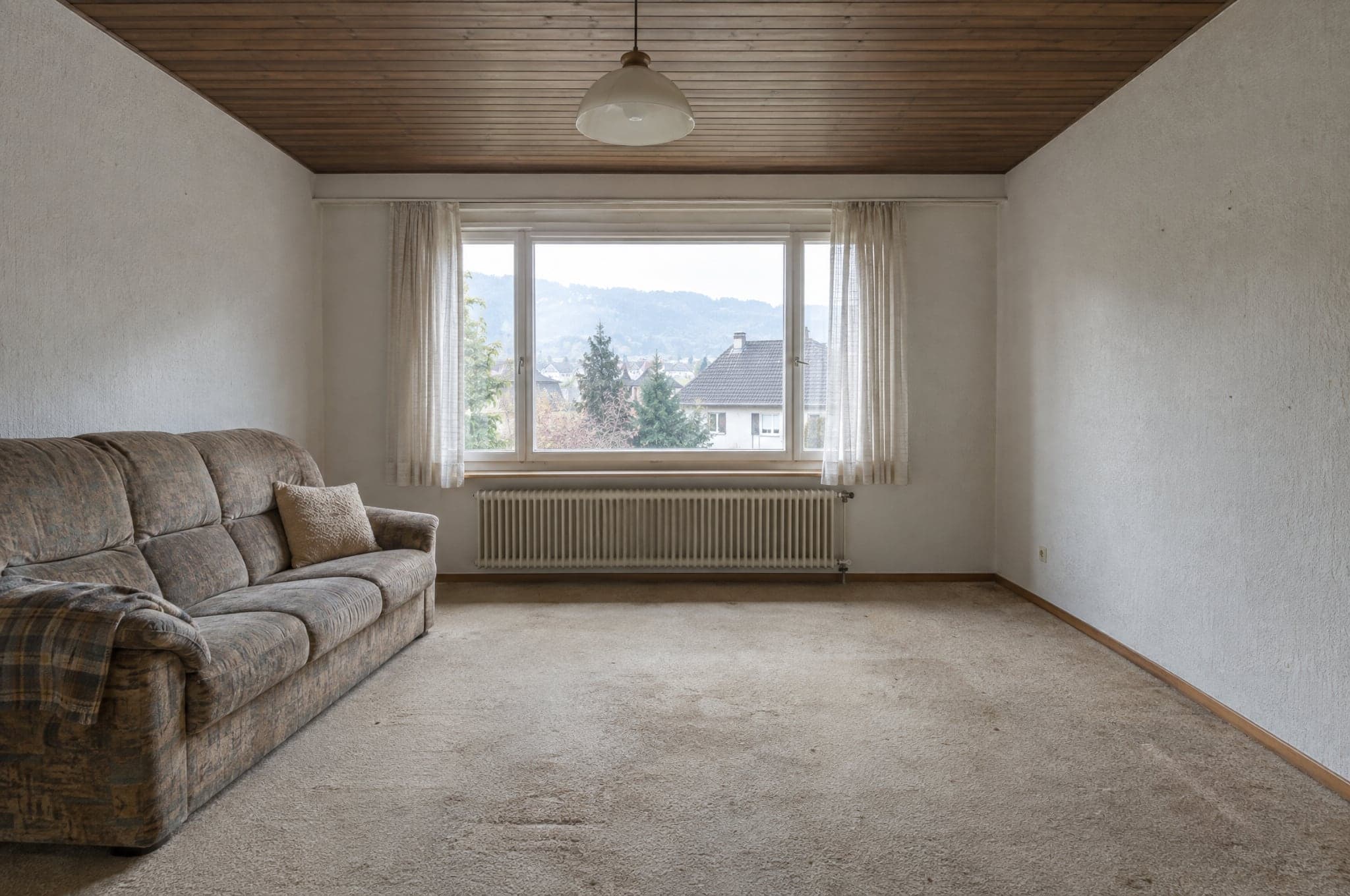 Primer
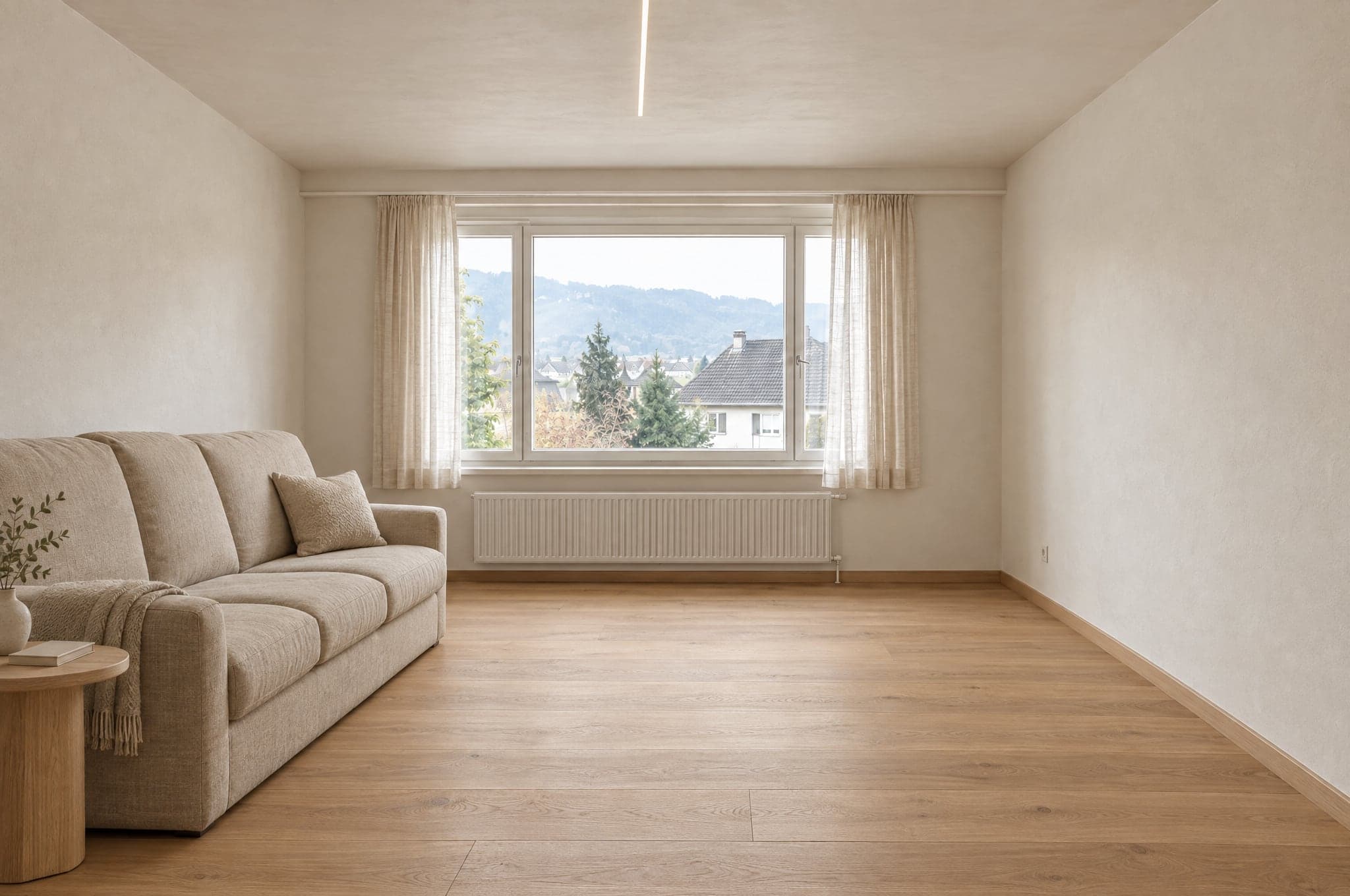 Primer
Ostaje kao na fotografiji
- Zidovi i plafon
- Prozori i vrata
- Proporcije prostorije
- Položaj kamere
- Pravac dnevnog svetla
Menja se prema pravcu
- Površine i završne obrade
- Ormari i nameštaj
- Sanitarije, slavine i okovi
- Boje
- Rasveta
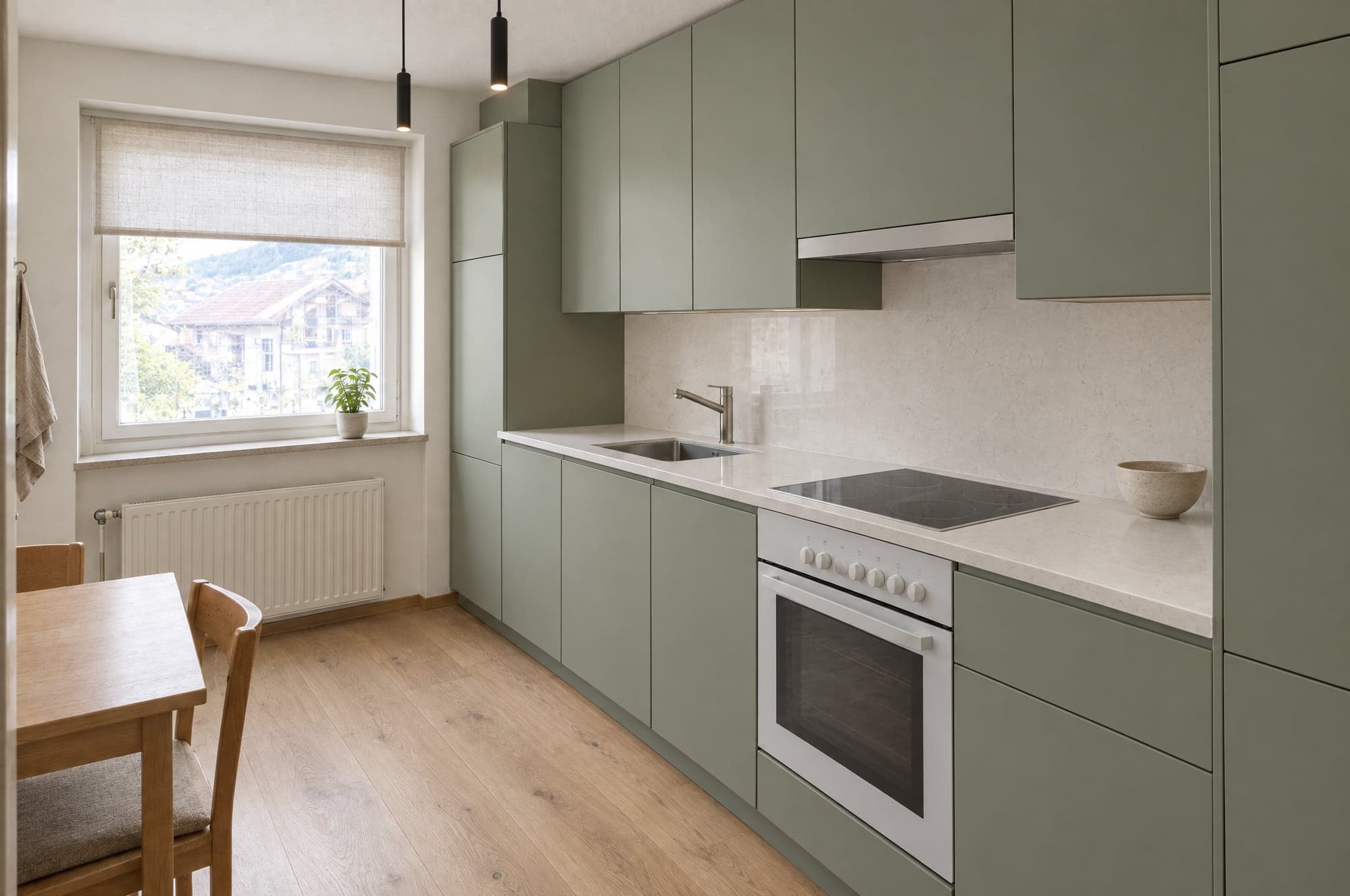
Svaka zona ima svoj skup materijala.
Kuhinja nikada ne dobija pločice za tuš, a fasada nikada ne dobija unutrašnju boju. U modulu System granica je Vaš katalog, pa vizuelizacija prikazuje samo proizvode koje prodajete.
Kuhinja
- Frontovi
- Radne ploče
- Zidna obloga
- Pod
- Rasveta
Van granice
Pločice za tuš
Kupatilo
- Zidne pločice
- Ormarić za lavabo
- Armatura
- Tuš
- Pod
Van granice
Kuhinjski frontovi
Fasada
- Malter
- Obloga
- Prozorski ramovi
- Boja
- Ulaz
Van granice
Boja za unutrašnje zidove
Dvorište i bazen
- Popločavanje
- Zelenilo
- Bazen
- Terasa
- Rasveta
Van granice
Parket
Modeli generišu. beform radi ostalo.
beform ne obučava osnovni model. On gradi i uči sloj koji najjače opšte modele čini pouzdanim za kuhinje, kupatila, fasade i dvorišta, i taj sloj stalno prenosi na modele koji su najbolji.
Sloj beform
Sve što te modele čini pouzdanim za kuhinje, kupatila, fasade i bašte izgradio je i naučio beform. Tu je posao i to je ono što kompanija kupuje.
Pravila po zanatu i po oblasti
Šta sme da se promeni u kuhinji, kupatilu, na fasadi ili u bašti, i šta nikada ne sme da se pomeri. Zapisano po zanatu, testirano po oblasti.
Zaključavanje geometrije
Zidovi, prozori, vrata, plafon i kamera prate se sa fotografije i drže se, tako da klijent i dalje prepoznaje sopstveni prostor.
Biblioteka materijala
Kako se obrada ponaša u prostoriji i kako se svako ponašanje preslikava na proizvode koje kompanija zaista prodaje.
Učenje same kompanije
Reference, podaci o proizvodima, završeni projekti i povratne informacije savetnika postaju sloj koji pripada samo toj kompaniji.
Usmeravanje između pružalaca
Svaki korak ide modelu koji je trenutno najbolji u njemu. Kada se pojavi jači model, usmeravanje se pomera, a pravila ostaju.
Skupovi za proveru
Utvrđeni skupovi stvarnih prostorija po oblasti. Nov model ili promenjeno pravilo pokreću se nad njima i porede pre nego što stignu do naloga.
Kapija kvaliteta
Automatska provera kroz koju prolazi svaki rezultat pre nego što se prikaže i oznaka koju nosi u slici i u datoteci.
Opšti modeli
Stvaranje slike i čitanje rečenice rade najjači savremeni modeli nekoliko pružalaca. beform ne obučava sopstveni osnovni model i ne tvrdi da to radi.
Slika je početak, a ne ono što se isporučuje.
Motor se ceni po tome šta Vaša firma sa rezultatom može dalje da uradi, pa zato daje više od slike.
Šta daje
- Fotorealistična vizuelizacija klijentovog sopstvenog prostora, u pravcu iz vaše linije.
- Nekoliko verzija za poređenje, svaka sačuvana i imenovana.
- Datoteka slike označena kao stvorena veštačkom inteligencijom, u slici i u metapodacima.
- Zahtev za projekat sa fotografijom, oblašću, izabranim pravcem i kontaktom.
- Vizuelizacija koju vaš savetnik može da prenese pravo u ponudu.
- Okvirni raspon cena, tamo gde je firmi podešen dodatni modul „Cene i procene“.
Za koga je
Klijent na vašem sajtu
Vidi sopstvenu kuhinju, kupatilo, fasadu ili baštu završene pre nego što iko dođe, i zadržava sliku da je pokaže onome ko odlučuje sa njim.
Savetnik na sastanku
Otvara istu vizuelizaciju, menja materijale dok klijent gleda, i odlazi sa odlukom umesto sa spiskom prideva.
Marketing tim
Vodi kampanje koje odgovaraju sopstvenim prostorom posetioca i dobija zahteve koji su već kvalifikovani.
Vlasnik
Vidi odakle dolaze zahtevi, koliko košta vizuelizacija i koje su vizuelizacije postale potpisan posao.
Ista fotografija u čet aplikaciji daje Vam lepu sliku.
Neće Vam dati Vašu prostoriju, Vaš asortiman, isti odgovor dva puta, ni bilo šta što Vaš tim može da pošalje. To je razlika između prompta i naučenog sloja.
Drži prostoriju
Uputstvo u aplikaciji za ćaskanje slobodno je da precrta prostor. Sloj prvo prati geometriju i drži je, tako da je rezultat i dalje klijentova prostorija.
Prikazuje samo ono što prodajete
Opšti model izmišlja uverljiv proizvod. Sloj je ograničen vašim katalogom, tako da ono što je klijent izabrao može da se ponudi.
Isti je svaki put
Ista fotografija i isti pravac daju uporediv rezultat svakom savetniku, umesto da zavise od toga ko piše bolje uputstvo.
Ne staje na slici
Vizuelizacija stiže kao zahtev, stavka u ponudi i označena datoteka, u vašem brendu i u vašem CRM, sa evidentiranom potrošnjom.
Provereno pre nego što iko vidi.
Svaki rezultat se meri pre nego što bude prikazan, vizuelizacija koja ne izdrži oblikuje se još jednom ili se uopšte ne prikazuje, a svaka vizuelizacija koja prođe proveru označava se u slici i u datoteci. Ovde je zapisano i šta vizuelizacija ne može da Vam kaže.
Meri se automatski
Pre nego što se rezultat prikaže, meri se pet stvari: datoteka je potpuna, u punoj rezoluciji i u traženom odnosu stranica; kadar je onaj sa fotografije, bez isecanja i zumiranja; zidovi, prozori, vrata, linije krova i horizont su tamo gde su bili; promena je zaista napravljena, a nije vraćena ista fotografija; i nijedna površina nije prazna, siva ili crna. Ista slika uvek dobija isti odgovor. Provera ne ocenjuje ukus niti da li je materijal pravi.
Kada rezultat ne izdrži
Oblikuje se još jednom, sa strožim uputstvom koje navodi šta nije prošlo. Ako i dalje ne izdrži, ne prikazuje se. Klijent vidi da vizuelizacija nije završena i može da pokuša ponovo.
Označeno kada prođe
Rezultat koji prođe proveru označava se kao vizuelizacija veštačke inteligencije, u slici i u metapodacima datoteke, tako da svuda kaže šta je.
Šta vizuelizacija nije
Ona je ilustracija pravca, ne projekat i ne ponuda. Nije u razmeri, mere i rasponi cena su okvirni, a kompanija potvrđuje materijale, izvodljivost i cenu u sopstvenoj ponudi.
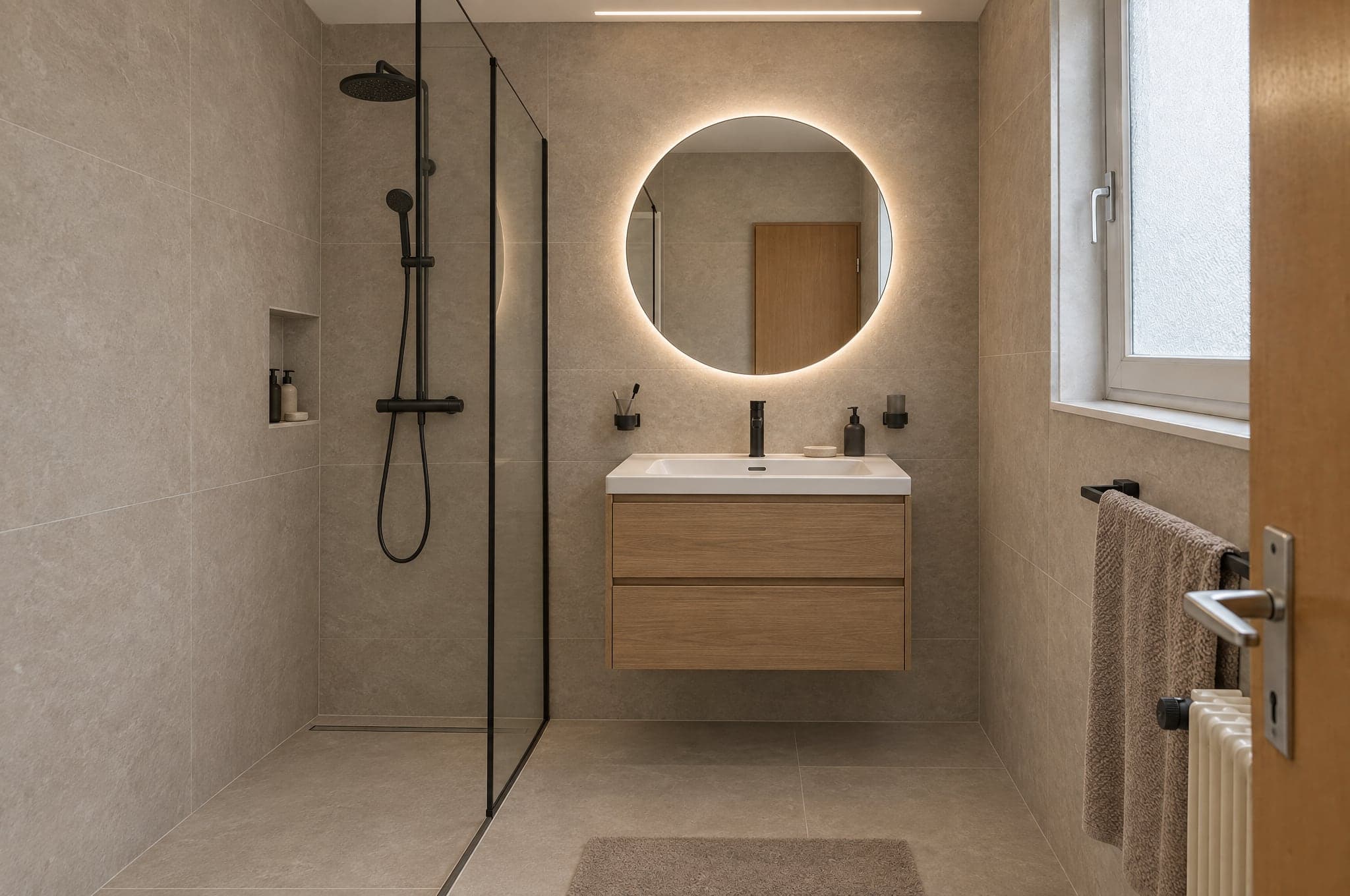 Primer
Automatska provera
Prošlo- Datoteka
- Kadar
- Struktura
- Promena
- Čistoća
Tri motora, svaki za svoju namenu.
Motor birate za svaki modul i svaku situaciju. Skicirajte na motoru Fast, sajt pokrenite na motoru Pro, a prezentujte na motoru Ultra. Svaki rezultat prolazi istu kontrolu kvaliteta pre nego što ga klijent vidi.
Za prezentacije
Ultra
Najvernije prikazuje prostoriju samog klijenta. Geometrija, svetlo i materijali ostaju uverljivi i preko celog ekrana i u štampi.
VernostBrzina- Uobičajeno vreme
- od 40 do 90 s
- Najbolje za
- Ponude, prezentacije konsultanata, premium projekti
Za svaki dan
Pro
Oštar i pouzdan. Podrazumevani motor na sajtu i u svakodnevnim konsultacijama.
VernostBrzina- Uobičajeno vreme
- od 15 do 30 s
- Najbolje za
- Showroom na sajtu, svakodnevni rad u modulu Studio
Za veliki obim
Fast
Prvi pravci za nekoliko sekundi, za kampanje u kojima je obim važniji od poslednjeg detalja. Svaki rezultat jednim klikom prebacujete na Pro ili Ultra.
VernostBrzina- Uobičajeno vreme
- od 8 do 15 s
- Najbolje za
- Odredišne stranice kampanja, prvi pravci
Na Vašem sajtu ili na Vašoj adresi.
Showroom radi tamo gde Vas klijenti već pronalaze. Studio radi u pregledaču, na tabletu u izložbenom salonu, na telefonu na terenu i na ekranu u kancelariji.
- <script>
 Sačuvajte vizuelizaciju
Ugrađeno na Vaš sajt
Jedan script tag postavlja Showroom na bilo koju stranicu Vašeg sajta. WordPress, Webflow, Shopify, Squarespace ili sajt rađen po meri. Preuzima Vaše boje i font.
- vizuelizacija.vasdomen.comVaše kupatiloTopli prirodniSačuvajte vizuelizaciju
Na Vašem poddomenu
Hostovani Showroom na adresi kao što je visual.yourdomain.com, za kampanje, QR kodove u salonu i sajtove koje biste radije ostavili netaknutim.
Upiti stižu tamo gde Vaš tim već radi.
27 integracija za CRM, automatizaciju, sajtove, marketing i komunikaciju. HubSpot, Pipedrive i Salesforce povezujete na Vašem portalu, a potpisan webhook poziv stiže do svakog drugog sistema, direktno ili preko platformi Zapier i Make.
CRM i prodaja
Upiti postaju kontakti, potencijalni klijenti i prodajne prilike.
- HubSpot
Kreira ili ažurira kontakt i dodaje prodajnu priliku ili belešku, sa linkovima ka vizuelizaciji.
- Salesforce
Lead za svaki upit preko Web-to-Lead, podaci i linkovi u poljima koja mapirate.
- Pipedrive
Osoba i prodajna prilika u fazi koju izaberete, ili lead, sa beleškom i linkom ka vizuelizaciji.
- Zoho CRM
Preko platformi Zapier i Make ili potpisanog webhook poziva, ili ga podešava beform.
- Microsoft Dynamics 365
Preko potpisanog webhook poziva ili platformi Zapier i Make, ili ga podešava beform.
- monday.com
Preko platformi Zapier i Make ili potpisanog webhook poziva, ili ga podešava beform.
- Bexio
Preko platformi Zapier i Make ili potpisanog webhook poziva, ili ga podešava beform.
- Odoo
Preko potpisanog webhook poziva ili platformi Zapier i Make, ili ga podešava beform.
Automatizacija
Usmerite svaki upit tamo gde Vašem procesu treba.
- Zapier
Povezuje se preko potpisanog webhook poziva, uz uputstvo korak po korak na Vašem portalu.
- Make
Custom webhook pokreće Vaš scenario, uz uputstvo korak po korak na Vašem portalu.
- n8n
Webhook čvor pokreće Vaš tok rada za svaki potpisani upit.
- Airtable
Zapis za svaki upit, preko platformi Zapier ili Make.
- Google Sheets
Jedan red po upitu preko platformi Zapier ili Make, za timove koji prodaju iz tabele.
- Webhook pozivi
Potpisan HTTPS POST zahtev za svaki upit, ponovljen u slučaju greške, sa svim poljima i linkovima ka vizuelizaciji.
Sajtovi
Showroom radi na sajtu koji već imate.
- WordPress
Jedan script tag na bilo kojoj stranici ili hostovana stranica na Vašem domenu.
- Webflow
Postavite Showroom u bilo koju sekciju pomoću Embed elementa.
- Shopify
Stranica sa modulom Showroom u Vašoj temi, postavljena pomoću skripta za ugrađivanje.
- Squarespace
Dodajte Showroom na bilo koju stranicu pomoću Code bloka.
- Wix
Ugradite Showroom pomoću elementa za prilagođeni kod.
- Framer
Ubacite Showroom na stranicu pomoću Embed komponente.
Marketing i analitika
Merite tok i hranite svoje kampanje podacima.
- Google AnalyticsPlanirano
Dodavanja fotografija, pravci i upiti kao događaji u GA4.
- Google Tag ManagerPlanirano
Svaki korak toka prosleđen u data layer.
- Google AdsPlanirano
Kvalifikovani upiti vraćeni kao konverzije za licitiranje.
- MetaPlanirano
Upiti prijavljeni kao konverzije za Vaše kampanje na platformi Meta.
- Mailchimp
Kontakti stižu u publiku koju izaberete, preko platformi Zapier ili Make.
- Brevo
Kontakti i njihov izabrani pravac stižu u Brevo preko platformi Zapier ili Make.
Komunikacija
Obavestite tim, odgovorite klijentu.
- Slack
Poruka u Vašem prodajnom kanalu za svaki novi upit, preko platformi Zapier ili Make.
- Microsoft Teams
Novi upiti objavljeni u kanalu koji Vaš tim prati, preko platformi Zapier ili Make.
- WhatsApp
Poruka Vašem timu za svaki novi upit, preko platformi Zapier ili Make.
- Gmail
Svaki upit imejlom Vašem timu, šta god još povezali.
- Calendly
Klijenti zakazuju konsultacije odmah pošto sačuvaju vizuelizaciju.
Označeno kao AI, vidljivo i u samoj datoteci.
Platforma beform je građena prema pravilima o transparentnosti iz Akta EU o veštačkoj inteligenciji (EU AI Act). Svaka vizuelizacija jasno kaže šta je, i osobi koja je gleda i softveru koji je otvara.
Kako beform danas označava vizuelizacije i kako postupa sa njima. Ovo nije sertifikat.
Vidljiva oznaka
Svaka demo vizuelizacija nosi vidljivu oznaku beform, da je niko ne bi zamenio za fotografiju.
Oznaka u datoteci
Slike koje isporučuje beform sadrže IPTC metapodatke koji ih označavaju kao generisane veštačkom inteligencijom, po standardu koji koriste izdavači i platforme.
Ilustracija sopstvenog prostora
Geometrija fotografije klijenta se zadržava, a svaka vizuelizacija se predstavlja kao ilustracija pravca, a ne kao gotov projekat.
Bez odluka o ljudima
Nema biometrijske obrade ni automatizovanih odluka o ljudima. Svaka vizuelizacija se automatski proverava pre nego što je iko vidi.
Razvijeno u Švajcarskoj, podaci se čuvaju u Cirihu.
Odgovori na pitanja koja će postaviti Vaš IT i Vaš advokat, na jednom mestu.
- Čuvanje u Cirihu, rad u Frankfurtu
- Baza podataka i skladište datoteka nalaze se u Cirihu, u Švajcarskoj, a aplikacija radi u Frankfurtu, u Nemačkoj. Da bi se napravila vizuelizacija, fotografija se šalje AI modelima kompanija Google i OpenAI, koji je obrađuju na sopstvenoj infrastrukturi, uključujući i onu u SAD, prema uslovima o obradi podataka.
- Šifrovano pri čuvanju i u prenosu
- TLS na svakoj vezi sa platformom beform i šifrovanje pri čuvanju koje obezbeđuju pružaoci hosting usluga kod kojih se podaci nalaze.
- Svaka firma zasebno
- Svi klijenti dele jednu bazu podataka, a svaki zapis pripada jednom od njih. Zaštita na nivou redova (row level security) omogućava prijavljenom korisniku da čita samo zapise svoje firme, a test koji se prijavljuje kao dve firme proverava razdvajanje posle promena u bazi podataka.
- Pristup po ulozi, dvofaktorska prijava
- Lični nalozi sa ulogama: vlasnik, administrator, komercijalista, konsultant i posmatrač. Prava uloga proveravaju se na serveru, a dvofaktorska prijava dostupna je svakom korisniku. Tim platforme beform vidi Vaše podatke samo preko vremenski ograničenog pristupa za podršku koji Vi odobrite ili dok priprema sprovođenje modula Second Look koje ste zatražili.
- Privatno skladište, kratkotrajne veze
- Fotografije i vizuelizacije nikada nisu javno dostupne. Svaka datoteka se otvara samo preko potpisane veze koja ističe, a osetljive radnje, kao što su izvozi, beleže se u dnevnik revizije.
- Rokovi čuvanja utvrđeni ugovorom
- Fotografije posetilaca koji ne pošalju upit brišu se posle 90 dana, osim ako nije drugačije dogovoreno. Upiti ostaju dok ih ne obrišete. Po prestanku ugovora izvozimo Vaše podatke ako to zatražite u roku od 30 dana, a zatim ih brišemo u narednih 30 dana. Kopije obrisanih podataka uklanjaju se iz rezervnih kopija najkasnije u roku od 90 dana.
- Bez obučavanja na Vašim podacima
- beform ne koristi Vaš sadržaj niti podatke Vaših klijenata za obučavanje AI modela, a prema API uslovima koji važe za naloge platforme beform to ne čine ni AI dobavljači.
- Švajcarski ugovorni partner
- beform je proizvod kompanije crue GmbH iz Švajcarske. Ugovor sa klijentom podleže švajcarskom pravu, a njegov prilog o obradi podataka obuhvata švajcarski Savezni zakon o zaštiti podataka (FADP), GDPR i, kada se primenjuje, UK GDPR.
Zatražite prezentaciju na svojim projektima.
Pogledajte beform na prostorijama, fasadama i dvorištima koje Vam klijenti zaista šalju. Bez slajdova, bez ogledne kuhinje.
- 01Pošaljete nam adresu svog sajta i jednu rečenicu o tome šta prodajete.
- 02Edvin priprema vizuelizacije tri Vaša projekta.
- 03Trideset minuta zajedno o rezultatu, toku upita i uvođenju.
 Edvin KarlssonPartner, beform
Recite nam odakle da počnemo
Edvin odgovara u roku od jednog radnog dana, sa predlogom termina i spiskom onoga što treba da pošaljete.
Pogledajte beform na fotografiji svog klijenta.
Dodajte jednu fotografiju u demo i gledajte kako dobija novi oblik. Ili zakažite trideset minuta, pa ćemo beform isprobati na tri Vaša stvarna projekta.