beform, or a general AI tool?
Short answer: a general AI app makes a picture for the person typing. beform keeps the client's room as photographed, changes only the surfaces and finishes your company sells, and hands your team a qualified request. Set up on your own content and rules, with every visual checked automatically before anyone sees it.
Compared on this page
- ChatGPT
- Claude
- Gemini
- Higgsfield
- Midjourney
- beform
A general AI app
One person writes a prompt and gets a picture.
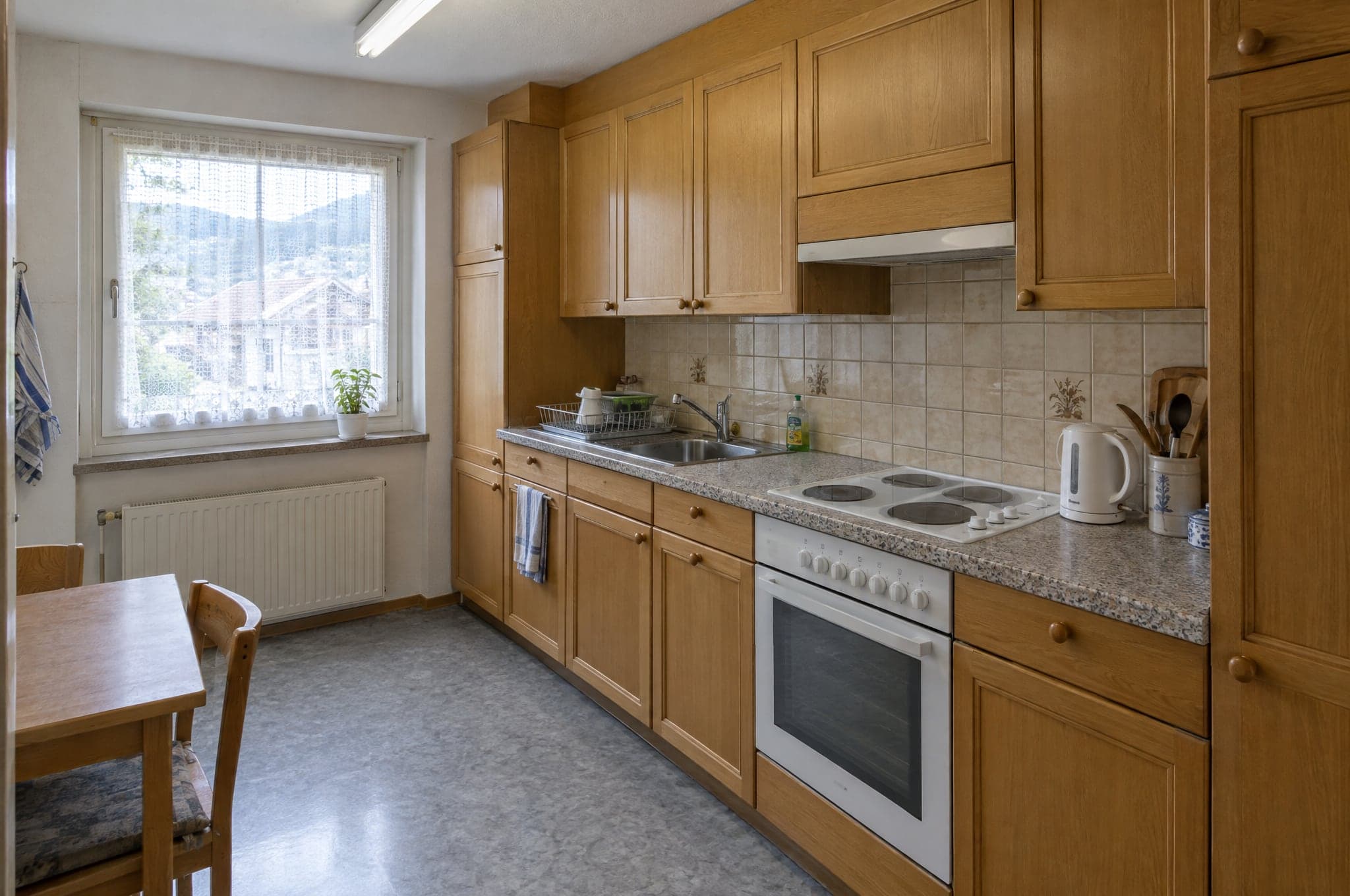
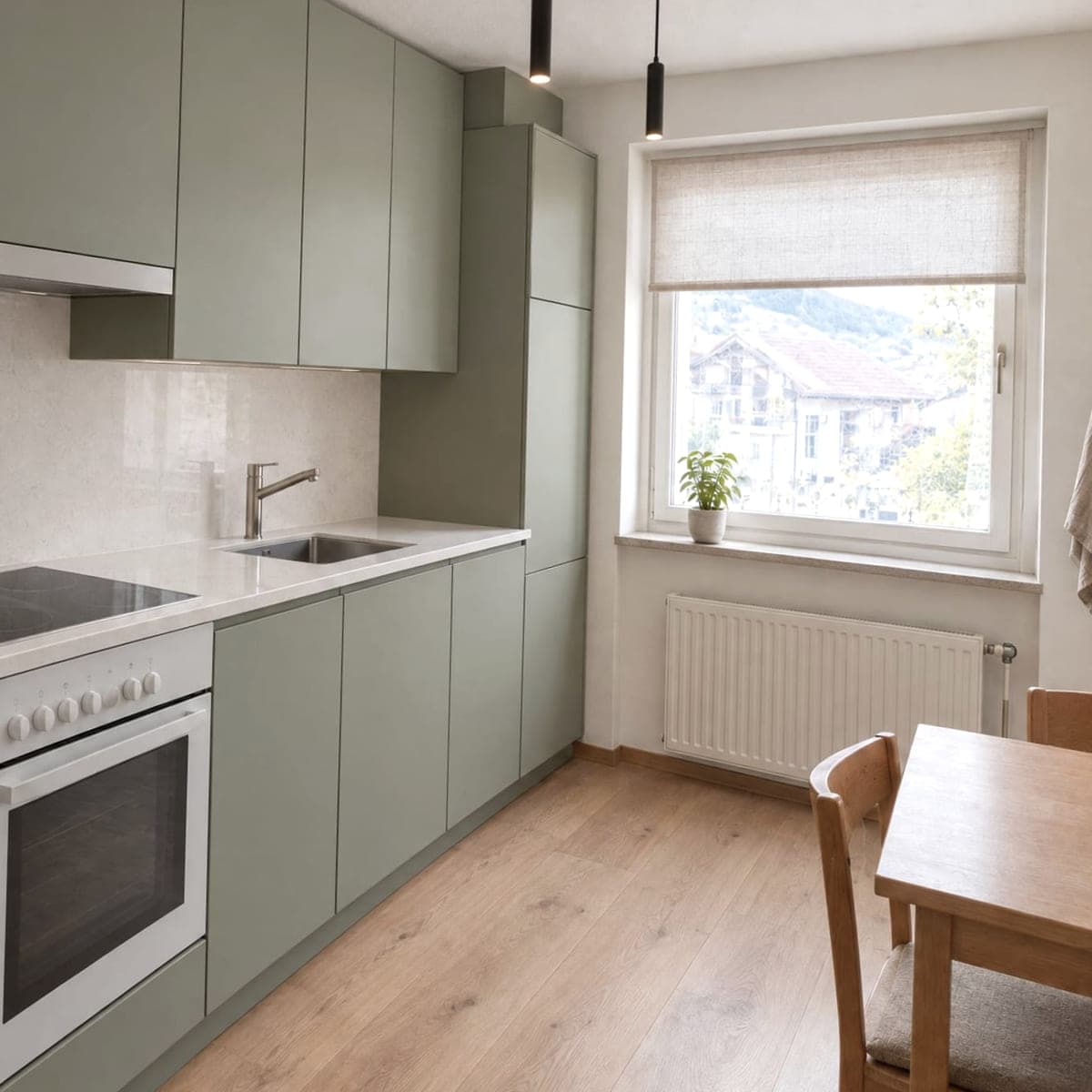
Illustration. With nothing holding the geometry, what comes back can be another room: other proportions, the window on the other side, a different crop.
Then, by hand
- Check that it is still their room, then send it
- Ask for their name, email and project
- Type the request into your CRM
beform Showroom
Your client uploads a photo. Your team gets a request.
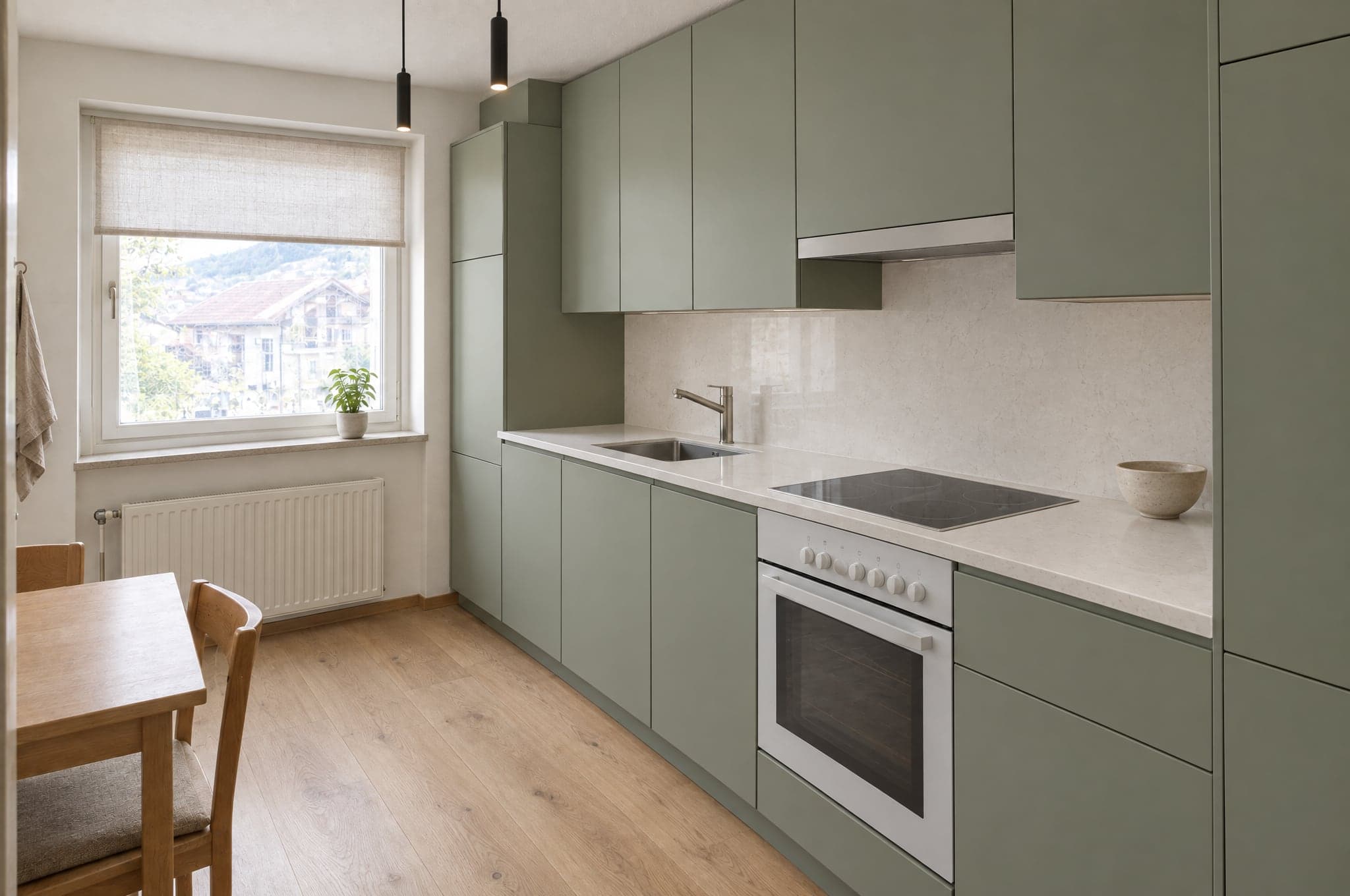
The client's own kitchen. Same camera, same window, same proportions, with surfaces and finishes from your range.
Arrives with the request
- The photo and the chosen direction
- Name, email and the details you ask for
- Delivered by email, webhook or into your CRM
Both visuals are AI illustrations.
Making a picture is easy. Being right is the work.
beform reads the room before it changes anything, works from the content your company gave it and follows the standards of the trade and the rules you set. Every render is checked automatically before anyone sees it, and labeled as AI in the picture and in the file.
The room
The room is detected and kept
beform works out what the photograph actually shows, then protects it. Only surfaces and finishes change.
- Walls, ceiling and proportions unchanged
- Windows, doors and fixtures where they are
- The camera and the daylight as photographed
- Only surfaces, cabinetry and fittings change
The surfaces
Materials are adjusted to the surface they sit on
A finish is not pasted over a picture. It is scaled, lit and reflected for the surface it lands on, in the light of that room.
- Tile and plank sizes true to the surface
- Joints and edges that follow the room
- Reflections and shadows from the same light
- Fronts, worktops and floors read as one job
Your content
beform knows what your company sells
Your own material is digested once at setup, so the options a client sees are options you can deliver.
- Your ranges and your finishes
- The words you use for your styles
- The areas and trades you sell
- Your prices, where you have them set up
The standards
Your rules and the standards of the trade
The standards of the area and the trade sit in the setup, your own rules go on top, and every render is checked automatically before anyone sees it.
- What may never change, written into the setup
- Area rules, such as no shower tiles in a kitchen
- Every render checked automatically before it is shown
- The same standard for every client and consultant
Without a setup
A general AI app is a product you prompt, not a setup built for your company. It has no catalog of your products, no rules about what may never change and no check before it answers, so every prompt starts again and the result depends on who wrote it.
The beform Engine, on image models from OpenAI and Google. A visual is an illustration of a direction, never a plan, a measurement or a quote.
Everything around the model, aspect by aspect.
The marks show what each option is designed for, not how good its pictures are. For one picture, all three can look convincing. The difference is whether the room, your products and your rules survive every render, and what has to happen around the picture.
What the marks mean
- Included
- With your setup or an add-on
- Possible with your own work
- Not designed for it
Your clients' experience
A photo upload on your own website
- AI chat
- Possible with your own work. Only as your own developer project on a model API
- Image apps
- Not designed for it. Used inside the app, under its brand
- beform
- Included. Showroom on your website or a subdomain, on any phone
Nothing for your client to write
- AI chat
- Not designed for it. Results start from a written request
- Image apps
- Not designed for it. Results start from a prompt or a preset
- beform
- Included. Photo, area and direction, with no account to create
Quality on every render
The room read before anything changes
- AI chat
- Possible with your own work. Whatever the model takes from your words
- Image apps
- Possible with your own work. Whatever the model takes from your words
- beform
- Included. Surfaces, openings and fixtures found first, then kept
Walls, windows and fixtures kept as photographed
- AI chat
- Possible with your own work. Asked for in each prompt and checked by eye
- Image apps
- Possible with your own work. Asked for in each prompt and checked by eye
- beform
- Included. Geometry lock in every render instruction
Materials adjusted to the surface they sit on
- AI chat
- Possible with your own work. Described in words and judged by eye
- Image apps
- Possible with your own work. Described in words and judged by eye
- beform
- Included. Scale, light and reflections follow the room
Rules per area, such as no shower tiles in a kitchen
- AI chat
- Possible with your own work. Written into each prompt
- Image apps
- Possible with your own work. Written into each prompt
- beform
- Included. Material boundaries for each area
The same standard, whoever uses it
- AI chat
- Possible with your own work. Depends on who writes the prompt
- Image apps
- Possible with your own work. Depends on who writes the prompt
- beform
- Included. Tested directions, every result checked the same way
Your content, your products, your rules
Your real materials and ranges as options
- AI chat
- Possible with your own work. Described or uploaded as references each time
- Image apps
- Possible with your own work. Described or uploaded as references each time
- beform
- With your setup or an add-on. From your range or your full product catalog
Your ranges, finishes and style words learned once
- AI chat
- Possible with your own work. Pasted in or uploaded with every request
- Image apps
- Possible with your own work. Pasted in or uploaded with every request
- beform
- Included. Digested at setup and used in every render
Style directions named the way you sell them
- AI chat
- Possible with your own work. Kept by whoever writes the prompts
- Image apps
- Possible with your own work. Kept by whoever runs the app
- beform
- Included. Your areas and directions in every setup
Rules about what may never change
- AI chat
- Possible with your own work. Repeated in every prompt
- Image apps
- Possible with your own work. Repeated in every prompt
- beform
- Included. Fixed in your setup, applied to every render
Only finishes your company can actually build
- AI chat
- Possible with your own work. Your range pasted in and checked by you
- Image apps
- Possible with your own work. Your range pasted in and checked by you
- beform
- Included. Options come from your own range
A price range beside the client's visual
- AI chat
- Not designed for it.
- Image apps
- Not designed for it.
- beform
- With your setup or an add-on. From your own prices, with the Pricing and estimates add-on
Your brand on every screen
- AI chat
- Not designed for it. The provider's own interface
- Image apps
- Not designed for it. The provider's own interface
- beform
- Included. Your colors, your typeface, your domain
Leads and sales
Contact captured together with the picture
- AI chat
- Not designed for it. Makes an image, not a request
- Image apps
- Not designed for it. Makes an image, not a request
- beform
- Included. Asked for when the client wants to keep the visual
A request with photo, direction and details
- AI chat
- Not designed for it.
- Image apps
- Not designed for it.
- beform
- Included. Photo, area, direction, versions and answers together
An alert to your team and a confirmation to the client
- AI chat
- Not designed for it.
- Image apps
- Not designed for it.
- beform
- Included. Both sent the moment a request arrives
Delivered by email, webhook or into your CRM
- AI chat
- Possible with your own work. Copied across by hand
- Image apps
- Possible with your own work. Copied across by hand
- beform
- Included. Email or webhook in every setup, CRM as an option
Events for your analytics
- AI chat
- Not designed for it.
- Image apps
- Not designed for it.
- beform
- With your setup or an add-on. Uploads, directions and requests as events, with a dashboard as an option
Consultants in the meeting
Refine the client's own picture live
- AI chat
- Possible with your own work. One request at a time
- Image apps
- Possible with your own work. One request at a time
- beform
- With your setup or an add-on. The Studio, with Pro for consultants
Versions side by side, the chosen one marked
- AI chat
- Possible with your own work. Compared by hand
- Image apps
- Possible with your own work. Compared by hand
- beform
- With your setup or an add-on. Every change kept as a version
The chosen visual handed into the offer
- AI chat
- Possible with your own work. Downloaded and inserted by hand
- Image apps
- Possible with your own work. Downloaded and inserted by hand
- beform
- With your setup or an add-on. The visual in your offer PDF, included in Pro for consultants
Clients, leads and consultants in one place
- AI chat
- Possible with your own work. Seats depend on the plan, leads live elsewhere
- Image apps
- Possible with your own work. Seats depend on the plan, leads live elsewhere
- beform
- With your setup or an add-on. Team management in Pro for consultants
Marketing
Everyday images and copy for posts
- AI chat
- Included. Strong for text and one-off images
- Image apps
- Included. Made for creating images
- beform
- Not designed for it. Not what beform is for
A showroom on your website for campaigns to point to
- AI chat
- Not designed for it.
- Image apps
- Not designed for it.
- beform
- Included. The Showroom answers at any hour
Before and after material from your own requests
- AI chat
- Possible with your own work. Pictures from a prompt, not from your projects
- Image apps
- Possible with your own work. Pictures from a prompt, not from your projects
- beform
- Included. Every render kept with its before, to publish with the AI label
Landing pages and ads that open the showroom
- AI chat
- Possible with your own work. Built and connected by your team
- Image apps
- Possible with your own work. Built and connected by your team
- beform
- With your setup or an add-on. A page per trade with the showroom preset to that area
Infrastructure and operations
Hosting and storage for a public flow
- AI chat
- Possible with your own work. The app is run for you, a public flow around it is yours
- Image apps
- Not designed for it. Made for use inside the app
- beform
- Included. On your own environment or hosted by beform
Rate limits and abuse protection on a public page
- AI chat
- Possible with your own work. Yours to build and watch
- Image apps
- Not designed for it. Made for use inside the app
- beform
- Included. Limits and input checks on every request
A spending cap per account
- AI chat
- Possible with your own work. Depends on the plan and settings you choose
- Image apps
- Possible with your own work. Depends on the plan and settings you choose
- beform
- Included. A cap you set, with alerts at 80 and 100 percent
Kept working when models change
- AI chat
- Possible with your own work. Prompts and flows tested again by you
- Image apps
- Possible with your own work. Prompts and presets tested again by you
- beform
- Included. Engines kept current, every result checked the same way
The right engine for each moment
- AI chat
- Possible with your own work. Model choice depends on the app and plan
- Image apps
- Possible with your own work. Model choice depends on the app and plan
- beform
- Included. Ultra, Pro or Fast, chosen per surface
Trust and compliance
A visible AI label your clients see
- AI chat
- Possible with your own work. Labeling for your clients is yours to handle
- Image apps
- Possible with your own work. Labeling for your clients is yours to handle
- beform
- Included. On live visuals, with a link to the AI notice
AI marking inside the image file
- AI chat
- Possible with your own work. Varies by provider, check what survives editing
- Image apps
- Possible with your own work. Varies by provider, check what survives editing
- beform
- Included. IPTC metadata marks delivered images as AI-generated
An AI notice your clients can read
- AI chat
- Possible with your own work. Yours to write and publish
- Image apps
- Possible with your own work. Yours to write and publish
- beform
- Included. The AI and visualization notice, ready to link
Client photos kept out of model training
- AI chat
- Possible with your own work. Depends on the plan and settings you choose
- Image apps
- Possible with your own work. Depends on the plan and settings you choose
- beform
- Included. Client photos and renders are never used for training
Data processing terms for your website visitors
- AI chat
- Possible with your own work. Yours to work out for the plan you choose
- Image apps
- Possible with your own work. Yours to work out for the plan you choose
- beform
- Included. A data processing agreement in every contract
A check that the room was kept, before anyone sees it
- AI chat
- Not designed for it.
- Image apps
- Not designed for it.
- beform
- Included. Automatic, then labeled in the picture and the file
A Swiss contract partner
- AI chat
- Possible with your own work. Terms depend on the provider and plan you choose
- Image apps
- Possible with your own work. Terms depend on the provider and plan you choose
- beform
- Included. crue GmbH, Ennetbaden, Switzerland, under Swiss and EU data protection law
The work of doing it yourself
Writing, testing and maintaining prompts
- AI chat
- Possible with your own work. Ongoing, by your team
- Image apps
- Possible with your own work. Ongoing, by your team
- beform
- Included. Set up and kept current by beform
Building and running a website flow
- AI chat
- Possible with your own work. A development project of its own
- Image apps
- Not designed for it. Made for use inside the app
- beform
- Included. Part of the one-time project
Following up requests with everything attached
- AI chat
- Possible with your own work. Collected and sorted by hand
- Image apps
- Possible with your own work. Collected and sorted by hand
- beform
- Included. Requests arrive complete
Assessed on 17 September 2026 from how each product is designed and publicly described, not from tests of individual plans. Third-party products, plans and terms change often, so check the provider's current information. What beform includes depends on the setup and add-ons you choose.
ChatGPT, Claude, Gemini, Higgsfield, Midjourney, OpenAI, Google and all other product names and logos belong to their owners. beform is not affiliated with, sponsored or endorsed by any of them.
What beform adds to the model.
The image model is the part a general AI tool gives you too. Around it sits the system: your own content and rules, the flow on your website, the request that reaches your team, the follow-up, the CRM, the campaigns and the people who keep it current.
The model
Image models from OpenAI and Google
Three engines behind one interface, chosen per surface.
- UltraOpenAI GPT Image
- ProGoogle Nano Banana Pro, 2K
- FastGoogle Nano Banana, 1K
A flow for your clients
A photo upload on your website that works on any phone, with no prompt to write and no account to create, and a consultation booked from the visual where you add it.
The room is kept
The room is read before anything changes, so geometry, windows, proportions and light stay as photographed and only surfaces and finishes move.
Your products and brand
Your ranges as materials, your style directions, your colors and your domain on every screen, and every render kept with its before for your own campaigns.
The request reaches your team
Contact, photo, area, direction and versions in one request, with an alert to your team, a confirmation to the client, a handover to your CRM and, set up on demand, a follow-up that carries the visual.
The Studio in the meeting
Consultants refine the client's picture live, compare versions and hand the chosen one into the offer.
Running it
Hosting on your environment or by beform, rate limits, a usage cap per account, engines kept current and events for your analytics.
Labels and notices
Visible labels, IPTC metadata and an AI notice for your clients. Built for the transparency rules of the EU AI Act.
People behind it
Set up for your company by beform, with a Swiss company as your contract partner.
The model
Image models from OpenAI and Google
Three engines behind one interface, chosen per surface.
- UltraOpenAI GPT Image
- ProGoogle Nano Banana Pro, 2K
- FastGoogle Nano Banana, 1K
The parts that were never about the picture.
Add-ons extend the same setup: leads, marketing, what beform knows about your products, integrations and service. Each one is work done inside your own setup, on your own content.
What an add-on is
- With beform.
- Set up inside your own setup, from your own content and rules.
- Not part of a general AI app.
- These are services and product work for one company, not features of a product you prompt.
Leads and sales
Second Look
Your quotes that went quiet, seen again, each with the client's own room formed.
Lead CRM
Every request with its photos, versions and status in one place.
Lead automation and follow-up
Reminders and follow-ups so no request goes cold.
Appointment booking
Clients book a consultation straight from their visual.
Marketing
Google Ads on the showroom
Search campaigns that land on the showroom, not a contact form.
Meta Ads on the showroom
Before and after campaigns on Instagram and Facebook.
Landing page per trade
A focused page per trade with the showroom built in.
Outreach and cold acquisition
We open conversations in your region with the client's own visual.
AI and product
AI Brain
Your company as a brain your team works with in Claude or ChatGPT.
AI recommendations and consulting
What a professional would change next, and why.
Pricing and estimates
Clients see a from and to range built on measured quantities.
Measurements and quantities
Estimated dimensions, a CAD-style sketch and a quantity list from the photo.
Floor plans and 3D
A clean plan from photos or an existing plan, and 3D visuals from it.
3D and VR
Every visual in 3D, from a phone to a headset, and High-end 4K for your consultants.
360 Rooms and tours
Clients stand in the formed room, turn around and walk from room to room.
Extra language
The showroom, emails and results in one more language.
Extra area set
Another set of areas, such as gardens next to kitchens.
Integrations
CRM integration
beform connects the CRM you already run, mapped to your own fields.
Website integration by us
We place beform on your website, not just hand over a snippet.
Analytics dashboard
Visitors, renders, requests and appointments on one screen.
Service
Training workshop
Half a day with your team on selling with the picture.
Priority support
Answers within four working hours and a direct line.
Every add-on is built on the same content and rules as your setup, so one add-on never contradicts what another already knows. A general AI app has no setup to extend, which is why some add-ons put your setup inside the apps your team already uses.
What each one costsWhen a general AI tool is all you need.
Not every picture has to sell. For these jobs a general AI tool is often the simpler choice, and the two work well side by side.
A general AI tool is enough for
- One-off inspiration for yourself
- Internal mood boards before a brief
- A single image for a post, labeled as AI
- Texts, summaries and ideas around your projects
beform is built for
- Clients seeing their own space on your website
- Requests that arrive with the picture attached
- Consultants refining a visual in the meeting
- The same standard for every client, consultant and location
Questions about beform and general AI.
beform does not run inside ChatGPT or any other chat app. It works with models from OpenAI and Google through their developer interfaces. The images come from three engines: Ultra on OpenAI GPT Image, Pro on Google Nano Banana Pro at 2K and Fast on Google Nano Banana at 1K. beform adds the instructions, rules, flow, labels and the automatic check around them. beform is not affiliated with OpenAI or Google.
See the difference with a photo of your own.
Upload a photo in the demo and follow the flow your clients would see. Or book a call and bring the questions a general AI tool left open.