The beform Engine. Your client's room, kept.
A render is only useful if the client recognizes their own space. Everything under the hood exists for that: the geometry stays, the materials stay within bounds and every result is checked before anyone sees it.
Seven parts, one path from a photo to a request.
The beform Engine is not one model. It is seven parts that run in order, from reading the client's photograph to the request that reaches your team, and a loop that sharpens your own layer as you sell.
- Understand
Perception
The space is read.
Before anything is formed, beform reads the photograph: the geometry of the space and the position of the camera, where every surface starts and stops, the direction of the daylight and the materials already in the room.
- Geometry
- Camera
- Surfaces
- Daylight
- Existing materials
Knowledge
Your company, structured.
Your ranges, finishes, style directions, standards and rules sit in a layer of their own, with your prices where you have configured them, so a visual can only show what your company actually sells.
- Ranges
- Finishes
- Style directions
- Rules
- Standards
- Prices where configured
Direction
The wish becomes an instruction.
The area the client chose, the style they picked, the references they brought and the sentence they wrote become one precise instruction: what has to stay, what may change and how far it may go.
- Area
- Chosen style
- References
- The client's note
- Form
Formation
The visual is formed.
The instruction is routed to the strongest models available for that moment, as Fast, Pro or Ultra, and the visual is formed with the geometry of the client's own photograph held in place.
- Fast
- Pro
- Ultra
- Geometry lock
- Provider routing
Control
Checked before anyone sees it.
Every result is measured before it is shown: a complete file, the photograph's own framing, walls and openings where they were, the change actually made and no blank areas. It is labeled as an AI visual in the picture and in the file.
- File
- Framing
- Structure
- Change
- Clean
- Label
- Continue
Handover
It becomes a request.
The chosen visual leaves the engine as something your team can act on: a project request with the photo and the contact attached, a line in an offer, a record in your CRM.
- Project request
- Offer line
- Image file
- CRM record
Learning
Your layer gets sharper.
What your consultants keep, change or discard, and what clients choose in the end, is fed back into your own layer, so the next visual starts closer to the standard your company would sign off.
- Consultant feedback
- Client choices
- Your house standard
The loop
Learning feeds knowledge. Every project the company sells teaches its own layer, and the engine starts the next visual from there.
Built by people who learned how this work is sold.
A general model knows what a kitchen looks like. It does not know where a worktop joint belongs, which fronts a company stocks, or what happens between an inquiry and a signed offer. That knowledge is the product.
The trades
beform is built for one kind of work: changing a space someone already lives with. Every trade sells differently, shows differently and has its own vocabulary, so every trade has its own rules inside the engine rather than one general setting.
- Kitchen studios
- Bathroom specialists
- General contractors
- Facade and painting
- Landscapers and pool builders
- Windows and sun protection
- Flooring and interior finishing
- Architects and developers
How materials behave
A visual is convincing or wrong in the details a fitter would notice. Those details are written as rules and tested per area, because a general model has no reason to know them.
- Where a surface starts and where it stops
- Joints, seams, skirting and silicone lines
- Edges, profiles and window reveals
- Gloss level, grain and how a finish takes daylight
- Fitted lighting against the light already in the room
- Whether the result could actually be built
How these companies sell
The work is sold by people, in a sequence that has not changed: an inquiry, a showroom appointment, a site visit, a measured offer, a lead time of weeks. beform is shaped around that sequence, which is why a visual ends as a request and an offer line rather than a download.
- The inquiry, and who answers it first
- The showroom appointment and the site visit
- Ranges, suppliers and lead times
- What may be promised in an offer, and what may not
- Who signs off a visual before a client sees it
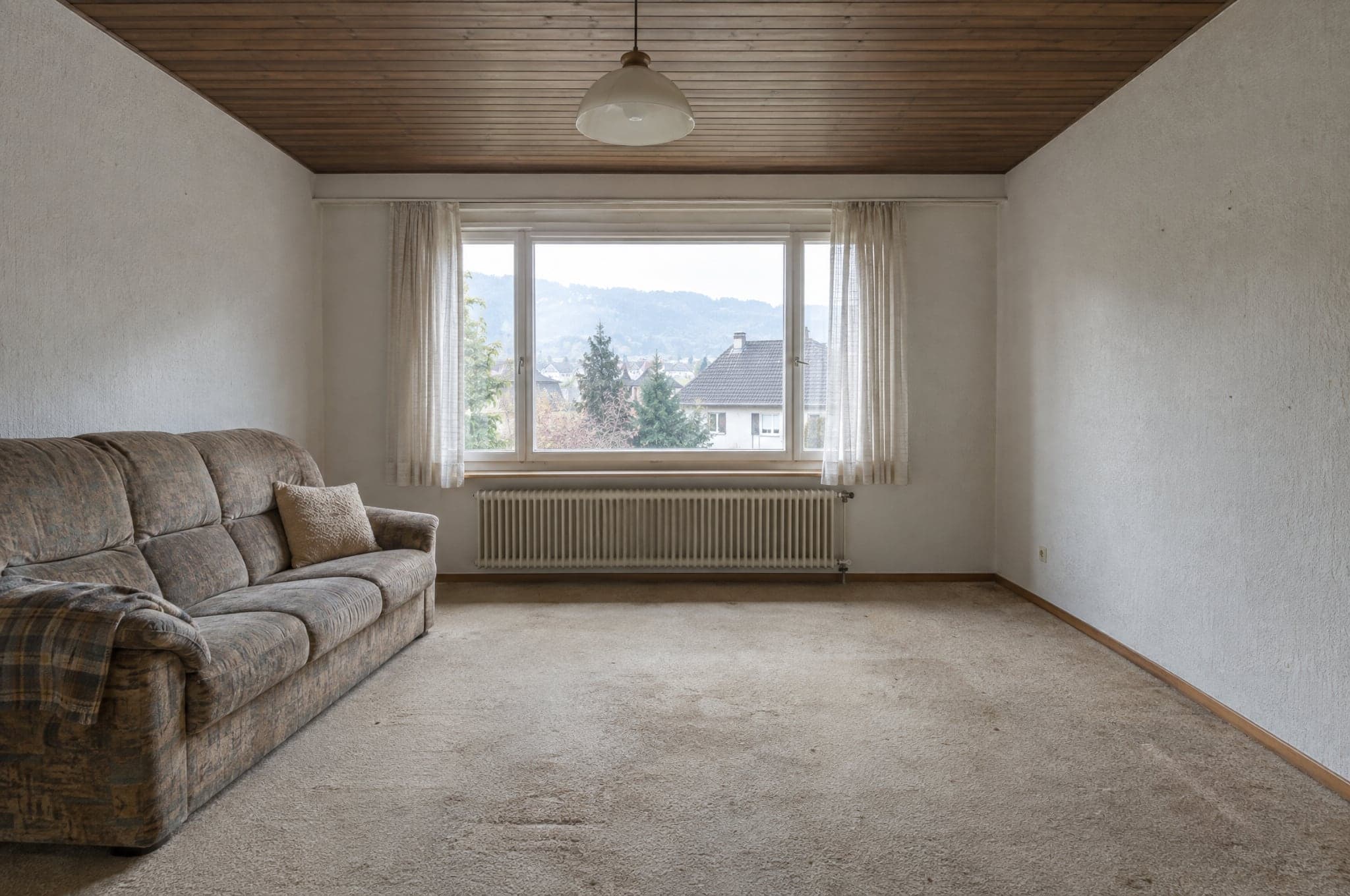
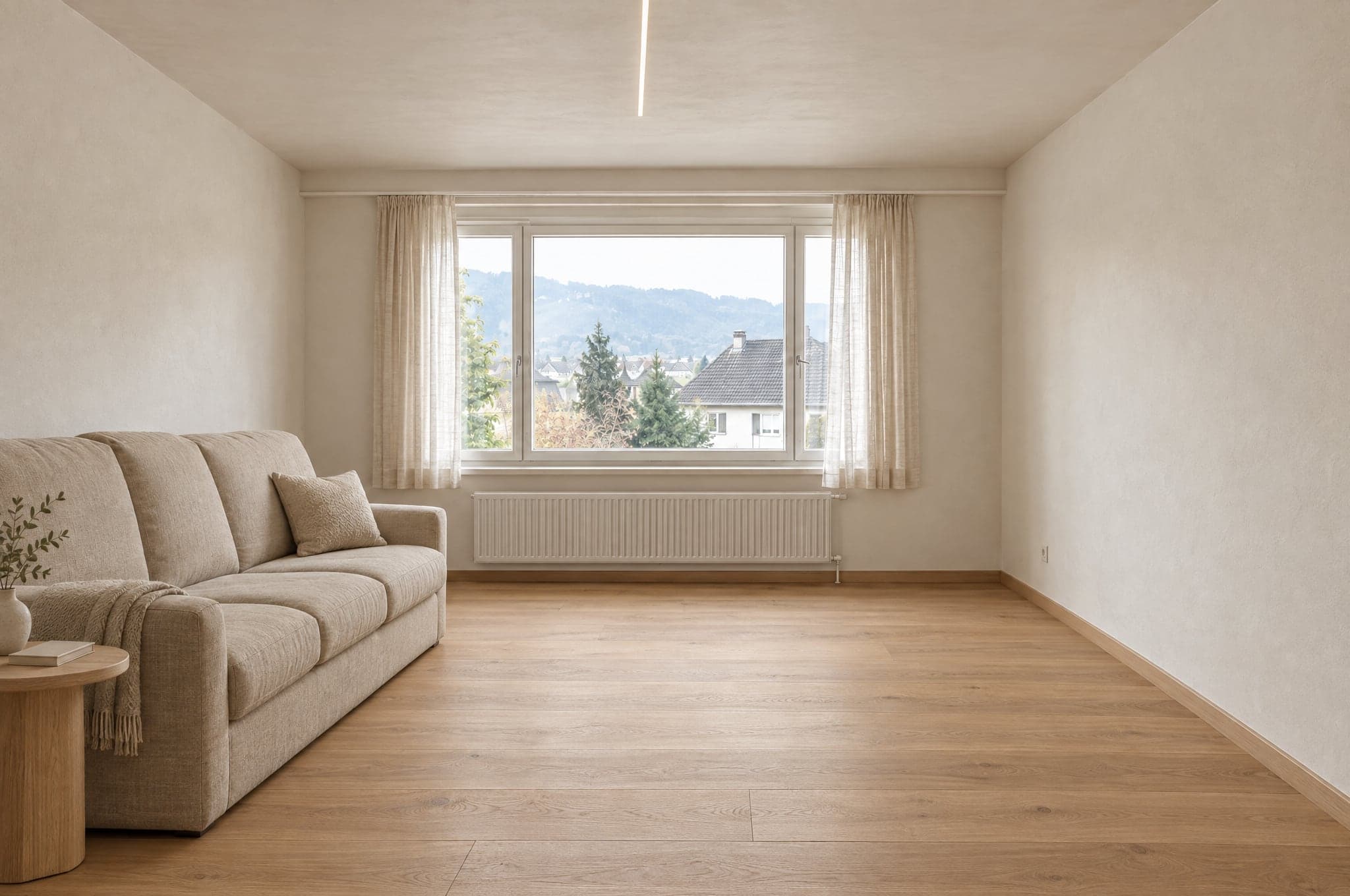
The lines of the room stay where they were.
beform traces the walls, the window, the ceiling line and the camera before anything is rendered. Those lines are fixed. The render may only change what a renovation would change.
 Example
 Example
Stays as photographed
- Walls and ceiling
- Windows and doors
- Room proportions
- Camera position
- Daylight direction
Changes with the direction
- Surfaces and finishes
- Cabinetry and furniture
- Fittings and fixtures
- Colors
- Lighting
Every area has its own set of materials.
A kitchen never receives shower tiles and a facade never receives interior paint. On System the boundary is your own catalog, so a render only shows products you sell.
Kitchen
- Fronts
- Worktops
- Splashback
- Floor
- Lighting
Outside the boundary
Shower tiles
Bathroom
- Wall tiles
- Vanity
- Fittings
- Shower
- Floor
Outside the boundary
Kitchen fronts
Facade
- Render
- Cladding
- Window frames
- Color
- Entrance
Outside the boundary
Interior paint
Garden and pool
- Paving
- Planting
- Pool
- Terrace
- Lighting
Outside the boundary
Parquet
The models do the generating. beform does the rest.
beform does not train a foundation model. It builds and teaches the layer that makes the strongest general models reliable for kitchens, bathrooms, facades and gardens, and it keeps moving that layer onto whichever models are best.
The beform layer
Everything that makes those models reliable for kitchens, bathrooms, facades and gardens is built and taught by beform. It is where the work sits, and it is what a company is buying.
Rules per trade and per area
What may change in a kitchen, a bathroom, a facade or a garden, and what must never move. Written per trade, tested per area.
The geometry lock
Walls, windows, doors, ceiling and camera are traced from the photograph and held, so the client still recognizes their own space.
The material library
How a finish behaves in a room, and how each behavior maps to the products a company actually sells.
The company's own teaching
References, product data, finished projects and consultant feedback become a layer that belongs to that company alone.
Routing between providers
Each step goes to the model that is currently best at it. When a stronger model appears, the routing moves and the rules stay.
Evaluation sets
Fixed sets of real rooms per area. A new model or a changed rule is run against them and compared before it reaches an account.
The quality gate
The automatic check every result goes through before it is shown, and the label it carries in the picture and in the file.
The general models
Generating an image and reading a sentence is done by the strongest current models from several providers. beform does not train a foundation model of its own, and does not claim to.
A picture is the start, not the deliverable.
The engine is judged on what your company can do next with the result, which is why it produces more than an image.
What it produces
- A photorealistic visual of the client's own space, in a direction from your range.
- Several versions to compare, each one kept and named.
- An image file labeled as AI-generated, in the picture and in the metadata.
- A project request with the photo, the area, the chosen direction and the contact.
- A visual your consultant can carry straight into the offer.
- An indicative price range, where a company has the Pricing and estimates add-on set up.
Who it is for
The client on your website
Sees their own kitchen, bathroom, facade or garden finished before anyone visits, and keeps the picture to show whoever decides with them.
The consultant in the meeting
Opens the same visual, changes materials while the client watches, and leaves with a decision instead of a list of adjectives.
The marketing team
Runs campaigns that answer with the visitor's own space, and receives requests that are already qualified.
The owner
Sees where requests come from, what the rendering costs and which visuals turned into signed work.
The same photo in a chat app gives you a nice picture.
It will not give you your room, your range, the same answer twice, or anything your team can send. That is the difference between a prompt and a taught layer.
It holds the room
A prompt in a chat app is free to redraw the space. The layer traces the geometry first and holds it, so the result is still the client's room.
It shows only what you sell
A general model invents a plausible product. The layer is bounded by your catalog, so what the client chose can be quoted.
It is the same every time
The same photo and the same direction give a comparable result for every consultant, instead of depending on who writes the better prompt.
It does not stop at the picture
The visual arrives as a request, an offer line and a labeled file, in your brand and in your CRM, with the usage accounted for.
Checked before anyone sees it.
Every result is measured before it is shown, a visual that does not hold is formed once more or not shown at all, and every visual that passes is labeled in the picture and in the file. What a visual cannot tell you is written down here too.
Measured automatically
Before a result is shown, five things are measured: the file is complete, at full resolution and in the shape that was asked for; the framing is the photograph's, not cropped or zoomed; walls, windows, doors, roof lines and the horizon are where they were; the change was actually made, not the photograph handed back; and no area is blank, gray or black. The same picture always gets the same answer. The check does not judge taste or whether a material is right.
When a result does not hold
It is formed once more, with a stricter instruction that names what failed. If it still does not hold, it is not shown. The client sees that the render did not complete and can try again.
Labeled when it passes
A result that passes is labeled as an AI visual, in the picture and in the file's metadata, so it says what it is wherever it goes.
What a visual is not
It is an illustration of a direction, not a plan and not a quote. It is not to scale, measurements and price ranges are indicative, and the company confirms materials, feasibility and price in its own offer.
 Example
Automatic check
Passed- File
- Framing
- Structure
- Change
- Clean
Three engines, chosen by strength.
Choose the engine per surface and per moment. Sketch on Fast, run the website on Pro, present on Ultra. Every result passes the same quality layer before a client sees it.
For presentations
Ultra
The highest fidelity to the client's own room. Geometry, light and materials hold up at full screen and in print.
FidelitySpeed- Typical time
- 40 to 90 s
- Best for
- Offers, consultant presentations, premium projects
For everyday
Pro
Sharp and reliable. The default engine on the website and in everyday consultation.
FidelitySpeed- Typical time
- 15 to 30 s
- Best for
- Website Showroom, everyday Studio work
For volume
Fast
First directions in seconds, for campaigns where volume matters more than the last detail. Upgrade any result to Pro or Ultra in one click.
FidelitySpeed- Typical time
- 8 to 15 s
- Best for
- Campaign landing pages, first directions
On your website, or on an address of yours.
The Showroom runs wherever your clients already find you. The Studio runs in the browser on the showroom tablet, the phone on site and the office screen.
- <script>
 Keep my visual
Embedded on your website
One script tag places the Showroom on any page of your site. WordPress, Webflow, Shopify, Squarespace or a custom build. It inherits your colors and typeface.
- visual.yourdomain.comYour bathroomWarm naturalKeep my visual
On a subdomain of yours
A hosted Showroom on an address such as visual.yourdomain.com, for campaigns, QR codes in the showroom and sites you would rather not touch.
Requests flow where your team already works.
27 connections for CRMs, automation, websites, marketing and communication. HubSpot, Pipedrive and Salesforce connect in your portal, and a signed webhook reaches every other system, directly or through Zapier and Make.
CRM and sales
Requests become contacts, leads and deals.
- HubSpot
Creates or updates the contact and adds a deal or a note, with links to the visual.
- Salesforce
A lead per request through Web-to-Lead, details and links in the fields you map.
- Pipedrive
A person and a deal in the stage you choose, or a lead, with a note linking the visual.
- Zoho CRM
Through Zapier, Make or the signed webhook, or set up by beform.
- Microsoft Dynamics 365
Through the signed webhook, Zapier or Make, or set up by beform.
- monday.com
Through Zapier, Make or the signed webhook, or set up by beform.
- Bexio
Through Zapier, Make or the signed webhook, or set up by beform.
- Odoo
Through the signed webhook, Zapier or Make, or set up by beform.
Automation
Route every request wherever your process needs it.
- Zapier
Connected through the signed webhook, with a step-by-step guide in your portal.
- Make
A custom webhook starts your scenario, with a step-by-step guide in your portal.
- n8n
A webhook node starts your workflow from each signed request.
- Airtable
A record per request, through Zapier or Make.
- Google Sheets
A row per request through Zapier or Make, for teams that sell from a sheet.
- Webhooks
A signed HTTPS POST per request, retried, with every field and links to the visual.
Websites
The Showroom runs on the site you already have.
- WordPress
One script tag on any page, or a hosted page on your domain.
- Webflow
Place the Showroom in any section with an embed element.
- Shopify
A Showroom page in your theme, placed with the embed script.
- Squarespace
Add the Showroom with a code block on any page.
- Wix
Embed the Showroom with a custom code element.
- Framer
Drop the Showroom into a page with an embed component.
Marketing and analytics
Measure the flow and feed your campaigns.
- Google AnalyticsPlanned
Uploads, directions and requests as events in GA4.
- Google Tag ManagerPlanned
Every step of the flow pushed to the data layer.
- Google AdsPlanned
Qualified requests sent back as conversions for bidding.
- MetaPlanned
Requests reported as conversions for your Meta campaigns.
- Mailchimp
Contacts reach the audience you choose, through Zapier or Make.
- Brevo
Contacts and their chosen direction reach Brevo through Zapier or Make.
Communication
Tell the team, answer the client.
- Slack
A message in your sales channel for every new request, through Zapier or Make.
- Microsoft Teams
New requests posted to the channel your team watches, through Zapier or Make.
- WhatsApp
A message to your team for every new request, through Zapier or Make.
- Gmail
Every request by email to your team, whatever else you connect.
- Calendly
Clients book the consultation right after they keep their visual.
Labeled as AI, visibly and in the file.
beform is built for the transparency rules of the EU AI Act. Every visual says what it is, to the person looking at it and to the software that opens it.
How beform labels and handles visuals today. Not a certification.
A visible label
Every demo visual carries a visible beform label, so nobody mistakes it for a photograph.
Marked in the file
Images delivered by beform carry IPTC metadata that marks them as AI-generated, the standard used by publishers and platforms.
An illustration of their own space
The geometry of the client's photo is kept, and every visual is presented as an illustration of a direction, not as a finished project.
No decisions about people
No biometric processing and no automated decisions about people. Every visual is checked automatically before anyone sees it.
Built in Switzerland, stored in Zurich.
What your IT and your lawyer ask first, answered in one place.
- Stored in Zurich, run in Frankfurt
- The database and the file storage are in Zurich, Switzerland, and the application runs in Frankfurt, Germany. To form a visual, the photo goes to the AI models of Google and OpenAI, which process it on their own infrastructure, including in the USA, under data processing terms.
- Encrypted in transit and at rest
- TLS on every connection to beform, and encryption at rest by the hosting providers that hold the data.
- Every company kept apart
- All clients share one database, and every record belongs to one of them. Row level security lets a signed-in user read only their own company's records, and a test that signs in as two companies checks the separation after changes to the database.
- Access by role, two-factor sign-in
- Personal accounts with the roles owner, admin, sales, consultant and viewer, checked on the server, and two-factor sign-in available to every user. The beform team sees your data only through a time-limited support access you grant, or while preparing a Second Look run you asked for.
- Private storage, short-lived links
- Photos and visuals are never publicly readable. Each file opens only through a signed link that expires, and sensitive actions such as exports are recorded in an audit log.
- Retention set out in the contract
- Photos from visitors who send no request are deleted after 90 days, unless agreed otherwise. Requests stay until you delete them. When the contract ends, we export your data if you ask within 30 days, then delete it within a further 30 days. Copies of deleted data leave the backups within 90 days at most.
- No training on your data
- beform does not use your content or your clients' data to train AI models, and under the API terms of beform's accounts the AI providers do not either.
- A Swiss contract partner
- beform is a product of crue GmbH, Switzerland. The client agreement is under Swiss law, and its data processing annex covers the Swiss FADP, the GDPR and, where it applies, the UK GDPR.
Request a walkthrough on your own projects.
See beform on the rooms, facades and gardens your clients actually send you. No slides, no sample kitchen.
- 01You send your website and a line on what you sell.
- 02Edvin prepares visuals from three of your own projects.
- 03Thirty minutes together on the result, the request flow and the setup.
 Edvin KarlssonPartner, beform
Tell us where to start
Edvin replies within one working day with a time and what to send.
See beform on your own client photo.
Upload one photo in the demo and watch it form. Or book thirty minutes and we will run it on three of your real projects.